Apple Hide My Email vs Temp Mail: A Practical Comparison for Private Signups
Comparing Apple Hide My Email vs Temp Mail for private signups means choosing between Apple's forwarding alias and a separate, disposable inbox. Both hide your real address, but they differ on cost, replies, platform reach, and how long the address stays useful.
Quick access
Key Takeaways
Apple Hide My Email creates random aliases that forward to your real inbox, so it keeps your address hidden while letting you reply and manage the alias long term. A temp mailbox is a separate, disposable inbox you read directly, with no registration, that auto-expires. Choose Hide My Email for ongoing Apple accounts; choose temp mail for fast, cross-platform, throwaway signups.
Disclosure: Tmailor runs this blog and offers the temp mail service discussed here. This is a source-verified comparison based on Apple support pages and Tmailor product facts checked on July 11, 2026, not a hands-on lab test.
- Two different models. Hide My Email is a relay that forwards to your personal inbox; temp mail is a standalone inbox you open and read yourself.
- Cost. Creating your own Hide My Email aliases needs a paid iCloud+ plan (from .99/month); temp mail is free with no registration.
- Reach. Apple documents Hide My Email on iPhone, iPad, Mac, and iCloud.com; on non-Apple hardware, the documented route is iCloud.com in a browser. Temp mail runs in any browser, on Android and iOS, and through a Telegram bot.
- Privacy stance. A Hide My Email alias still maps back to your Apple Account; a temp inbox is not tied to your personal email account or a named signup.
- Continuity. Aliases persist until you deactivate them; a temp address can be reopened later if you save its Access Token.
- Direction. Hide My Email can receive and reply through Apple Mail; temp mail is receive-only and blocks attachments.
What Each Option Actually Is
Hide My Email and temp mail solve the same problem — signing up without exposing your primary email address — but they are built on opposite mechanics. One hides your address behind Apple's relay; the other replaces it with a disposable inbox you never link to yourself.
Apple Hide My Email. It generates unique, random @privaterelay.appleid.com addresses that forward every message to your iCloud Mail address or another address on your Apple Account. You can create aliases inside Safari forms, the Mail app, and Settings, label them, and deactivate any that attract spam. Recipients never see your real address, and you can reply from the alias in Apple Mail. It is essentially a managed alias layer — close to a native version of an email forwarding service, which is why it helps to understand the broader trade-offs in temp mail versus email aliases.
Reusable temp mailbox. Tmailor gives you an address instantly in any browser with no registration and no need to share your personal email address. Messages typically stay visible for about 24 hours, then delete automatically. The inbox is receive-only and strips attachments to limit tracking and abuse. If you ever need the same address again — for a password reset or re-verification — you save an Access Token to reopen it. New to the concept? Start with how temp mail works before you compare the two.
The Cost Question: Free, Paid, or Both
Cost is the first place these two diverge, and the answer for Hide My Email is "it depends on how you use it." There is a free path and a paid path, and only the paid path lets you mask any signup form.
- Free with Sign in with Apple. When a site offers the "Sign in with Apple" button, you can pick Hide My Email at no cost, even without iCloud+. This is limited to apps and sites that support that button.
- Paid with iCloud+. To generate your own random address for any email field — a store, a forum, a newsletter — you need an iCloud+ subscription. The cheapest tier is 50 GB at .99/month, and Apple documents no cap on how many addresses you can create.
A temp mailbox has no tiers to reason about: it is free to use on the web, with nothing to subscribe to. That difference matters most when you want disposable addresses on a non-Apple device, where Apple documents Hide My Email through iCloud.com in a supported browser rather than through a native cross-platform app.
Apple Hide My Email vs Temp Mail: Side by Side
Apple Hide My Email and temp mail solve the same privacy problem in different ways. The Hide My Email vs disposable email choice comes down to where mail lives: Hide My Email forwards into your real inbox, while a temp mailbox is a separate, disposable inbox you read directly. In practice, Hide My Email fits ongoing Apple-based accounts, while temp mail fits quick, cross-platform signups. The table below lines up cost, reach, replies, retention, and delivery.
| Factor | Apple Hide My Email | Reusable Temp Mailbox |
|---|---|---|
| Cost | Free via Sign in with Apple; iCloud+ (.99/mo+) to create arbitrary aliases | Free, no registration |
| Platforms | Apple documents it on iPhone, iPad, Mac, and iCloud.com | Any browser, plus Android, iOS, and a Telegram bot |
| Where mail lives | Forwarded into your real inbox | A separate inbox you read directly |
| Reply from the mask | Yes, in Apple Mail (single recipient) | No — receive-only |
| Identity link | Alias maps to your Apple Account | Not tied to a personal email account or named signup |
| Continuity | Alias persists until deactivated | Reopen later with an Access Token |
| Retention | Stays in your mailbox | About 24 hours, then auto-deletes |
| Attachments | Not documented in the Apple support pages checked | Blocked |
| Setup friction | Apple Account + two-factor authentication required | None — open and use |
OTP and Verification Reliability
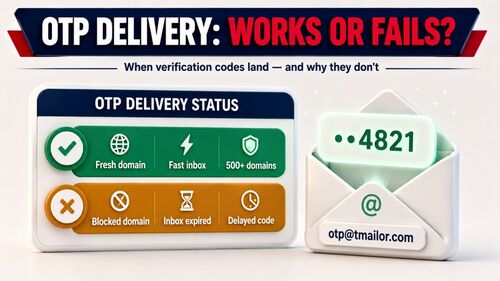
For one-time codes, the key question is where the code lands. With Hide My Email, verification codes forward into your normal inbox, so their reliability equals your everyday email's reliability — consistent, but tied to the address you are trying to keep private. Tmailor is built to receive codes on a disposable inbox instead, so you can receive verification codes without exposing any personal address.
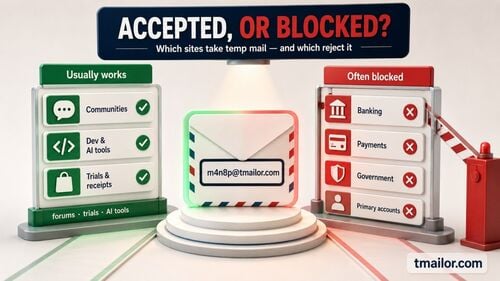
Neither option is guaranteed. Some services block known disposable domains, and some banks or government portals reject any masked address. If a code stalls on a temp inbox, switching to another domain and resending often helps, which is one reason broad domain coverage matters for OTP and account verification. If a code stalls with Hide My Email, the issue sits with your own mailbox filters, not a domain blocklist.
Reach: Apple-First vs Everywhere
Platform coverage is where the two options split hardest. Apple's official Hide My Email guidance documents access on iPhone, iPad, Mac, and iCloud.com with iCloud+. On non-Apple hardware, the documented route is iCloud.com in a supported web browser, so creating an alias on a Windows PC or Android phone runs through that website rather than a native app.
A temp mailbox has no such boundary. It opens in any browser and also runs as native temp mail on Android and iOS and through a Telegram bot. For people who move across ecosystems — an Android phone and a Windows laptop, say — that portability is often the deciding factor.
Privacy Model: Linked Alias vs Decoupled Inbox
Both hide your address from the recipient, but they differ in what happens behind the mask. A Hide My Email alias is still connected to your Apple Account, so Apple can map the alias back to you and mail ultimately reaches your real inbox. A temp mailbox keeps more separation from your personal inbox and accounts: you never sign in, and the inbox is not tied to a personal email account. That distinction is the heart of how anonymous temp mail is in practice.
Which model is "better" depends on your goal. If you want a durable, manageable mask tied to an account you trust, the alias approach is clean. If you want the least possible link between a throwaway signup and your real identity, a disposable inbox exposes far less.
Continuity and Recovery
Long-term accounts need a way back in, and each option handles that differently. Hide My Email aliases are persistent by design: they keep forwarding until you deactivate them, and a deactivated address returns new mail to the sender until you reactivate it. Deleting an alias is permanent.
Temp mail is short-lived by default but can be made reusable on demand. Save the Access Token when you create the inbox, and you can reopen the same address later for resets or re-verification. Skip the token and the inbox stays disposable. Individual messages still clear after about 24 hours, so Tmailor helps with address reuse, not permanent inbox storage.
Tmailor's Limits You Should Know
Tmailor suits receive-only, low-friction signups rather than long conversations or permanent storage. Messages clear after about 24 hours; some services block disposable domains, and you must save your Access Token to reopen the same address later. Knowing these boundaries up front keeps it a privacy tool, not a mailbox replacement.
- Receive-only. You cannot send replies, and inbound attachments are stripped, so you cannot receive files from a Tmailor address.
- Short retention. Inbox messages clear automatically after about 24 hours.
- Token-dependent reuse. The Access Token can reopen an address, but a lost Access Token cannot be recovered.
- Not universal. Some banks, government portals, and other strict services block disposable email domains.
Which One Should You Use
Use Hide My Email when you want a durable, Apple-managed alias that keeps forwarding and can send replies. Use a temp mailbox when you want a faster, free, cross-platform disposable inbox with less identity linkage. The better choice depends on whether continuity or separation matters more for that specific signup.
- Ongoing accounts inside Apple's ecosystem. Use Hide My Email when you expect replies, receipts, or support threads and you already pay for iCloud+.
- Fast, throwaway signups anywhere. Use a temp mailbox for beta apps, forums, one-off downloads, and any non-Apple device.
- Accounts you may need to recover. With temp mail, generate an inbox, save its token in your password manager, then sign up.
- Testing and QA. Spin up several temp inboxes to validate signup flows without cluttering a real mailbox; automatic expiry clears the residue.
- Maximum distance from your identity. Choose a temp inbox, since a Hide My Email alias still resolves to your Apple Account.
Setting Up Each Option
Both take under a minute once you know where to look. Hide My Email lives in your iCloud settings and needs an iCloud+ plan to create arbitrary aliases, while a temp mailbox needs nothing beyond opening the site. The subsections below cover each path.
Turning on Hide My Email
On iPhone or iPad, open Settings, tap your name, then iCloud, then Hide My Email. On a Mac, use System Settings > your Apple Account > iCloud > Hide My Email. In a browser, sign in at iCloud.com and open Hide My Email under iCloud+. Two-factor authentication must be on to create an address. Inside a Safari or Mail email field, choose Hide My Email to generate an alias, and use the same panel later to label or deactivate it.
Creating a temp mailbox
Open Tmailor and create a free temp mail to get an address instantly, then paste it into the signup form. If you will need the account again, save the Access Token before you leave. When you are done, either let the inbox expire or reopen it later with your token — no app install required.
Frequently Asked Questions
The questions below cover the practical comparison points readers care about most: whether Hide My Email is free, how it works on Android or Windows, whether temp mail can receive codes, and which option keeps more distance from a personal inbox.
Is Apple Hide My Email free?
Partly. Hide My Email is free when you use "Sign in with Apple" on apps and sites that support that button. To create your own random addresses for any signup form, you need a paid iCloud+ subscription, which starts at .99 per month for the 50 GB tier.
Can I use Hide My Email on Android or Windows?
Apple's official guidance documents Hide My Email on iPhone, iPad, Mac, and iCloud.com. On Android or Windows, the documented route is iCloud.com in a supported web browser rather than a native app. If you need disposable addresses on a non-Apple device, a browser-based temp mailbox is the more practical choice.
Does a temp mailbox miss verification codes?
Usually not, because temp mail is built to receive codes quickly. Delivery is never guaranteed, though: some services block disposable domains. If a code is late, switch to another domain and resend, or use your real inbox for high-stakes accounts like banking.
Can I reply from a temp mail address?
No. Tmailor is receive-only, so you can read incoming mail and copy codes, but cannot send replies. If two-way conversation matters, Hide My Email lets you reply from the alias inside Apple Mail while keeping your real address hidden.
Which is more private for signups?
For more separation from your personal inbox, a temp mailbox exposes less because it is not tied to a personal account and messages auto-delete. A Hide My Email alias hides your address from the recipient but still maps back to your Apple Account and forwards mail into your real inbox.
How long do messages stay in a temp inbox?
About 24 hours from receipt, then they delete automatically. If you save the Access Token, you can reopen the same address later, but the individual messages are not kept beyond the retention window.
Can I use both together?
Yes, and many people do. Use Hide My Email for lasting accounts where you may need to reply or receive receipts, and reach for a temp mailbox for quick trials, throwaway forums, and signups on non-Apple devices. They cover different jobs rather than competing head-to-head.
The Bottom Line
Use Hide My Email when you live inside Apple's ecosystem, pay for iCloud+, and expect ongoing, two-way correspondence from a managed alias. Use a reusable temp mailbox when you want free, cross-platform, identity-decoupled signups — then save an Access Token whenever an account needs to be recoverable later. The best choice is simply the one that matches how long you need the address to live.

Elena Petrova compares temp mail and burner email services head to head. She reviews providers, weighs Tmailor against alternatives like 10 Minute Mail, Guerrilla Mail and Apple Hide My Email, and explains which option fits which use case.