Tmailor
 Where Do Spammers Get Your Email Address? 7 Common Sources and What to Do
If you're wondering how spammers got your email address, it may have come from a breach, a signup list, a public page, or a simple guess. Here is how to spot the likely source, unsubscribe safely, and keep the next leak away from your main inbox.
Quick access
Where do spammers get your email address?
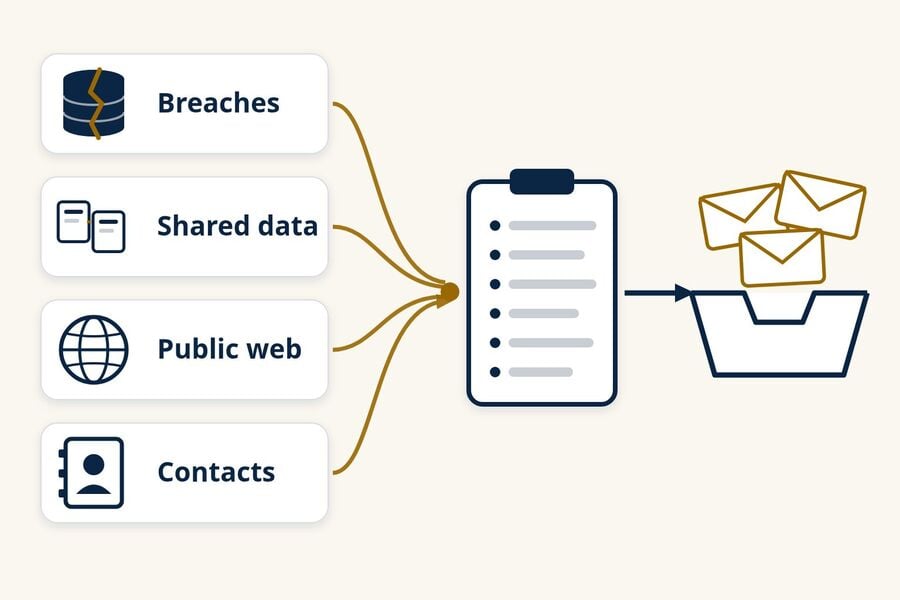
Spammers get your email address from a handful of common sources: breached customer databases, companies and data brokers that share contact lists, public web pages and profiles, other people's contacts and message threads, phishing forms, and guessed addresses. Getting spam does not mean your inbox was hacked, and unless you used a separate address for each signup, the exact source is often impossible to prove.
An exposed address and a hacked account are different problems. A spammer only needs your address to send you mail, but would need your password to read it. The same address can sit on many lists at once, so closing one leak rarely stops spam overnight.
- Once an address is on a list, you can rarely get it removed everywhere, but you can stop feeding new lists.
- Unsubscribe only from mailing lists you recognize; report unknown or suspicious senders as spam instead.
- A separate address or alias for each signup is the clearest practical way to see where spam started.
- Temp mail suits one-off, low-risk signups, not accounts you need to keep or recover.
Seven common sources of spam email addresses
Each source below works differently, leaves different clues, and calls for a different fix. One address can come from several of them at once, and spammers trade lists, so the first source is often hard to pin down.
1. Data breaches at services you used
When a shop, app, or forum you signed up for is breached, its customer database can be copied, sold, or posted online. If the exposed records include email addresses, those addresses can later turn up on spam and phishing lists. Data copied from an old account can stay in circulation even after you close the account.
Clues: spam or phishing that mentions the service by name, or a jump in spam soon after a breach notice. What helps: check your address on Have I Been Pwned, a free breach-lookup service, and sign up for its alerts if you want to hear about future breaches. A clean result does not prove your address was never exposed, because the service only covers breaches in its own dataset. If a breach involved a password you reused, change it everywhere you used it. To limit what the next breach can expose, see how temp mail can shrink the fallout from data breaches.
2. Signups, lead forms, and companies that share data
Many sites ask for an email address before you can buy, download, enter a giveaway, take a quiz, or keep reading. Some use it only for their own marketing. Others share it with "partners," "affiliates," or "sponsors" under their privacy policy or contest rules, and a pre-checked consent box can be all it takes. The FTC's consumer guide "How To Get Less Spam in Your Email" notes that companies may share or sell your address and suggests checking privacy policies before you hand it over.
Clues: marketing from brands you never contacted, starting soon after one signup or giveaway entry. What helps: uncheck partner-marketing boxes, skip giveaways whose rules mention sharing entries with sponsors, and use a separate address for signups you don't fully trust.
3. Data brokers and list sellers
Data brokers collect information from public records, purchases, and online activity, then sell profiles and marketing lists. The FTC's 2014 study of nine data brokers, "Data Brokers: A Call for Transparency and Accountability," found brokers selling marketing products, including lists of consumers who match certain criteria. Spammers and aggressive marketers can buy or rent lists like these instead of collecting addresses themselves.
Clues: spam that already knows your name or city. That can point to a broker, but it can also come from merged breach data, so treat it as a hint rather than proof. What helps: opt-out requests to individual brokers can reduce future sharing, though they can't recall lists already sold. California residents can use the state's Delete Request and Opt-out Platform (DROP) to send one deletion request to registered data brokers, which have had to process those requests since August 1, 2026, subject to legal exceptions.
4. Public pages, profiles, forums, and records
Automated programs scan public web pages and copy anything that looks like an email address. Common spots include personal and business websites, forum posts, online résumés, PDFs, comment sections, public social media and business profiles, and some public records. Older public WHOIS records for domain names could also expose a registrant's email address. In 2018, ICANN restricted publication of personal contact data for generic top-level domains and required an anonymized email address or web form instead.
Clues: search for your full address in quotation marks. A result shows where the address is publicly visible, but no result does not prove it was never posted, because archived or unindexed pages won't appear. What helps: remove the address where you can, use a contact form instead of a printed address, hide your email in profile privacy settings, and turn on domain privacy if you own a website.
5. Other people's contacts and message threads
Your address also lives in other people's address books, old email threads, and group messages. If one of those accounts or devices is compromised, its contact list and conversations can be copied. Long CC chains and forwarded messages also expose every visible recipient to anyone who later receives them.
Clues: spam that appears to come from a friend or coworker, or that reuses the subject line of a genuine old thread. What helps: use BCC for group messages, keep your security software updated as the FTC recommends, and tell a contact if their account seems to be sending mail they didn't write.
6. Phishing pages and deceptive forms
A fake sign-in page, survey, prize claim, or "confirm your account" message can collect your email address directly, often along with a password. Here the address is a side effect; the real target is your account. If you entered a password on a page you reached from an unexpected email, treat it as an account problem rather than a spam problem: change the password on the real site and turn on two-factor authentication.
What helps: open important sites from your own bookmark or app rather than from links in email, and be wary of any form that asks for your email password.
7. Guessed addresses
Spammers also send to addresses they never found anywhere, built from common names and common address formats at popular providers or company domains. The FTC's CAN-SPAM compliance guide lists address harvesting and these "dictionary attacks" among aggravated violations that can bring extra penalties, but that doesn't stop senders who ignore the law.
Clues: spam to an address you have barely used or never shared, especially a short or name-based one. What helps: rely on your provider's spam filter. You don't need to abandon an address for this alone, but a less predictable address can help for new accounts.
Why am I suddenly getting so much spam?
A sudden jump usually means your address landed on a new list, or an old list started being mailed again. Common triggers include a recently disclosed breach, a signup or giveaway that shared your address, or a new campaign your spam filter hasn't learned to catch yet. Spam often arrives in bursts because lists are traded and mailed in bulk.
Three quick questions can narrow it down:
- Did you sign up for anything new in the past few weeks?
- Does the spam mention a specific company, product, or old account?
- Does a breach lookup show a recent breach for your address?
Replies, clicks, and loaded images
Some spammers also look for signs that an address is in use. Replying to spam, clicking its links (including its unsubscribe link), or loading its remote images can tell the sender that a message reached a working inbox. The signal is imperfect because some mail apps and security scanners load images automatically, but you gain nothing by sending it. Report the message instead of replying.
A flood of signup confirmations
If dozens or hundreds of newsletter confirmations or welcome emails arrive within hours, someone may be signing your address up to many sites at once. This is sometimes called subscription bombing. It can be plain harassment, but it may also be meant to bury a real alert, such as an order confirmation or a password-change notice, under the noise. Check your important accounts by opening the official app or typing the site's address yourself, not by following links in the flood, and don't click the confirmation links.
How can you find out who sold or leaked your email address?
Usually you can't prove who sold or leaked an address once spam begins. A unique address or alias shows where you originally used that address, but it can't tell a sale apart from a vendor breach or later sharing. Timing, personal details, and the company named in a message are clues, not proof.
Use a separate address or alias for each signup
Gmail and Google Workspace support plus addressing: adding a tag after your username, such as yourname+shop, still delivers to your main inbox, and the tag shows which version of the address a sender used. Plus addressing is only a clue, though: a form may reject the plus sign, and the tag can be removed before the address is shared. Forwarding aliases go further, because each alias is a separate address you can switch off. Our comparison of temp mail vs email aliases explains which type suits accounts you keep.
A unique address shows which address leaked, not who leaked it. The company may have sold it, one of its vendors may have been breached, or a list may have been passed along further down the line.
What message details can and cannot tell you
The "To" address, any plus tag, and when the spam started are the most useful details. Full message headers show the servers a message passed through and whether it passed authentication checks, but they can't show who sold or shared your address. Spammers often send through services or compromised machines that have nothing to do with the original leak.
Is it safe to click unsubscribe?
It is safe to unsubscribe from a mailing list you recognize and remember joining, ideally with your email app's built-in Unsubscribe button. For unknown, suspicious, or impersonated senders, don't follow the unsubscribe link at all; mark the message as spam or phishing instead.
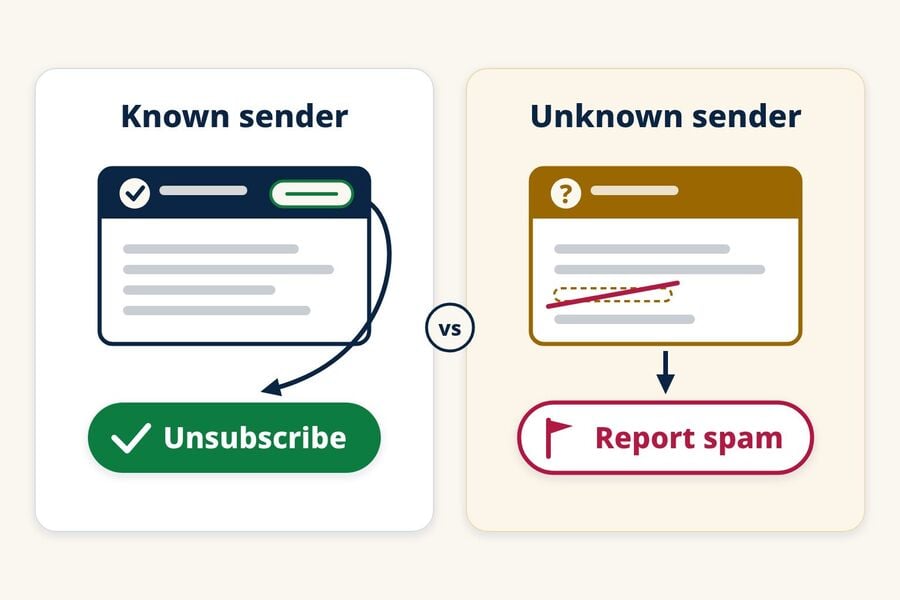
Use your email app's unsubscribe control
Legitimate marketers have legal and practical reasons to honor opt-outs. In the US, the FTC's CAN-SPAM guide says commercial email must offer a way to opt out, requests must be honored within 10 business days, and the opt-out mechanism must keep working for at least 30 days after the message is sent. Senders can't charge a fee or ask for more than your email address, and after you opt out they can't sell or transfer your address, except to a company hired to help them comply with the law.
Google also requires senders that send more than 5,000 messages a day to Gmail accounts to support one-click unsubscribe for marketing and subscribed messages. Compliant messages carry standard unsubscribe headers that Gmail and other email apps can use to show an Unsubscribe option, so you don't have to hunt through the message or visit a page the sender chose. The FTC's spam guide likewise recommends the unsubscribe features your email provider offers.
When not to follow an unsubscribe link
- You don't recognize the company, or you never signed up.
- The sender's name or domain imitates a brand you know, with small misspellings or an unrelated domain.
- The unsubscribe page asks you to sign in, enter a password, or give more than your email address.
- The link starts a download, or the message pressures you to act quickly.
A sender that already ignores the law has no reason to honor your request, and its link can confirm your address or lead to a phishing page. Report the message and move on.
How to reduce the spam emails you already get
You can't remove your address from every copied list, so stopping spam usually means filtering and reporting it rather than stopping every send. The FTC's consumer advice recommends these basics:
- Mark spam as spam or junk in your email app.
- Block persistent senders or domains when the same source keeps getting through.
- Check the spam folder now and then for real mail caught by mistake.
- Report unwanted messages to your email provider, and report scams to the FTC at ReportFraud.ftc.gov.
As an extra precaution, don't reply to suspicious messages or call phone numbers listed in them.
Switching to a new address is a last resort. It only helps if you move your important accounts carefully and protect the new address better than the old one.
Keep your main address out of future signup lists
The most effective long-term step is giving fewer companies your main address. A simple three-tier setup works for most people:
- Main address: banking, work, government services, and any account you would need to recover.
- Forwarding alias: shopping, subscriptions, and accounts you keep, so you can switch off any alias that starts getting spam.
- Temp mail: one-off downloads, coupons, forum trials, and other low-risk signups you don't plan to keep.
When temp mail fits, and when it doesn't
A temp mail address keeps one-off signups away from your main inbox. If an address you used for only one signup later receives spam, that signup is a useful lead, though it can't prove whether the company, one of its vendors, or someone further down the line shared the address. If you're new to the idea, this overview of how temp mail works covers the basics.
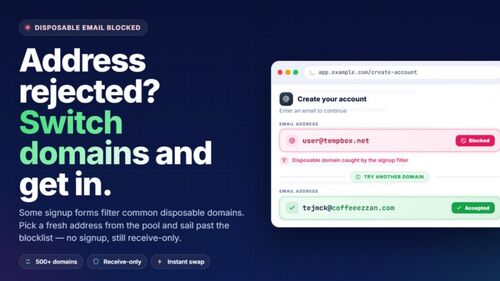
Tmailor is receive-only, so you can't send or reply from the address, and it doesn't accept attachments. Messages are deleted automatically about 24 hours after they arrive. You can return to the same address later with its Access Token, but a lost token can't be recovered, and some sites block disposable email domains. That makes temp mail a poor fit for banking, work, purchases you may need receipts for, or any account you might need to recover. For more on everyday uses, see our guide to temporary email and spam protection.
Frequently Asked Questions
Why do I get spam that isn't addressed to me?
Your address was probably a hidden (BCC) recipient or part of a mailing list. Spammers often put a different address, or none, in the To line and send the real list as hidden recipients, so your address doesn't appear even though the message reached you. Mail sent to an alias or forwarding address can look the same way.
Does getting spam mean my email account was hacked?
Usually not. Sending you spam only requires your address, not access to your inbox. Signs of a real compromise look different: sent messages you didn't write, sign-in or password-change alerts you didn't trigger, forwarding rules you didn't create, or contacts saying they got strange mail from you.
Can a spammer tell that I opened an email?
Sometimes. If your email app loads remote images, an image request can tell the sender's server that the message was loaded, and when. It isn't proof that you read it, because some apps load images through a proxy and security scanners may open messages automatically. Turning off automatic remote images in your email app weakens this signal.
Should I change my email address because of spam?
Usually not as a first step. Filters, reporting, and separate addresses for new signups handle most spam. Consider a new address only if the old one has become unusable, and plan the move: update important accounts and recovery settings first, then keep checking the old address long enough to catch anything you missed.
Is all unsolicited commercial email illegal in the US?
No. The CAN-SPAM Act does not ban unsolicited commercial email; it sets rules for it. Those rules require truthful header information and subject lines, identification of the message as an ad, a valid postal address, and a working opt-out that is honored within 10 business days. Harvesting addresses and dictionary attacks count as aggravated violations.
You can't trace every spam message, but you can stop feeding new lists
Spam starts with an address that someone collected, shared, or guessed, and once it circulates, you can't pull it back. What you can control is how many new lists see your main address. Report what gets through, unsubscribe only from senders you recognize, and keep one-off signups separate. The next time a download or coupon asks for an email, create a free temp mail for it instead of using your real one.
Jordan Mills has covered disposable email, OTP delivery and online privacy since 2018. He writes Tmailor's guides on staying anonymous, avoiding spam, and getting verification codes to land every time.