Tmailor
 Temp Mail Alternatives by Need: Find the Right Tool for Each Job
There's no single best temp mail alternative — the right disposable email tool depends on the job. Here's which option fits each need, and exactly where Tmailor is the strongest pick. Match the job to the tool: each common email need has a best-fit alternative.
Quick access
Key Takeaways
The best temp mail alternative depends on the job — match the tool to the need, not the hype.

- There is no single best temp mail alternative; the right pick depends on your needs — whether you need a one-off code, address reuse, privacy, attachments, or scale.
- For a single verification code you will never revisit, a throwaway inbox or a 10 minute mail address is enough.
- To return to the same inbox later, choose an option with token-based reuse instead of generating a fresh random address each time.
- For a real, long-term account, an email alias or forwarding service usually beats classic temp mail.
- Temp mail is built for receiving, not two-way exchange, and can't guarantee that an OTP arrives; Tmailor in particular strips inbound attachments — so files, replies, and must-arrive mail need a different tool.
- Tmailor covers several of these jobs natively (reuse, custom domain, multiple inboxes); the matrix below shows where it does and doesn't support them.
How to Pick a Temp Mail Alternative
Decide what the address must actually do before you compare any tools.
To choose a temp mail alternative, start with the job, not the brand. Ask three questions: Do you need to return to the inbox later? Must the address receive ongoing mail or attachments? Is the account low-stakes or important? Your answers route you toward a throwaway inbox, a reusable address, an email alias, or a forwarding service.
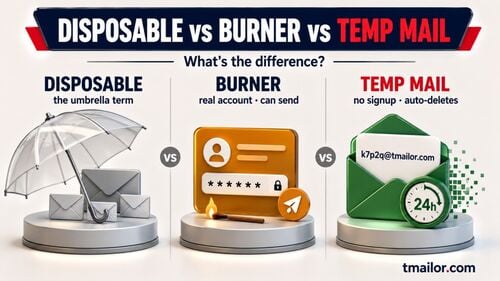
The terms themselves cause half the confusion, because "disposable email," "burner email," and "temp mail" get used interchangeably even though they describe slightly different lifespans and recovery paths. If you're unsure which label applies to your situation, this breakdown of how these three terms differ clarifies which one applies before you pick a tool. Once the vocabulary is straight, the six needs below map cleanly to one recommended option each.
Need-to-Pick Comparison Matrix
One table mapping each common email job to its best-fit option and where Tmailor lands.
The table below maps six common email jobs to the best-fit alternative and shows where Tmailor is the right pick. Use it as a quick router: find your need in the first column, then read across to the recommended option and the reason it wins. The sections after the table explain each choice in depth.
| Your need | Best-fit option | Why it wins | Where Tmailor fits |
|---|---|---|---|
| One-off OTP or throwaway signup | Instant or 10 minute mail inbox | Address in seconds, zero cleanup | Strong — instant inbox, 24-hour window |
| Reuse one address later | Token-based reusable address | Reopens the same inbox anywhere | Strong — Access Token reuse |
| Long-term account privacy | Email alias or Hide My Email | Forwards ongoing mail, persists | Limited — not the right tool |
| Branded or business address | Custom private domain | Own-domain identity, not a shared pool | Strong — free custom domain |
| Many inboxes (QA, parallel testing) | Multi-inbox manager | Side-by-side, no per-address login | Strong — multiple inboxes |
| Attachments, replies, must-arrive mail | Secondary email or forwarding | Two-way, keeps files | None — receive-only, strips files |
Best for a One-Off OTP or Throwaway Signup
When you'll never log back in, speed takes precedence over every other feature.
For a single verification code on a signup you will never revisit, a standard throwaway inbox or a 10 minute mail address is the best alternative. You need an address in seconds, one inbound message, and zero cleanup afterward. Reuse, attachments, and long retention don't matter here, so there is no reason to pay for them.
This covers newsletter gates, one-time PDF or ebook downloads, and low-stakes trials you're only sampling. The throwaway approach wins precisely because the address is meant to disappear — fewer features, less friction, nothing to clean up later. Tmailor handles this job with an instant inbox and a roughly 24-hour retention window, which is more forgiving than a strict 10-minute inbox when a verification code arrives slowly. Tmailor's random generator draws from a large, rotating pool of 500+ domains — only a subset issues addresses at any moment, and the live list is deliberately unpublished — all routed through Google-MX infrastructure. If one shared domain is rejected because it sits on a blocklist, a fresh address on another domain may go through for that form. But if the site refuses disposable email as a matter of policy, don't keep cycling addresses — use your real email or an alias tied to a mailbox you control.
Best for Reusing One Address Across Return Visits
If you come back, a fresh random address every time is the wrong move.
To return to the same inbox later, pick an alternative with token-based recovery instead of generating a new random address each visit. A recovery token works like a key that reopens the same inbox on any device. The trade-off is straightforward: a reusable address is more useful for accounts you revisit, but slightly less anonymous than a single-use throwaway.
This fits a trial you plan to re-enter, a forum login, or any recurring low-stakes account. Without reuse, every return visit means a new random inbox and no way back to earlier confirmation emails. Tmailor's Access Token lets you reuse one address with a token, restoring past messages rather than starting over each time. A custom email alias can also persist, but it ties back to your real inbox — the token approach keeps the address standalone while still bringing you back to the same place.
Best for Keeping a Real, Long-Term Account Private
For accounts you intend to keep, temp mail is usually the wrong tool.
For a long-term account you will keep — a subscription, a work tool, or anything you expect mail from for months — an email alias or Apple Hide My Email beats classic temp mail. These options forward to your real inbox, persist for far longer than 24 hours, and allow you to receive ongoing messages. Temp mail's auto-delete and receive-only design make it a poor fit for accounts that genuinely matter.
An alias hides your primary address while still delivering mail you need to keep, which is the opposite of temp mail's disappear-by-design behavior. If you're weighing the two approaches for private signups you'll maintain, see how Apple Hide My Email compares with temp mail on reply behavior, cost, and flexibility. For accounts you will revisit for years, the forwarding model almost always wins. A streaming subscription or a recurring SaaS login is a good example — you want those messages to keep arriving, not vanish after a day.
Best for a Branded or Business Address
When the address itself needs to look legitimate, go custom.
When you need an address on your own domain — for a brand, a small team, or a cleaner separation between workflows — a custom private domain is the right alternative. You keep the temp mail convenience, but the address sits on a domain you own rather than a shared public one. This suits freelancers, small businesses, and teams that want disposable-style inboxes under their own name. Both a freelancer sending a client an intake form and a small team standing up logins for a new tool look more credible on a domain that isn't an obviously shared one.
Shared disposable domains are easy for services to recognize because many people draw from the same public pool. Moving to a private custom domain gives you receive-only inboxes on infrastructure you control, with less exposure to those shared lists. It can help when a form rejects one shared domain, but it does not override a site's policy: if a service doesn't permit disposable or temporary addresses at all, use a real mailbox or an alias that forwards to one. A full self-hosted mailbox would also work, but it is overkill for most people.
Best for Running Many Inboxes at Once
Scale changes the requirement from one inbox to many, managed together.
For QA work, onboarding tests, or several signups in parallel, the best alternative is a tool that manages multiple inboxes in one place rather than forcing you to juggle browser tabs. At scale, you need fast creation, side-by-side inboxes, and no separate login per address. This is a workflow problem, so choose inbox management rather than address generation.
Single-address tools break down once you're running five or ten inboxes — you lose track of which code belongs to which account. Tmailor lets you manage several inboxes at once, which keeps developer testing and parallel test signups organized in a single view. Teams testing email-related flows get the most value here, since every inbox stays visible without repeated logins. A QA engineer validating a signup flow across ten test accounts, for example, can watch every confirmation land in one place instead of opening ten separate sessions.
Best When You Need Attachments, Replies, or Guaranteed Delivery
Some jobs disqualify temp mail entirely — name them honestly.
If you must download a file, reply to a message, or guarantee that a code arrives, no disposable inbox is the right answer. Tmailor is receive-only and strips inbound attachments, so you can't open or download a file sent to a Tmailor address; and no temp mail service can promise delivery when the receiving site blocks temporary addresses. For these jobs, use a secondary email account, a forwarding service, or a privacy-first provider instead.
Some of these are limits of the whole approach — throwaway inboxes aren't designed for two-way mail or guaranteed delivery — while attachment handling varies by provider: a few disposable services do surface attachments, though that still doesn't make them the right choice for must-have files. Before you rely on any throwaway inbox for something important, understand what temp mail can't do. High-security flows, such as banking or government services, intentionally reject temp mail, so those should always go to your real, secure email.
Where Every Option Falls Short
No alternative is universal — know the shared blind spots before you commit.
Every option on this page has a ceiling. Disposable-domain blocklists can reject any temp-mail-style address, and a custom domain reduces that risk without eliminating it. Reusable addresses trade a little anonymity for convenience. Aliases and forwarding services tie back to a real inbox, so they are less anonymous by design. And none of these tools is built for high-stakes identity. Opening a bank account, verifying a government service, or recovering a primary email all demand an address you fully own and can prove is yours.
If you'd rather weigh options by category instead of by need, the main alternatives worth comparing are email aliases, plus-addressing, encrypted providers, and forwarding services. Whichever angle you start from, the rule holds: for anything tied to money, legal identity, or an account you can't afford to lose, use your real email with proper security.
Frequently Asked Questions
What's the best disposable email alternative for OTP codes?
For a one-time code, a throwaway or 10 minute mail inbox is ideal; for codes on accounts you'll revisit, choose a reusable token-based address. If one shared domain is blocked, another domain or a custom domain may work for that form; if the service doesn't allow disposable email at all, use your real address. No option guarantees delivery, because that depends on the receiving service's own policy.
Can I reuse a temp mail address instead of getting a new one each time?
Yes — pick an alternative with token-based recovery. Tmailor's Access Token reopens the same inbox on any device, so you don't lose access to past signups. A bookmarked address alone isn't enough; the token is what actually restores the inbox and its messages.
Are email aliases better than temp mail for privacy?
For long-term accounts, usually yes. Aliases forward to your real inbox, persist indefinitely, and let you receive ongoing mail and replies. Temp mail is better for short-lived, fully anonymous signups where you never need the address again. The right choice depends on whether you'll keep the account.
Is Apple Hide My Email a temp mail alternative?
Apple Hide My Email is an alternative for a different job. Creating its aliases on demand requires iCloud+, Apple's paid tier; each alias forwards to your real inbox and can be replied to from Apple Mail, which makes it good for long-term private signups. Classic temp mail is faster and more anonymous for one-off, throwaway use.
Do temp mail alternatives work when a site blocks disposable domains?
Sometimes. A large domain pool and a custom private domain both reduce rejection, but no tool bypasses every blocklist. High-security services such as banking and government sites deliberately block disposable email, so for those, you should use your real, verified address instead.
What's the safest alternative for accounts I want to keep long-term?
An email alias, a forwarding service, or a dedicated secondary email account. These keep your primary inbox clean while still letting you receive ongoing mail and replies — things temp mail's 24-hour, receive-only design cannot support. Reserve temp mail for the short-lived signups you never plan to revisit.
Can I use a custom domain instead of a random temp mail address?
Yes. A custom private domain gives you a professional-looking address on a domain you own, while keeping the convenience of temp mail. It suits freelancers, small teams, and anyone tired of shared disposable domains being rejected. You get throwaway-style inboxes on a domain you control rather than a shared public one — though it still won't override a site's policy against disposable email.
Which alternative lets me reply to or forward emails?
Not temp mail — it is receive-only. For two-way email, use a secondary inbox, an alias that forwards to a mailbox you control, or a privacy-first provider. Temp mail is built only for receiving, reading, and discarding messages, so replies and forwarding are out of scope.
The Bottom Line
There is no universal best temp mail alternative — there is a best one for each job. Match the need to the tool: a throwaway inbox for one-off codes, a reusable token for return visits, an alias or forwarding service for long-term accounts, and a custom domain when the address has to look legitimate. Tmailor covers several of these needs natively; for the rest, this guide honestly points you to the right alternatives, including the jobs where temp mail isn't the answer.

Minh Nguyen is the founder of Tmailor and the developer who publishes the Tmailor temp mail apps on the App Store and Google Play. He has built and operated Tmailor's free, receive-only disposable email service since 2022, focusing on reliable OTP delivery, inbox privacy, and reusable temp mail addresses.