Tmailor
 Disposable Email vs Burner Email vs Temp Mail: What's the Difference?
Disposable email vs burner email vs temp mail is more than just wording — each one protects your inbox differently. Here's how to tell them apart and pick the right one.
Quick access
Key Takeaways
Disposable email is the umbrella term. Burner email is a real account you use temporarily. Temp mail is a no-signup, receive-only inbox that expires quickly. Email aliases forward to your real inbox instead of creating a separate mailbox. Use temp mail for one-offs, burner email for longer-lived accounts, and aliases for low-risk forwarding.
The essential distinctions between disposable email, burner email, and temp mail in one quick read.
- "Disposable email" is the broadest term — it covers any address you intend to throw away after use, regardless of how it was created.
- "Burner email" usually refers to a real, separate account on a mainstream provider (e.g., Gmail or Outlook) that you create for temporary or pseudonymous use.
- "Temp mail" specifically refers to a service that generates anonymous, self-destructing inboxes with no registration, password, or primary email address required.
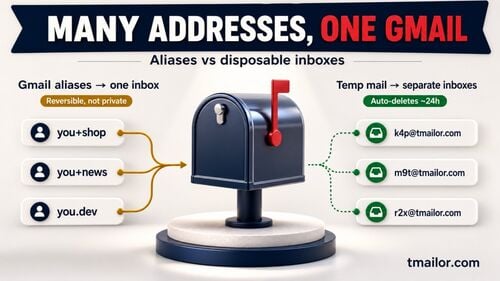
- Email aliases (like Apple's Hide My Email or Gmail's plus-addressing) are a fourth category — they forward to your real inbox and do not create a separate mailbox.
- The right choice depends on how long you need the address, whether you need to send messages, and how much identity separation you want.
- The short version: temp mail for instant throwaway sign-ups, a burner email for accounts you need to keep, and an alias for low-risk forwarding.
Disposable Email vs Burner Email vs Temp Mail: Which to Use?
Skip the theory — here is the fast verdict before the detailed breakdown.
Choose temp mail for instant, anonymous, one-time sign-ups. Choose a burner email when you need to send replies or keep an account alive for weeks. Choose an email alias for low-risk forwarding you want tied to your real inbox. Most people are best served using all three, each in the situation it was designed for.
If you are weighing full services rather than categories, our roundup of the best temp mail providers compares real options side by side. The rest of this guide explains the differences behind that verdict so you can adapt it to your own risk level and lifespan.
Define Each Term Clearly
Precise definitions prevent confusion and help you choose the right privacy tool for any situation.
Disposable email, burner email, temp mail, and email alias describe four distinct approaches, not synonyms. The differences come down to how the address is created, whether it can send mail, how long it lasts, and how much it separates from your real identity.

Disposable Email (The Umbrella Term)
"Disposable email" is a category, not a specific product. Any email address you plan to use temporarily and then abandon qualifies. This includes temp mail services, burner accounts on regular providers, email aliases, and even a secondary Gmail you created years ago and never check. When someone says "disposable email," they mean the intended use (as a throwaway), not the technology behind it.
Burner Email (A Real Account, Used Temporarily)
A burner email is typically a complete email account on a mainstream provider — Gmail, Outlook, Yahoo, ProtonMail — that you create as a separate account for temporary or pseudonymous use. Unlike temp mail, a burner email lets you both send and receive messages. It has a password and behaves like a regular email account, but its lifespan depends on the provider's policies and on whether you keep the account active — Google, for example, may delete an account that has been inactive for two years. The "burner" part is your intent to discard it after a period of use, not a built-in self-destruct feature.
People choose burner emails when they need to send replies, maintain an account for weeks or months, or sign up for services that reject known disposable domains. The deeper temp mail vs burner email breakdown covers when each makes sense. The downside is setup effort: creating a real account takes minutes, may require phone verification, and produces an address that can still be traced to your IP or device if the provider logs that data.
Temp Mail (Anonymous, Self-Destructing, No Registration)
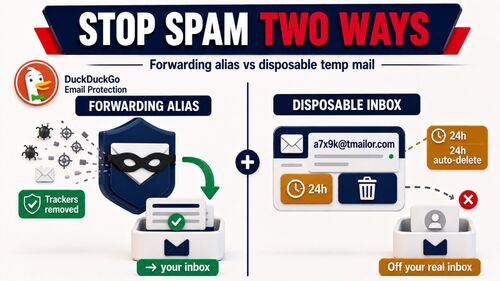
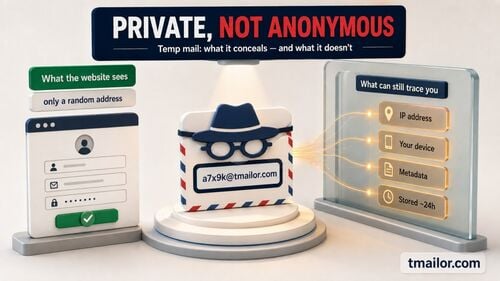
Temp mail is a specialized service that generates a random email address instantly — no sign-up, no phone number, and no primary email address required. You receive messages in a browser-based inbox, and everything is automatically deleted after a retention period (usually about 24 hours). Temp mail is receive-only by design: you cannot send or reply. The address comes from a pool of domains owned by the provider, and services with hundreds of domains make it easy to switch when a legitimate sign-up is not accepted.
The privacy advantage is significant: no account registration is required, no password is created, and you do not have to hand your primary email address to the site you are testing. The trade-off is permanence — the address and its messages will disappear, and you cannot send outbound email. If you want a deeper look at the mechanics — how MX routing, catch-all addresses, and retention work end-to-end — the technical temp mail walkthrough covers everything from address generation to auto-deletion.
Email Alias (Forwarding, Not a Separate Inbox)
An email alias — like Apple's Hide My Email, Firefox Relay, or Gmail's plus-addressing (you+tag@gmail.com) — creates a forwarding layer on top of your real inbox: messages sent to the alias land in your actual mailbox. You can often reply from the alias — Apple's Hide My Email supports this with an iCloud+ subscription, and Firefox Relay supports it on its premium tier — and the alias persists until you deactivate it. The practical takeaway from how aliases and temp mail compare is that aliases offer convenience but less identity separation: your real inbox is still the destination, and a breach at the alias provider could expose the connection.
Side-by-Side Comparison Table
A side-by-side breakdown so you can match each tool to the right situation at a glance.
The table below compares temp mail, burner email, and email alias across setup time, sending ability, lifespan, identity separation, and account recovery. Temp mail wins for speed and anonymity, a burner email for control and sending, and an alias for everyday convenience.
| Criteria | Temp Mail | Burner Email | Email Alias |
|---|---|---|---|
| Setup Time | Instant (no registration) | Minutes (account creation required) | Seconds (within existing account) |
| Can Send Email | No (receive-only) | Yes | Usually yes (via relay) |
| Lifespan | ~24 hours for messages; the address may be reopened with an Access Token | Longer-lived; depends on provider policy and account activity | Usually lasts until you deactivate it or close the underlying account |
| Identity Separation | Strong (no registration) | Moderate (IP/phone may link) | Weak (forwards to real inbox) |
| Domain Blocking Risk | Higher (known disposable domains) | Low (mainstream provider domains) | Low (uses real provider domain) |
| Account Recovery | Access Token only; limited window | Full (password reset available) | Full (via primary inbox) |
| Best For | Quick sign-ups, OTP, trials, QA | Pseudonymous profiles, longer-term use | Newsletters, low-risk services |
| Avoid For | Banking, government, long-term | High-anonymity needs | True identity separation |
Match Each Tool To A Use Case
The best privacy tool is the one that fits the specific risk level and lifespan of the task at hand.
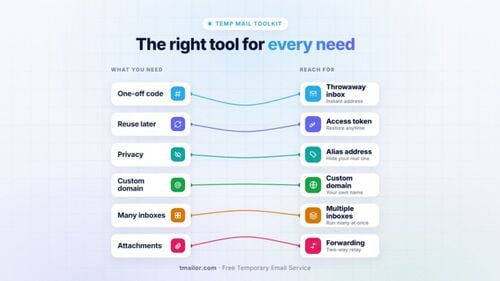
The right choice depends on the task's lifespan and risk. Throwaway sign-ups suit temp mail, longer-lived accounts suit a burner email, and casual newsletters suit an alias. Matching the tool to the job avoids both wasted setup effort and unnecessary exposure of your real address.

Quick Sign-Ups and One-Time Downloads
You want to grab a coupon, download an e-book, or unlock a gated article. You will never log in again. This is the ideal scenario for a free temp mail address — instant, anonymous, and zero cleanup. A burner email is overkill here, and an alias clutters your real inbox with a message you do not need.
Free Trials and Product Evaluations
Evaluating a SaaS tool for a few days works best with a recoverable address. If the trial sends a confirmation and re-verifies partway through, a temp mail address with Access Token reuse lets you return to the same inbox. Some services do not accept disposable domains, though — when a sign-up is rejected, an address you own long-term is the dependable choice.
Secondary and Pseudonymous Profiles
A longer-lived pseudonymous profile — a hobby forum handle, a marketplace persona, a public-facing account you keep separate from your name — needs an address that can receive re-verification and security alerts months later. A burner email is the safer bet because such profiles often re-verify over time and may not accept temp mail domains. A temp mail address covers the initial sign-up, but you risk losing access if you misplace the Access Token.
Newsletter Previews
Previewing a newsletter before committing your real email is a textbook temp mail job. Receive the first issue, decide, and either subscribe with your real address or let the disposable one expire. An alias also works here, but it leaves the subscription connected to your real inbox until you manually revoke it.
Ongoing Privacy Separation
Maintaining identity separation over weeks or months — freelance inquiries, dating profiles, marketplace listings — calls for a burner email or a dedicated secondary email strategy. Temp mail's retention window is too short for messages that arrive days apart, and aliases still link back to your primary inbox, so neither fits a genuinely long-lived need.
QA Testing and Development
Development teams need many unique addresses fast, with no setup overhead. Temp mail wins here: generate, test, discard, repeat. Burner emails are too slow to create at scale, and aliases are impractical for volume testing. A 10 minute mail model also works for automated tests that complete quickly.
Risks And When Not To Use
Every privacy tool has blind spots — knowing them in advance prevents the mistakes that cause real problems.
Every option has a blind spot. Temp mail can lose access to accounts you create, burner emails can be traced through IP or phone verification, and aliases expose the link to your real inbox if the provider is breached. None of them suits banking, government, or health accounts that require a permanent identity.
Temp Mail Risks
The most significant risk with temp mail is losing access to an account you created. If you sign up for something and later need a password reset, the disposable inbox may already be gone. Some platforms also block known temp mail domains outright — the full picture of why some sites block disposable domains explains how detection works. Temp mail should never be used for banking, insurance, government, health, or any account that requires permanent identity verification.
Burner Email Risks
A burner email on a mainstream provider feels more "real," but it carries its own risks. The provider may log your IP address, require phone verification (which links it back to your identity), or suspend your account for suspicious activity. If the burner account gets compromised, any services tied to it become vulnerable. And because burner emails persist, forgotten accounts can become targets in data breaches years later.
Alias Risks
Aliases provide convenience but weak separation. If the alias provider is breached, the link to your real email is exposed — alias privacy depends entirely on the provider you trust with the mapping. Plus-addressing (you+tag@gmail.com) leaves your base address visible before the "+tag," so any service can strip it — handy for filtering, but weak for privacy. Dedicated alias services such as Hide My Email and Firefox Relay mask far better than plus-addressing, but you are still trusting a third party with the link between the alias and your real address.
The Universal "Do Not Use" List
None of these approaches should be used for banking, tax platforms, government portals, health insurance, or any service involving legal identity or financial compliance. These accounts require a permanent, personally owned, recoverable email address. For a broader look at where disposable addresses cross the line, see what temp mail can't do safely.
Frequently Asked Questions
Answers to the questions people ask most when choosing between disposable, burner, and temp mail options.
Is a burner email the same as temp mail?
No. A burner email is a real account on a mainstream provider that you use temporarily or pseudonymously. Temp mail is a specialized service that generates anonymous, receive-only inboxes with no registration and automatic deletion. The key differences are that burner emails can send messages, usually last much longer than temp mail, and depend on provider rules and account activity rather than an auto-expiry timer.
Which one is best for receiving OTP verification codes?
Temp mail works well for OTP when the domain is not blocked. If the platform rejects disposable domains, a burner email on a mainstream provider is the reliable fallback. Email aliases also receive OTPs but route the code to your real inbox, which defeats the purpose of privacy. Match the tool to the account's sensitivity.
Can I use Gmail plus-addressing as a disposable email?
Technically, yes, but it is weak for privacy because your base email address stays visible before the "+tag," and any service can strip that tag to reveal it. Plus-addressing is useful for organizing your inbox with filters, but it does not provide the identity separation that temp mail or a burner email does.
Is it illegal to use a disposable or burner email?
The legal risk depends far more on how you use the address than on the tool itself. Disposable, burner, and temp mail addresses are widely used as ordinary privacy tools, but fraud, impersonation, false statements, or violating a service's rules can create legal or account consequences. For regulated, identity-bound, or financially important services, use your real, recoverable email and follow the platform's requirements.
Which option gives the strongest privacy?
Temp mail usually provides the strongest identity separation for one-time sign-ups because no registration details or primary inbox are required, no account password is created, and messages are auto-deleted after a short retention window. Burner emails are moderately private but may log IP addresses or require phone numbers. Email aliases offer the weakest privacy because all messages are routed to your real inbox.
Can I reply to emails with a temp mail address?
No. Temp mail services are receive-only by design to prevent abuse. If you need to send replies, use a burner email on a mainstream provider or an email alias service that supports outbound forwarding. Temp mail is built for receiving verification codes and confirmations, not conversations.
What happens if a service blocks my temp mail domain?
Switch to a different domain from the provider's pool. Services with hundreds of domains make this easier. If every disposable domain is blocked, the platform has made a deliberate policy choice — your alternatives are then a burner email or an email alias on a mainstream provider.
Can I keep the same temp mail address for a long-term account?
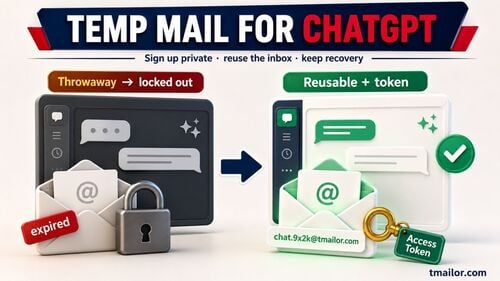
Sometimes. Temp mail inboxes clear after about 24 hours, but some services (including tmailor.com) let you return to the same address if you saved its Access Token. The token restores the address, not the old messages, and a lost Access Token cannot be recovered. For an account you truly rely on, a burner email or your real inbox is safer.
Should I use all three approaches together?
Yes — a layered strategy is the smartest approach. Use temp mail for quick, one-time interactions. Use a burner email for accounts that need to last longer or require sending capability. Use an alias for low-risk services where convenience matters more than full separation. This way, each tool handles the scenarios it was designed for.
The Bottom Line
Three terms, three different tools — the smartest approach is to use each one where it actually fits.
"Disposable email" is what you intend to do. "Temp mail" and "burner email" are the ways to do it. And "email alias" is a lighter alternative that trades real separation for convenience. None of them replaces the others, and the best privacy setup uses all three, depending on the situation. Use temp mail when you want instant anonymity and zero commitment. Use a burner email when you need to send messages or keep access for weeks. Use an alias when you want convenience without giving a service your real address. When you are unsure, matching the right tool to each job beats forcing one option everywhere. Keep your primary inbox exclusively for accounts that genuinely matter.

Minh Nguyen is the founder of Tmailor and the developer who publishes the Tmailor temp mail apps on the App Store and Google Play. He has built and operated Tmailor's free, receive-only disposable email service since 2022, focusing on reliable OTP delivery, inbox privacy, and reusable temp mail addresses.