How to Create a Temp Gmail Account or a Private Temp Mail Alternative
There is no official "temp Gmail account" — Google does not offer throwaway or self-expiring Gmail addresses. What actually works is creating a secondary Gmail, using Gmail aliases like plus-addressing and the dot trick, or skipping Gmail for a private temp mail service that gives you a working inbox in seconds. This guide compares all three.
Quick access
Key Takeaways
What "temp Gmail" really means, and the fastest way to get a private inbox.
- Google does not offer a true "temporary" or self-deleting Gmail account — every Gmail address is a permanent account tied to your identity until you delete it.
- The closest Gmail-native options are aliases: plus-addressing (you+tag@gmail.com) and the dot trick (y.o.u.r.name@gmail.com), both of which land in your real inbox.
- Many signup forms reject the plus sign, so the dot variation is the more reliable Gmail alias for websites that block it.
- Aliases sort and filter mail, but they do not hide your real address — anyone can strip the tag and see your primary Gmail.
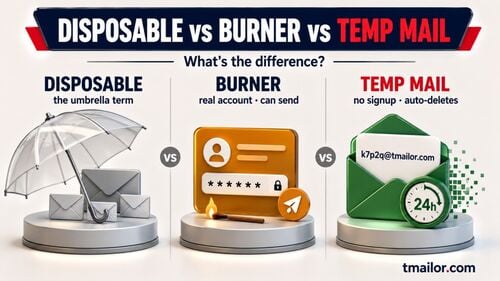
- A temp mail service gives you a genuinely disposable, no-signup inbox in seconds, auto-deletes messages after about 24 hours, and requires none of your personal data.
- Google has not published any official Help Center page or blog post for a disposable-Gmail feature such as "Shielded Email" — treat it as an unconfirmed report, not something you can use today.
Is There Really a "Temp Gmail Account"?
The honest answer to one of the most-searched email privacy questions.
No, Google does not provide a temporary Gmail account. A Gmail address is a full Google account that stays active until you delete it manually — there is no built-in expiration, no self-destruct timer, and no "disposable Gmail" product. When people search for a "temp Gmail account," they usually want one of three things: a throwaway address for a risky signup, a way to keep spam out of their main inbox, or an address they can abandon later. Each of those goals has a real solution below, and only one of them actually involves Gmail.
Option 1: Create a Secondary Gmail Account
A secondary Gmail account is a real, permanent Google account you control — the closest thing to a "temp Gmail" that still behaves like Gmail. It takes a full signup, may require phone verification, and stays until you delete it. Use it when you want a durable alternate identity, not a throwaway address.
A real second account you treat as disposable — workable, but slow and not truly anonymous.
The manual route is to create a brand-new Gmail account and use it only for low-stakes signups. It works, but it is the slowest option and not private in the way most people expect. Because it is a permanent account, you have to remember to delete it later, which defeats the "temporary" goal for most people. If you still want a full second account, here is the process:
- Sign out of your current account. Click your profile picture and choose "Sign out" so the new account is not tied to your existing session.
- Open Google's account signup page and choose to create a personal account.
- Enter a name and username you do not mind being disposable, then set a strong, unique password.
- Complete verification. Google may ask you to add or verify a phone number, which can tie the address back to you; if that is your sticking point, our guide on creating an email without a phone number covers the options.
- Finish the setup, then plan its deletion. Because the account is permanent, delete it yourself once you no longer need it — nothing expires on its own.
Option 2: Use Gmail Aliases (Plus-Addressing and the Dot Trick)
Free, built-in variations of your address, all landing in one inbox.
Gmail aliases are inbox variations, not separate accounts or separate logins — and they cost nothing. Plus-addressing adds a label before the @ sign, so yourname+shopping@gmail.com still arrives in yourname@gmail.com with the tag preserved for filtering. For personal @gmail.com addresses, Google also ignores dots, so y.o.u.r.name@gmail.com and yourname@gmail.com reach the same inbox. One practical catch: many signup forms reject the + character, so the dot variation is often the more reliable alias when a site blocks the plus sign.
The bigger limit is privacy. An alias still contains your real Gmail username, so anyone can strip +shopping or remove the dots and reach your primary inbox — aliases sort your mail, they do not anonymize it. One more caveat worth knowing: Google's dot rule applies to personal @gmail.com addresses only. If you use Gmail through work, school, or another organization, dots do change the address, so the trick does not carry over. For the full step-by-step on running many aliases from one account, see our guide to creating multiple addresses from one Gmail, and the explainer on how catch-all and random aliases work.
Option 3: Use a Temp Mail Service
A temp mail service gives you a disposable inbox instantly, with no account and no personal data, so your Gmail address never enters the signup at all. It is receive-only, messages stay visible for about 24 hours from arrival, and you can reopen the same address later only if you saved the Access Token.
The fastest path to a genuinely disposable inbox, with no account and no personal data.
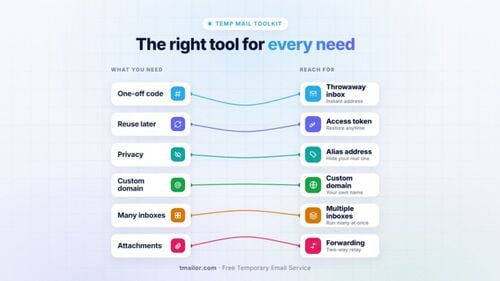
A temporary email service is the only option here that gives you a truly throwaway address. With Tmailor, you open the site, and a working inbox is ready in seconds — no signup, no name, no phone number. Messages arrive normally and then auto-delete after about 24 hours, so there is nothing to clean up. It is built for exactly the jobs a "temp Gmail" is meant for: risky signups, forums, newsletters, and one-off verifications you never want in your real inbox. You can get a temp email in seconds on the web, on Android or iOS, or via the Telegram bot.
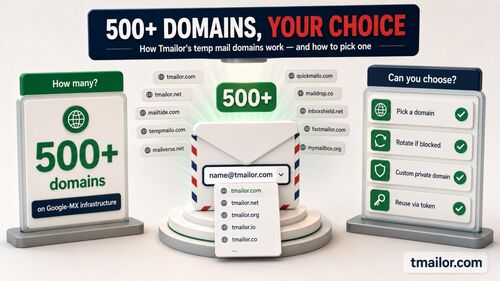
Two features set it apart from a bare disposable inbox. First, it is receive-only and strips tracking: an image proxy and JavaScript removal keep hidden trackers out of the messages you open. Second, you can reuse the same temp address later with a saved Access Token, so an inbox you thought was one-time can be reopened for a follow-up email — something neither a burned secondary Gmail nor a plain 10-minute inbox lets you do. A 500+ domain pool and Google-MX infrastructure round out the reliability. The trade-offs are honest: it cannot send email, it does not accept attachments, and some strict sites still refuse disposable domains.
What's Coming: Google Shielded Email
Unconfirmed by Google — keep it on the watchlist, not in your decision.
As of July 13, 2026, Google has not published an official Help Center article or blog post announcing Shielded Email. Without a Google source, treat the name as unconfirmed and not something you can plan around. For a decision you have to make today, the real options remain a secondary Gmail account, a Gmail alias, or a temp mail service.
Disclosure: Tmailor publishes this blog and runs the temp mail service described in Option 3. The comparison below states what each option does; it is not a lab-tested ranking of every provider.
Secondary Gmail vs Gmail Alias vs Temp Mail
The same goal, three tools — pick by how private and how disposable you need the address to be.
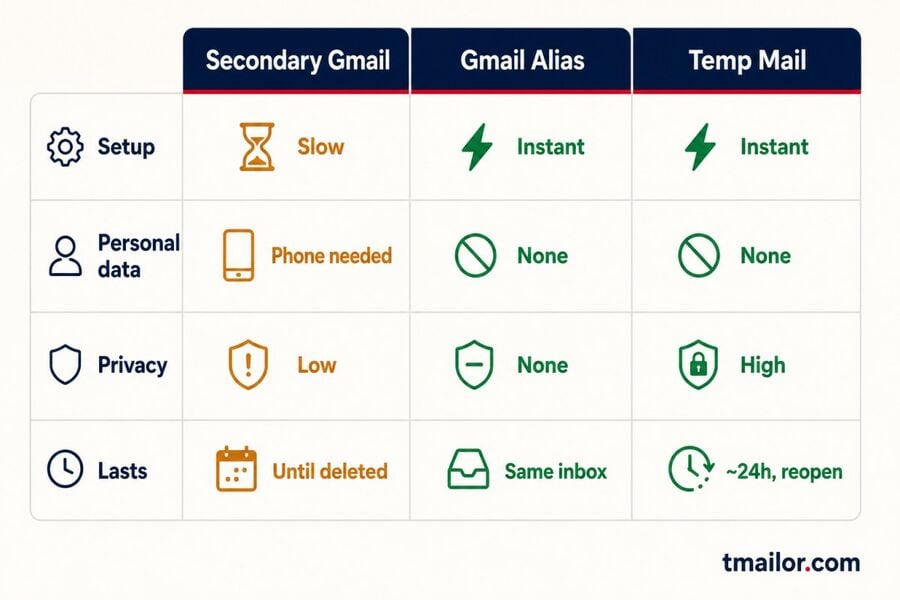
| Approach | Setup | Needs personal data | Privacy from your real inbox | How long it lasts | Best for |
|---|---|---|---|---|---|
| Secondary Gmail account | Slow (full signup) | May require phone verification | Low (separate account, still tied to you) | Permanent until deleted | A long-term alternative you fully control |
| Gmail alias (plus/dot) | Instant, free | No new data | None — reveals your real address | Same as your Gmail | Sorting and filtering your own mail |
| Temp mail service | Instant, no account | None | High — keeps your Gmail address out of the signup | Messages stay ~24h; the address can be reopened with an Access Token | Throwaway, low-stakes signups |
Which Should You Use?
Pick by how long the address must live. A one-off signup you never revisit: temp mail. Sorting your own mail inside an inbox you already own: a Gmail alias. An alternate identity you will keep for years, with recovery and storage: a secondary Gmail account. The wrong pick is using a disposable inbox for an account you cannot afford to lose.
A quick rule for matching the tool to the task.
Choose what you are protecting. If you want to keep marketing mail out of your main view but still receive it, a Gmail alias is the least effort. If you want a durable second identity you will log into for months, a secondary Gmail makes sense despite the setup. If you want a separate, no-signup address for a low-stakes signup — and you do not want it sitting in your Gmail forever — a temp mail service is the right tool. For the full privacy picture across every method, our complete temporary email guide maps out how each approach protects you.
Limitations to Know
Every option has honest trade-offs — here is where each one stops working.
No single method is perfect. Gmail aliases never hide your real address, and they can be rejected if they contain a plus sign. A secondary Gmail is slow to set up, often requires a phone number, and must be deleted manually to remain "temporary." A temp mail address is receive-only, cannot handle attachments, and clears after about 24 hours — so copy anything you need to keep, and save your Access Token to reopen the inbox, before it resets. Strict platforms such as banks or government services also refuse disposable email addresses, since they require a permanent, verified email address. Match the tool to a low-stakes job: for anything tied to your money or legal identity, use a permanent inbox you control, not a disposable one.
Frequently Asked Questions
Direct answers to the temp Gmail and alias questions people search for most.
Does Google offer a temporary Gmail account?
No. Every Gmail address is a permanent Google account with no built-in expiration. The closest Gmail-native options are aliases, and the only genuinely disposable choice is a separate temp mail service.
Why do some websites reject my Gmail Plus address?
Some signup forms treat the plus sign as an invalid character, so you+tag@gmail.com fails validation. The dot variation, such as y.o.u.r.name@gmail.com, is rejected far less often and is the more reliable Gmail alias for those forms.
Is a Gmail alias private?
Not really. An alias still contains your real Gmail username, so anyone can remove the tag or the dots and reach your primary inbox. Aliases organize mail; they do not anonymize it. For an address that keeps your Gmail out of the signup, use a temp mail service instead.
Is Temp Mail safe to use instead of a temporary Gmail account?
Yes, for low-stakes signups and routine verifications. It keeps your real Gmail address out of the sign-up flow and reduces exposure to inbox tracking. It is not suitable for banking, government, or any account you must recover later, since those situations require a permanent, verified email address.
Can I reuse a temp email address later?
With Tmailor, yes. Save the Access Token for an inbox, and you can reopen the same address later — useful for a subscription or a delayed verification. A lost token cannot be recovered, so store it safely.
What is Google Shielded Email?
As of July 13, 2026, Google has not published an official Help Center article or blog post announcing Shielded Email. Treat the name as an unconfirmed report, not an option you can sign up for today.
The Bottom Line
There is no real temp Gmail, but there is always the right tool for a private inbox.
"Temp Gmail account" is a search for something Google does not sell: a disposable, self-expiring Gmail. What you can do is use a Gmail alias to sort your own mail, spin up a secondary Gmail if you want a durable second identity, or reach for a temp mail service when you need a genuinely private, throwaway address in seconds. For most people chasing a "temp Gmail," the temp mail route is faster, needs no personal data, and clears messages automatically — while keeping your real Gmail exactly where it should be: out of it.

Marcus Lee writes Tmailor's step-by-step guides — signing up to apps and platforms with temp mail, using the mobile app and Telegram bot, custom domains, reusing addresses, and getting the most out of disposable email day to day.