Can Temp Mail Receive Attachments? What Happens to Your File
Attachment support depends on the provider. Tmailor keeps the text of an accepted message but removes attached files and images embedded in the email, so documents you need belong in an inbox you control.
Quick access
Can temp mail receive attachments?
Some temp mail services can receive attachments, but support depends on the provider. Tmailor accepts the email itself but removes attached files and embedded images before the message is stored, keeping only the text and a cleaned-up HTML version of the body. If you need a PDF, a receipt, or any other file, use a lasting inbox or an email alias you control.
Whichever service you use, a file in a temporary inbox is short-lived and may come from a sender you can't verify, so opening it requires care. If disposable inboxes are new to you, start with this overview of how temp mail works.
What Tmailor keeps and what it removes
When an email with a file reaches a Tmailor address, Tmailor keeps the message's text and HTML body and discards every other part before saving it. The HTML is also sanitized, so scripts, iframes, and forms are removed. Attached files and images embedded inside the email never reach the inbox.
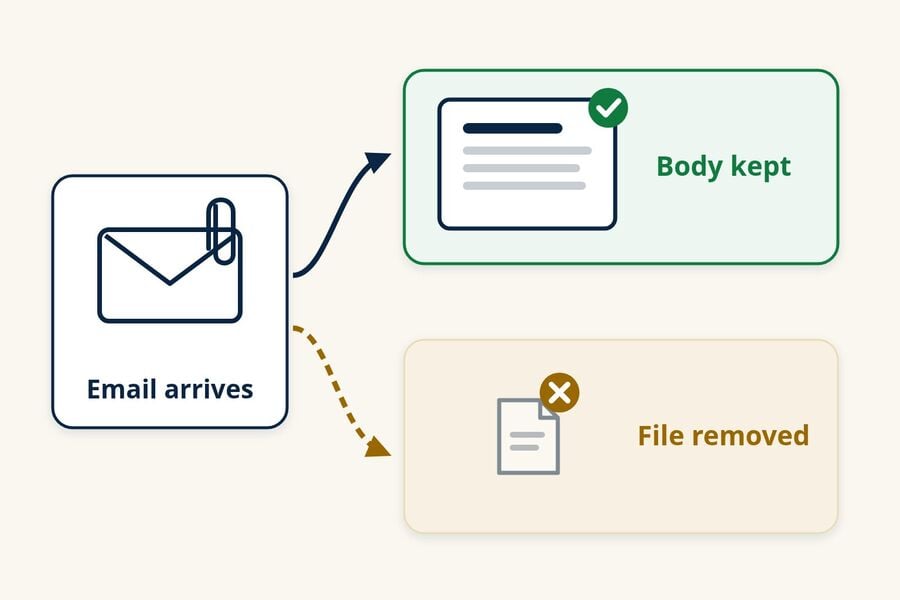
- No file and no notice. The message shows its subject, sender, and body, but there is no file list, no download button, and no note that something was removed.
- The sender isn't told either. For an accepted message, the sender's mail server receives a normal SMTP success response, so it is not told that the attachment was removed. An unusually large message is different: it can be refused, and then the sender gets a bounce.
- Linked images can still appear. Images embedded in the email are dropped, but images linked from the web can still load. They are fetched through Tmailor's image proxy instead of directly by your browser.
- Links stay clickable. A "download your file" link in the body still opens when you click it, and it can lead to an unsafe file or a phishing page.
If you only need a short, non-sensitive detail from the file, such as an order number, ask the sender to paste it into the email itself. Never do that for ID scans, contracts, or financial or medical documents. Removed files are one of several trade-offs covered in our guide to temp mail limits and risks.
Do other temp mail services accept attachments?
Some do, and some don't, so if you need temp mail with attachment support, check the provider's current documentation first. On October 19 and 20, 2026, we read each competitor's official pages and checked Tmailor's handling against its own mail-processing code. We did not send test messages, so the table is a source-verified comparison, not a delivery test.
| Provider | Attachment handling | What the provider says |
|---|---|---|
| Tmailor | Removes attached files and embedded images; keeps the text | Addresses are receive-only and do not accept attachments |
| Temp-Mail.org | Accepts attachments | Its terms list downloading the message source "including attachments"; free-plan mail is stored for up to 1–2 hours |
| Mailinator (public inboxes) | Does not accept attachments | A message with an attachment is either not delivered or has the attachment stripped; public messages auto-delete after a few hours |
| AdGuard Temp Mail | Does not accept attachments | Points people who need attachments to AdGuard Mail aliases, which can forward them |
AdGuard documents two related products. The standalone AdGuard Temp Mail service says it doesn't accept attachments, while the temp mail feature inside the AdGuard Mail app removes attachments and shows a notice listing what was removed. Tmailor shows no comparable notice. Support for PDFs, images, documents, or ZIP files and any size limit depend on the provider, and many services don't document them. If a provider's current help page doesn't say it accepts attachments, don't rely on it for a file. For a wider look at these services, see our comparison of temp mail providers.
Is it safe to open attachments in temp mail?
Open an attachment in temp mail only if you expected that exact file and can verify the sender on your own. Treat an unfamiliar sender, an unexpected invoice, or a download link you didn't request as suspicious.
- Malware and phishing. The FTC's phishing guidance warns that "attachments and links might install harmful malware." CISA advises people to "be wary of unsolicited attachments, even from people you know" and to save and scan files before opening them. A disposable address keeps the file away from your main inbox, but it doesn't make the file safe.
- Other people may see it. Mailinator's public inboxes are open to anyone, and Temp-Mail.org's terms say incoming mail is viewable by any user of the system. On Tmailor, anyone who has your Access Token can reopen that inbox.
- It disappears with the message. Temp-Mail.org's free plan keeps mail for up to 1–2 hours, and Tmailor deletes messages about 24 hours after they arrive. Once the message is gone, the file can't be recovered.
If a file seems suspicious, don't open it, even if a scan says it's clean; CISA notes that antivirus tools can miss new threats. Our guide to whether temporary emails are safe covers the risks that go beyond attachments.
What to use when you need the file
Use a lasting inbox or an email alias for anything you expect to receive as a file, such as receipts, invoices, tickets, statements, or contracts. Keep temp mail for verification codes, confirmation links, and newsletters you may not want later.
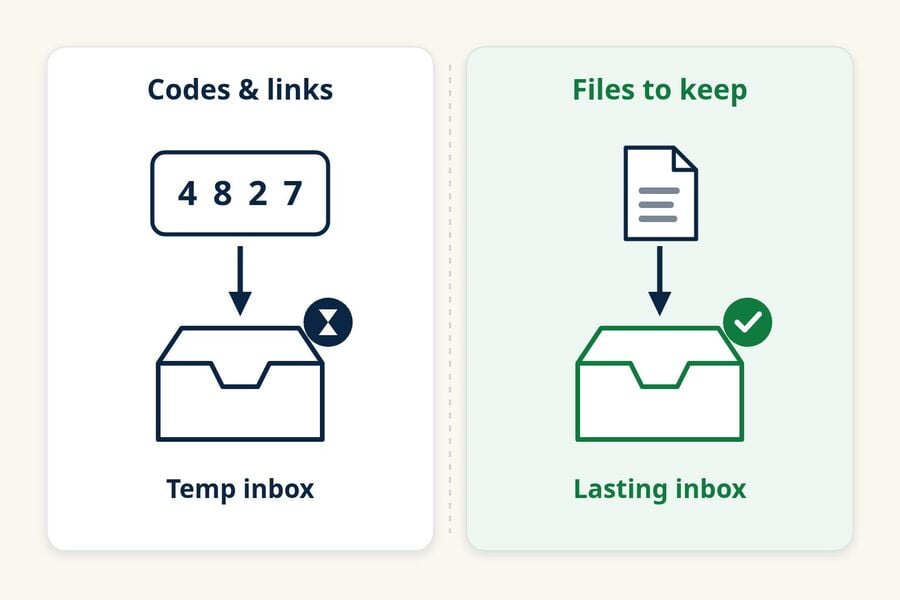
An email alias forwards mail to your real inbox without revealing your main address, and alias services such as AdGuard Mail say their aliases forward attachments. This comparison of temp mail vs email aliases helps you choose between them. If a temporary message holds text you need, copy it before it expires, because Tmailor has no export option; this article explains why a Tmailor inbox can't be exported. Tmailor also can't send files or replies, as covered in our article on whether Tmailor can send emails.
For quick signups that only need a code or a link, you can create a free temp mail and keep your main inbox out of it.
Frequently Asked Questions
Can temp mail receive a PDF?
Only on services that accept attachments. On Tmailor, the email that carries a PDF receipt or invoice arrives, but the PDF itself is removed. For documents you want to keep, use your regular inbox or an email alias.
Can I recover an attachment after a temp inbox expires?
Don't count on it. A provider may delete the message, its attachments, or the whole inbox with no way to restore them. If a service supports attachments and you need the file, move it to storage you control before the provider's stated expiry time.
What is the temp mail attachment size limit?
There is no universal limit, because each provider sets its own rules and many don't publish a per-file limit. Tmailor removes attached files regardless of size, and an unusually large message can be refused before it reaches the inbox.

Marcus Lee writes Tmailor's step-by-step guides — signing up to apps and platforms with temp mail, using the mobile app and Telegram bot, custom domains, reusing addresses, and getting the most out of disposable email day to day.