Tmailor
 What to Do If Your Email Address Was in a Data Breach
A breach alert does not, by itself, mean someone got into your email account. Here is how to confirm the alert, figure out what leaked with your address, and take only the steps that match it.
Quick access
What to do if your email was in a data breach
Your email address showing up in a data breach does not, by itself, mean someone got into your email account. First, verify the alert through the company's official website and find out what else was exposed. If a password leaked, change it everywhere you used it and turn on stronger sign-in protection. If card, bank, or Social Security details leaked, follow the matching bank, credit-bureau, or IdentityTheft.gov steps.
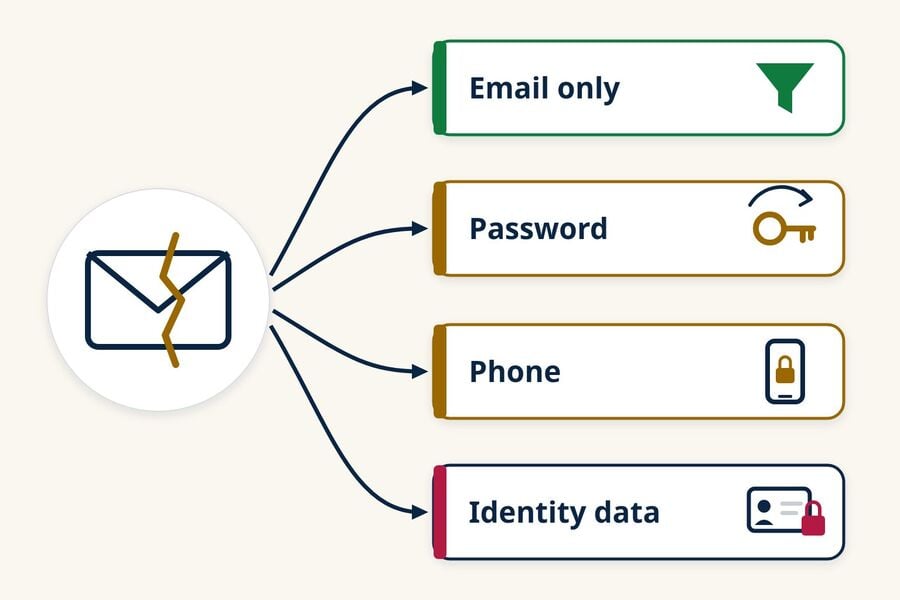
- Email address only: expect more spam and phishing aimed at you. It is not proof that anyone accessed your mailbox.
- Password exposed or flagged as compromised: change it on the affected account and on every other account where you used the same password.
- Signs of a takeover (unfamiliar logins, changed recovery details, forwarding rules you didn't create, messages you didn't send): use your email provider's hacked-account recovery process.
- Card, bank, Social Security, or ID details exposed: follow the specific steps for that data, not a generic email checklist.
How to know if your email was in a data breach
Confirm the notice through the affected company's official website or app, then check a reputable breach lookup and your saved-password alerts. No single lookup contains every breach, so also read the company's incident notice to learn which data was exposed with your address.
Verify the notice without using its links
Breach notices are a favorite disguise for phishing, so don't click links or call phone numbers in the message. The UK's National Cyber Security Centre (NCSC) advises contacting the organization through its official website or app instead. Type the address yourself or open the app you already use, then look for the company's incident page or support article.
Look for the company's description of the incident and the categories of data it says were affected, such as email addresses, passwords, phone numbers, or payment details. If the notice is vague, ask the company's support team through an official channel what data about you was involved.
Check Have I Been Pwned and your saved-password alerts
Have I Been Pwned is a free breach-lookup service run by security researcher Troy Hunt. You enter an email address, and it lists the known breaches in its dataset that include that address. Its FAQ says email searches are not logged, and it offers a free "Notify me" alert that is sent only to the address being monitored.
A clean result does not prove your address has never leaked. Have I Been Pwned can only report breaches it has indexed, and some data sets are handled differently or never surface publicly.
Your saved-password tools can also flag exposed passwords. Google Password Manager has a Password Checkup that reports saved passwords as exposed, reused, or weak. On iPhone, the Passwords app's Security section identifies weak or compromised passwords, including passwords detected in known data leaks. Some other password managers offer similar monitoring. Google recommends opening Password Checkup directly to verify an alert instead of following a link in the notification, which is a good habit for any security warning.
What leaked decides what you should do
Match your response to the data that was exposed. A leaked email address mostly raises your phishing risk, a leaked password calls for new passwords, and leaked financial or Social Security details call for bank and credit-bureau steps.
| Exposed with your email | Main risk | What to do |
|---|---|---|
| Email address only | More spam, phishing, and impersonation attempts | Report phishing, be wary of breach-themed messages, and keep your passwords unique |
| Password or password hash | Someone signing in to that account, or to other accounts where you reused it | Change the password everywhere you used it, and add a passkey or MFA |
| Phone number, home address, or date of birth | More personalized phishing and attempts to impersonate you to support teams or your carrier | Stay alert to calls and texts, and consider adding a PIN to your mobile carrier account |
| Card, bank, Social Security, or ID details | Fraudulent charges or new accounts opened in your name | Contact your bank or card issuer, consider a credit freeze, and follow IdentityTheft.gov |
A phone number, address, or birth date does not mean a SIM swap is coming. Those details make social engineering easier, though, and the Federal Trade Commission (FTC) notes that setting a PIN or password on your cellular account may help block unauthorized changes.
If the company says password hashes were exposed
Many companies store passwords as hashes rather than readable text. If a breach notice says password hashes were taken, follow the company's reset instructions and replace that password anywhere you reused it. Hashing may reduce the chance that a password can be recovered, but the protection depends on the hashing method, its configuration, and how strong your password was. Don't assume a hashed password is either immediately readable or permanently safe.
If the alert mentions a stealer log or malware
Some breach alerts come from "stealer logs," which are credentials collected by malware on an infected device rather than copied from a company's database. If an alert specifically says this, update and scan the affected device with trusted security software, then change sensitive passwords from a device you know is clean. An ordinary company breach does not, by itself, mean your phone or computer has malware.
If a password was exposed or reused
Act promptly when a password was exposed, because someone could try that email-and-password combination on the breached account or on other sites. Change it on the affected account, then replace it anywhere else you still use it.
Change it on the affected account
Sign in by typing the site's address yourself, not through a link in an email, and set a new password that is long and unique. IdentityTheft.gov also suggests changing your username if the site allows it. If you can't log in, contact the company and ask how to recover or close the account.
While you're signed in, check for changes you didn't make, especially on shopping or financial sites. Look at the shipping address, saved cards, linked accounts, and recent orders or transactions.
Replace it everywhere you reused it
Any other account that still uses the leaked password is at risk, even if that service was not breached. Change those passwords next, starting with accounts that can unlock other services or expose money or sensitive information:
- Your email accounts, since password reset links for almost everything else go there
- Banking, payment, and investment accounts
- Shopping sites that store a card
- Social media, cloud storage, and phone carrier accounts
If your main email password was not reused, not flagged, and shows no unusual activity, it does not need to come first. Change it when it shares a password with the breached site or appears in a breach alert of its own.
A password manager makes this practical by creating and storing a different password for each account. Some password managers can also flag saved passwords that are reused or known to be exposed. A password manager cannot stop a company from being breached, but unique passwords keep one leaked password from unlocking other accounts.
Switch to a passkey or add stronger sign-in protection
Where a site supports passkeys, consider using one instead of a password. Otherwise, use a unique password and turn on multi-factor authentication (MFA). For important accounts, an authenticator app or a security key is the stronger choice. Text-message codes still add protection, but the FTC warns they may not stop a SIM swap.
Before removing an old sign-in method, confirm that your recovery email address, recovery phone number, backup codes, and trusted devices are ones you control. Don't turn off text-message verification until another method is set up and working, or you could lock yourself out.
If there are signs someone accessed your email account
A breach involving another company does not necessarily mean anyone accessed your mailbox. The steps below apply only if you see signs of an email-account takeover, such as:
- You can't sign in, or your password or username changed without your action
- Login alerts from devices or places you don't recognize
- Recovery email addresses or phone numbers you didn't add
- Sent messages you didn't write, or friends reporting strange emails from you
Recover the account through your provider
Use your provider's official account recovery page, reached by typing its address or opening its app. Once you're back in, change the password, sign out of all other sessions and devices, and turn on MFA if it was off. The FTC also suggests updating your security software and running a scan.
Check devices, recovery details, forwarding rules, and connected apps
An intruder may change settings that preserve access or send them copies of your messages after you reset the password. Google's compromised-account guidance identifies the checks below; use the equivalent security and mail settings your own provider offers.
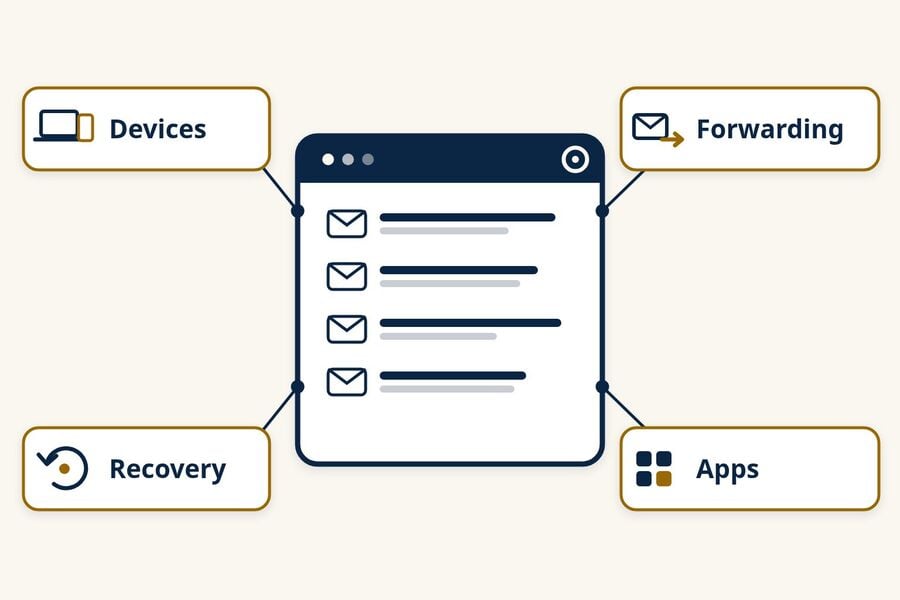
- Devices and sessions: review recent security activity and remove any device you don't recognize.
- Recovery details: correct any recovery email address, phone number, or account name you didn't set.
- Forwarding, filters, and delegates: delete forwarding rules, filters, and mail delegates you didn't create. Check your sent and deleted folders for messages someone else sent or read.
- Connected apps: remove third-party apps with access to your account that you don't recognize or no longer use.
Warn your contacts if messages went out
If someone sent mail from your account, tell your contacts so they don't click links or answer requests for money that appear to come from you.
If card, bank, or Social Security details were exposed
Financial and identity data call for steps that a new password can't cover. The steps in this section follow the FTC's IdentityTheft.gov guidance and are specific to the United States. Elsewhere, use your country's national cybercrime, data protection, and credit reporting authorities, along with your bank.
Credit or debit card
Contact your card issuer using the number on the back of the card or on your statement, not a number from a breach message. Ask to cancel the card and get a new one. Review recent transactions, report any you don't recognize, and update automatic payments with the new card number.
Bank or investment account
Tell your bank or brokerage what happened, using contact details you already know are real. IdentityTheft.gov suggests closing the account and opening a new one, but follow your institution's specific instructions. Then review transactions regularly and update any automatic payments.
Social Security number
An exposed Social Security number can be used to open credit, file taxes, or get a job in your name. These are the main protective steps:
- Freeze your credit with Equifax, Experian, and TransUnion. You have to contact each bureau separately. A freeze is free, lasts until you lift it, and does not affect your credit score. Anyone can place one at any time, but it matters most when your Social Security number or other identity details leak. It blocks new credit accounts; it does not stop misuse of existing cards or accounts.
- Consider a fraud alert. An initial alert is free, lasts one year, and needs only one call: the bureau you contact must tell the other two.
- Check your credit reports at AnnualCreditReport.com, where you can see reports from all three bureaus online every week for free.
- Accept free credit monitoring if the breached company offers it. Monitoring alerts you to activity on your reports; it does not block fraud the way a freeze can.
- Get an IRS Identity Protection PIN. It helps prevent someone else from using your Social Security number to file a fraudulent federal tax return, and a new IP PIN is generated each year.
- Review your work history in a my Social Security account to check whether someone used your number for a job.
If you find accounts, debts, or tax filings you don't recognize, report them at IdentityTheft.gov. The site builds a personal recovery plan based on what happened.
A child's information
If a child's Social Security number or other identity details were exposed, a parent or guardian can request a free credit freeze for the child from each bureau. Each bureau has its own process for minors, and it differs from an adult freeze.
Driver's license, passport, or health insurance information
If driver's license information was exposed, contact your state motor vehicle agency and ask whether it can flag the number or issue a replacement. If only your US passport number was exposed, the State Department has said it does not recommend reporting the passport lost or stolen; do that only if the physical passport book or card is actually lost or stolen, because a report cancels it. If Medicare, Medicaid, or health insurance information was exposed, contact the program or insurer through a number you know is real, and review your claims and Explanation of Benefits statements for care you didn't receive. If any of this information is misused, report it at IdentityTheft.gov.
Watch for breach-themed phishing
Scammers use real breaches as bait, and these messages can arrive long after a breach makes the news. Common themes include a "security update" that asks you to sign in, an offer of compensation, an urgent password reset, and a warning that your data is for sale on the dark web. The FTC's advice for that last one applies to all of them: don't click a link or use a phone number in the message. Go to the company's site or app directly.
Be wary of verification codes or password reset emails you didn't request. They can mean someone entered your address into a sign-in or recovery form, but they do not prove the person knows your password. Don't share the code or approve the request. Review the account's recent security activity, and change the password if it is reused, flagged as compromised, or accompanied by signs of unauthorized access.
Report phishing with your email app's report button so its filters improve. In the US, report scams and fraud at ReportFraud.ftc.gov, and use IdentityTheft.gov if someone has actually used your information.
If the account belongs to your work or school
If the breached address or account is managed by an employer or school, contact its IT or security team through an approved channel and follow its instructions before changing organization-managed settings. Share the notice only with the authorized team or reporting address, not with a broad group of coworkers or classmates.
Reduce exposure before the next breach
You can't prevent every company from being breached, but you can limit how much one breach reveals and how far it spreads. Unique passwords stored in a password manager keep one leak from unlocking other accounts. Microsoft also suggests keeping separate email addresses, such as one for friends and family and another for online accounts.
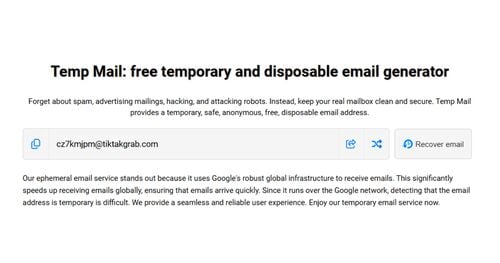
For low-risk signups like newsletters, coupons, and one-time downloads, a separate address keeps your main inbox off one more customer list. A persistent alias suits accounts you want to keep, while a temp mail address suits one-off signups; our comparison of temp mail vs email aliases explains the trade-offs.
Temp mail does not repair a breach that has already happened, and it isn't meant for banking, work, healthcare, account recovery, or any account you need to keep. Tmailor is receive-only, does not accept attachments, and deletes messages about 24 hours after they arrive. Some sites also block disposable addresses.
This guide covers what to do after a breach. If you want to reduce your exposure before the next one, read how temp mail limits what a data breach can expose.
Frequently Asked Questions
What does it mean if my email address was found in a data breach?
It means your email address appears in data associated with a reported breach or another exposed dataset. It does not, by itself, mean your email account was hacked. Review the lookup result or the company's notice to see what else was exposed, such as a password, phone number, or payment details.
Do I need to change my email password if only my address leaked?
Not necessarily. If your email password is unique, wasn't part of the breach, and your account shows no unusual activity, an address-only leak doesn't require a new password. Change it if you reused it anywhere, if a password tool flags it, or if you see signs of a takeover.
Can someone hack my email with just my email address?
An email address alone does not give anyone access to your account. The risks come from what attackers do with it: sending phishing messages, trying passwords leaked in other breaches, or impersonating you to support teams. A unique password plus MFA or a passkey makes those attempts much less likely to succeed.
Should I change or delete my email address after a breach?
Usually not. Your address is already known to many services and contacts, and replacing it is a lot of work for little security gain. Securing the account with a unique password and MFA protects it better. A new address can make sense if spam or phishing on the old one becomes unmanageable.
Is Have I Been Pwned safe to use?
Have I Been Pwned is a long-running, free service from security researcher Troy Hunt, and its FAQ says email searches are not logged. The breach search asks only for an email address, not a password. As with any site, type the address yourself rather than following a link in an unexpected message.
What if the breach or leaked password is several years old?
Old breach data can keep circulating, so replace the password anywhere it is still in use. If you changed it everywhere long ago, check what other data the breach included and whether any account shows misuse. An address-only leak mainly calls for phishing awareness, while exposed financial, Social Security, or identity data may still require the matching protective steps.
Jordan Mills has covered disposable email, OTP delivery and online privacy since 2018. He writes Tmailor's guides on staying anonymous, avoiding spam, and getting verification codes to land every time.