How Long Does Temp Mail Last? Message Retention and Address Lifespan Explained
How long does temp mail last? It depends on two separate clocks: how long messages stay readable and how long the address stays accessible. This guide explains both and compares the published policies of 10 services, checked on October 19, 2026.
Quick access
Key Takeaways
Temp mail runs on two separate clocks: one for messages and one for the address. Among the 10 services we checked, published policies range from a 10-minute session to months of storage, depending on the plan and how often you open the inbox. Tmailor deletes each message about 24 hours after it arrives. A saved Access Token can reopen the address later, but it cannot restore expired mail.
- Tmailor: the 24-hour clock starts when each email arrives, not when you create the address. The address can be reopened with its Access Token after the messages are gone.
- Other services: published windows run from 10 minutes (10 Minute Mail), 1 hour (Guerrilla Mail), and 1–2 hours (Temp-Mail.org free) to 7 days (Mail.tm), 8 days (YOPmail), and up to 6 months for an AdGuard Temp Mail inbox you keep opening.
- Public names are not private: on YOPmail, Mailinator's public inboxes, Guerrilla Mail, and Maildrop, anyone who knows the inbox name can read the mail.
- A retention window is not storage: copy any code or link you need before the clock runs out. Tmailor cannot recover a lost Access Token, so a guest address lasts only as long as you keep its token; an address saved to a free Tmailor account can be reopened from Created Emails.
How Long Does Temp Mail Last? Short Answer
Temp mail lasts as long as two clocks allow: the time a message stays in the inbox, and the time you can still open the address. On Tmailor, a message stays readable for about 24 hours from arrival, and the address can outlast that window if you saved its Access Token.
Which clock matters depends on the job. To read a verification code once, only the message window counts, and even a 10-minute inbox is usually enough if the code arrives quickly. If the site may email you again, for a login check or a password reset, the address model matters more. In that case, pick a service that lets you reopen the same address later.
Two Different Lifespans: Messages vs the Address
Message retention is how long a received email stays before the service deletes it. Address lifetime is whether you can get back to the same inbox later. The two run independently, which is why an inbox can be empty while the address still works.
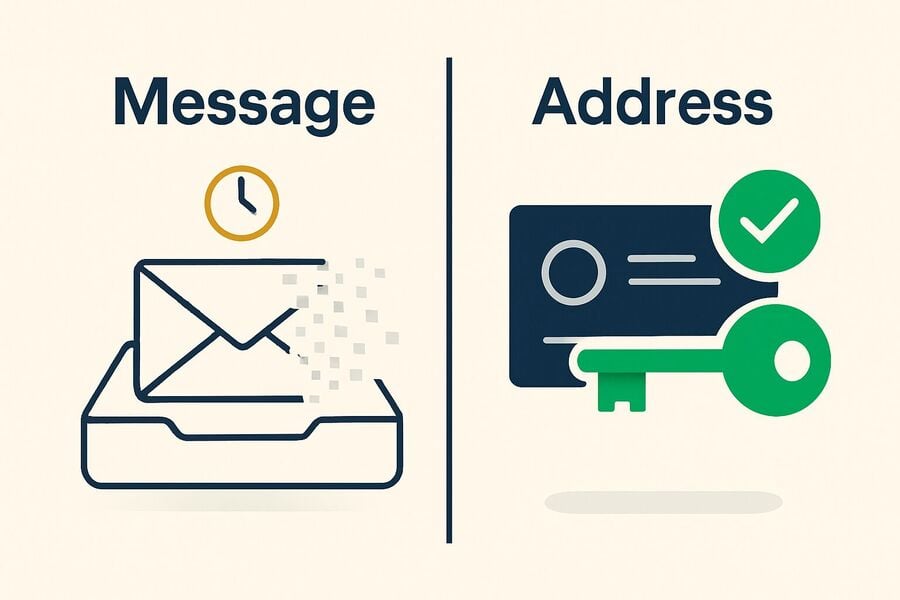
Services handle the address in three main ways:
- Session or browser addresses. 10 Minute Mail ties the address to a countdown, and an expired address cannot be recovered. AdGuard Temp Mail keeps the inbox in the same browser only.
- Public inbox names. YOPmail, Mailinator's public inboxes, Guerrilla Mail, and Maildrop let you type a name to open an inbox. Returning is easy, but anyone who knows or guesses the name can read the mail.
- Private reusable addresses. Tmailor reopens an address with an Access Token, while Mail.tm uses an address and password. Tmailor's token is a reuse key, not a password: anyone who obtains it can reopen the address, and a lost token cannot be recovered.
Retention protects privacy and saves storage, so services clear mail quickly. The address model provides continuity. For a deeper look at that trade-off, see the guide to reusable vs short-life inboxes.
How Temp Mail Auto-Delete Works
Temp mail auto-delete is a timer that the provider runs on its own systems: when the timer ends, the message or the inbox is removed without any action from you. What differs most between services is when that timer starts.
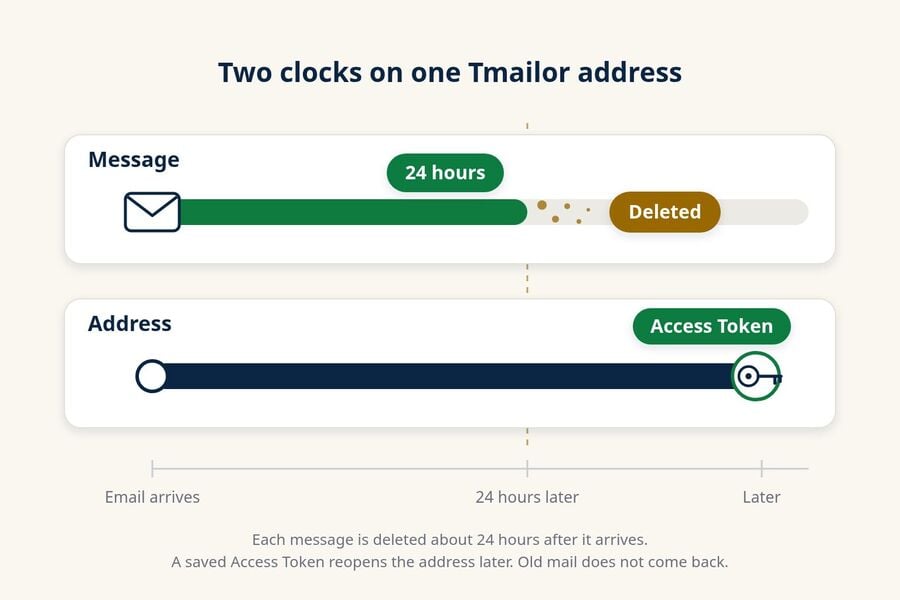
- From arrival: Tmailor deletes each email about 24 hours after it arrives. A message received in the evening is still there the next morning, while older mail in the same inbox may already be gone.
- From the session: 10 Minute Mail counts down from when the address is created, and resetting the timer gives you another 10 minutes.
- From inactivity: Maildrop erases an inbox that receives no new message for 24 hours (sooner under heavy load), and AdGuard Temp Mail deletes an inbox after 7 days without opening it.
- From browser access: EmailOnDeck says an address usually lasts most of the day, but closing the browser or clearing cookies may make you lose access sooner. Its FAQ separately says token recovery may remain possible until the address is wiped.
On Tmailor, you cannot pause or extend the 24-hour window, and opening the inbox does not reset the clock for older messages. Deleted messages cannot be restored. If you are new to disposable inboxes, the temp mail overview explains how the rest of the service works.
How Long Each Temp Mail Service Lasts (2026)
Temp mail lifespans range from a 10-minute session to months of storage, but providers measure different things: some count message age, others count session length, inbox inactivity, or paid storage. The table records each provider's stated rule and whether you can open the same address again.
How we checked: on October 19, 2026, we read each provider's own home page, FAQ, terms, or documentation and recorded its stated policy. We did not buy paid plans, send test emails, or time how long mail actually stayed. Tmailor runs this blog and is included in the table, with its limits listed like everyone else's: it is receive-only, it does not accept attachments, deleted messages cannot be recovered, and a lost Access Token cannot be restored.
| Service | How long mail stays (stated policy) | Can you return to the address? | Who can read the inbox |
|---|---|---|---|
| Tmailor | About 24 hours after each email arrives | Yes, with a saved Access Token or reuse link, or from Created Emails if the address is saved to your Tmailor account; a lost guest token cannot be recovered | Anyone who holds the Access Token |
| 10 Minute Mail | 10 minutes; "Give me 10 more minutes" resets the countdown | No; an expired address cannot be recovered | You, in that session |
| Temp-Mail.org | Free: up to 1–2 hours. Premium: 1 month | Valid until you delete it or the domain list changes; changing or recovering an address is Premium-only | Its terms say mail in the free system is viewable by any user |
| Guerrilla Mail | 1 hour | Guerrilla Mail says addresses never expire; you type the inbox name again | Anyone who knows the inbox ID |
| Mailinator | Public inboxes: several hours. Paid plans: kept until deleted or pushed out by storage limits | Any public inbox can be reopened by name | Public inboxes: anyone |
| Mail.tm | 7 days | The mailbox stays valid until you delete it; you sign in with the address and a password that cannot be reset | Whoever has the password |
| EmailOnDeck | No fixed time; "usually it lasts most of the day" | Token recovery is possible until the address is wiped, usually a couple of days after creation | You, according to its FAQ |
| YOPmail | 8 days | Inbox names are not deleted; anyone can type the name | Anyone; inboxes are not password-protected |
| AdGuard Temp Mail | Inbox deleted after 7 days without opening; up to 6 months with regular use | Only in the same browser; changing the address deletes the old inbox | You, in that browser |
| Maildrop | Inbox erased after 24 hours with no new mail (sooner under load); 10 messages at most | Anyone can type the name again | Anyone; every inbox is public |
Two patterns stand out. Paid plans stretch the window, as Temp-Mail.org does by going from 1–2 hours to a month. The services that make returning easiest are often the least private, because a typed name is the only key. The rows also measure different things (per-message age, inactivity, session length, or plan storage), so no single service lasts longest for every job.
For the two shortest windows side by side, see temp mail vs 10 minute mail. For features beyond lifespan, such as apps, APIs, and attachments, the comparison of 10 temp mail providers covers each service in depth.
How to Compare Temp Mail Retention Policies
To compare temp mail retention policies, look past the headline number and check five things. A "12-hour" or "24-hour" label tells you little until you know what the clock measures and when it starts.
- Which clock? Does the number apply to each message, to the whole inbox, or to the address?
- When does it start? From each email's arrival, from address creation, from your last visit, or from the last new message?
- Can you extend it? Some timers reset with a button or with activity; others, like Tmailor's 24-hour message window, cannot be extended.
- Who can read the inbox? Is access protected by a private token or password, tied to one browser, or open to anyone who types the name?
- How do you get back in? What happens if you lose that token or password, or clear your browser?
A long window on a public inbox can be riskier than a short one on a private inbox, because anyone who knows the name can read the mail for the whole period. Whatever the policy, no temp inbox is a safe home for bank, work, or account-recovery mail. The guide to whether temporary emails are safe covers those risks.
How to Keep a Temp Mail Address Longer
You usually cannot override a provider's deletion rules, although some services let activity or a reset button extend the current session or inbox. To keep access longer, choose a reusable address, act within the stated retention window, and never treat a temporary inbox as storage.
Use a reusable service and save the Access Token.
On Tmailor, open Access Details next to your address. The panel shows your Access Token and a reuse link, with a Download button, and reminds you to keep them private. Save one of them in a password manager or a private note, and you can reopen the same address later and receive new mail there.
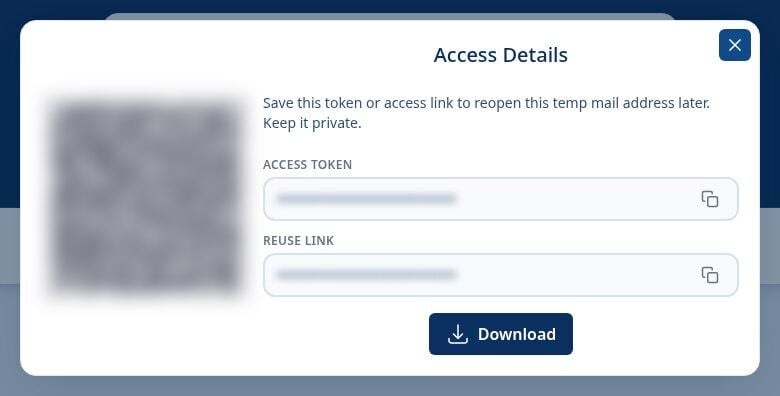
Two limits apply. The Access Token is a reuse key rather than a password, but anyone who obtains it can reopen the address, so keep it private and never show it in a screenshot. For a guest address, Tmailor cannot reissue a lost token, so if you lose it, you lose the address. If you create a free Tmailor account and stay signed in, every address you create is saved under Created Emails, so you can reopen it on any device without the token and issue a new token if the old one leaked. Reopening brings back the address, not expired messages: mail that arrived more than about 24 hours earlier has already been deleted.
Read and act before the window closes.
Retention is the deadline. Copy a verification code or open a confirmation link while the message is still there. Once the window passes, the message is gone, and the only option is to ask the site to send a new one.
Don't treat temp mail as storage.
A disposable inbox is not an archive, and Tmailor has no export or backup feature. If a message holds something you are allowed to keep, such as an order number, copy it out before it expires. The article on how to back up a temp inbox in time covers what you can and cannot save.
When a Short Lifespan Is a Problem (and What to Use Instead)
A short lifespan becomes a problem when a service emails you later: shipping updates, a delayed code, or a password reset you rely on. If the address was a pure throwaway, or the messages expired before you looked, that mail is lost.
Match the tool to how long the relationship will last. A reusable temp address with a saved Access Token suits an account you revisit occasionally and could afford to lose. A forwarding alias suits ongoing mail you want masked, and the comparison of temp mail vs email aliases explains when an alias is the better fit. A permanent mailbox you control suits anything important, such as banking, work, government services, or the recovery email for an account you need. Our overview of temp mail limits and risks lists where a disposable inbox should not be used.
Frequently Asked Questions
How long do temp mail messages stay?
Temp mail messages stay anywhere from minutes to days, and some paid or activity-based policies last longer. On Tmailor, each message is deleted about 24 hours after it arrives. Check whether a provider's number applies to each message, the whole inbox, a browser session, or storage under a paid plan.
How long does a temp email last?
A temp email has two lifespans: its messages and its address. On Tmailor, messages last about 24 hours from arrival, while the address can be reopened later with a saved Access Token. On session-based services such as 10 Minute Mail, the address itself expires when the timer runs out.
Do temp emails expire?
Usually, yes. Providers may delete each message after a set age, remove an inbox after inactivity, end it with a browser session, or apply a storage limit. On Tmailor, each email expires about 24 hours after it arrives, even though the address can be reopened with a saved Access Token.
Do temp mail addresses expire?
It depends on the address model. Session addresses expire with their timer, public inbox names can usually be typed in again for as long as the service supports them, and Tmailor reopens an address with its Access Token even after the messages are gone.
Can I get a temp email back after it expires?
You can reopen a reusable address if you saved its key: the Access Token on Tmailor, or the password on services like Mail.tm. Expired messages are gone for good, and Tmailor cannot recover a lost Access Token for a guest address, so save anything important before the retention window closes.
How long does a 10-minute mail last?
A 10 Minute Mail address starts with a 10-minute countdown, and the "Give me 10 more minutes" link resets it. When the session expires, the address and its messages are deleted and cannot be recovered, so copy any code as soon as it arrives.
Which temp mail lasts the longest?
No single service lasts longest, because the policies measure different things. AdGuard Temp Mail publishes a maximum inbox lifetime of 6 months with regular use, Temp-Mail.org Premium stores mail for 1 month, YOPmail keeps messages for 8 days in a public inbox, and Mail.tm stores messages for 7 days in a mailbox that stays valid until you delete it. Compare who can read the inbox and how you get back in, not just the headline number.
Does Temp Mail delete emails?
Yes. Temp mail providers remove messages or inboxes under their own retention rules. On Tmailor, each message is deleted about 24 hours after it arrives. The address can be reopened afterward with a saved Access Token, but deleted messages cannot be recovered.
Can I stop Temp Mail from deleting messages?
No, not on Tmailor: the 24-hour deletion is built in and cannot be turned off or extended. Copy anything you need within the window, and use a permanent inbox you control for mail you must keep.
When does the 24-hour timer start on Tmailor?
The 24-hour timer on Tmailor starts when each email arrives, not when you create the address or open the inbox. Every message has its own clock, so a new email can still be readable while an older one in the same inbox has already been deleted.
The Bottom Line
How long temp mail lasts depends on which clock and which policy you mean. The services checked here range from a 10-minute session to days or months of storage under particular plans or activity rules. On Tmailor, each message lasts about 24 hours from arrival, while a saved Access Token can reopen the address later. Choose the window that fits the task, and never use a disposable inbox as storage. When you need one now, create a free temp mail in seconds.

Marcus Lee writes Tmailor's step-by-step guides — signing up to apps and platforms with temp mail, using the mobile app and Telegram bot, custom domains, reusing addresses, and getting the most out of disposable email day to day.