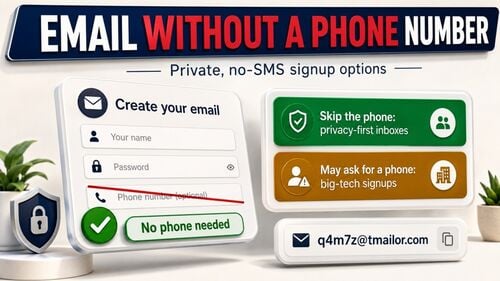
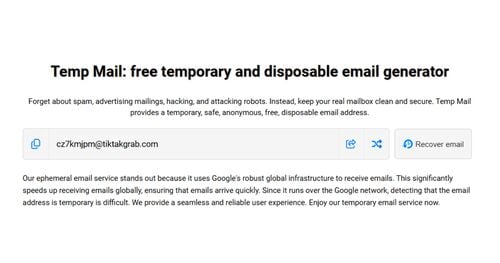
What Is AdGuard Temporary Email? How to Use AdGuard Temp Mail
AdGuard — best known for its ad blocker — also runs a free temporary email service. You do not need an AdGuard account, an app, or a subscription: open the Temp Mail page and a disposable address is already waiting. It receives mail in the browser, cannot send or reply, and does not accept attachments. AdGuard deletes an inbox after 7 days without a visit, after 6 months at the very most, or the instant you generate a new address. This guide covers AdGuard Temp Mail from the first click to daily use: how to get an address, what you can and cannot do with it, how long your mail survives, and where a standalone service like Tmailor differs on address reuse, domains, and platforms.
Quick access
Overview of temporary email services
A temporary email service hands you a short-lived inbox to use instead of your real address: paste it into a sign-up form, catch the confirmation link or the one-time code, and walk away. Nothing is registered in your name, and whatever the site sends afterwards lands somewhere you will never look again.
The category is broader than the marketing suggests, and the details differ a lot. Some inboxes last ten minutes; AdGuard keeps one alive for up to six months. Some let you reopen an address later; most do not. Nearly all of them are receive-only, and several strip attachments. Those four details — how long mail is kept, whether you can get the address back, what happens to files, and which domains are used — are what actually separate one service from the next.
Temporary email services help users avoid risks such as:
- Spam: The newsletter, the promo blast, and the "we've updated our terms" email all go to an address you have already abandoned, instead of your primary inbox.
- Tracking: A throwaway address is harder to join up with the rest of your online footprint, because it is not the address attached to your bank, your job, or your social accounts.
- Exposure in a breach: If the site is hacked or sells its list on, the address sitting in that dump is one you never used anywhere else.
That trade-off is worth understanding before you pick a provider. A free temp mail inbox is excellent for low-stakes sign-ups and a bad idea for anything you need to keep — password resets, invoices, or an account you will still care about next year.
What is AdGuard Temporary Email?
AdGuard Temporary Email (AdGuard Temp Mail) is AdGuard's free, browser-based disposable inbox. Open the page and an address has already been generated for you — no account, no password, nothing to install. It exists to absorb sign-up confirmations, download gates, and login codes so your real mailbox never sees them. Everything about AdGuard below comes from AdGuard's official Temp Mail page and its FAQ, checked in July 2026.
Some of the highlights of AdGuard Temporary Email include:
- No account, and no captcha: AdGuard offers "a free disposable email address instantly — no account needed," and the address appears the moment the page loads.
- Receive-only: AdGuard's FAQ is blunt about it — "a disposable email address is only used to receive emails." There is no send button, and no reply.
- No attachments: AdGuard states that its Temp Mail inbox "doesn't accept attachments." If a sender attaches a PDF or an image file, you will not get the file.
- Three ways an inbox dies: AdGuard deletes the inbox and its mail after 7 days if you do not open or refresh the page, after 6 months at most, even if you use it constantly, and immediately when you generate a new address.
- The address follows your cookies: AdGuard keeps your current address in a cookie so it is still there on your next visit — which is why AdGuard also warns you not to delete its cookies if you plan to use the address more than once.
- Senders do not see your IP: AdGuard says Temp Mail hides your IP address from whoever emails you, which blunts the tracking pixels buried in marketing mail.
What AdGuard does not offer is just as worth knowing. You cannot pick your domain — "it's not possible to choose a temporary email domain," and Gmail is not on the list — AdGuard does not publish how many domains it has, and nothing that has been deleted comes back. AdGuard's own advice is the fairest summary of the product: do not use Temp Mail for important accounts or data. For the running feature-by-feature view, see our AdGuard and Tmailor comparison page.
Tmailor.com Service – A More Powerful Temporary Email Solution
Disclosure: Tmailor publishes this blog. So here is the honest version, limits included. Tmailor is a free, no-registration temp mail service on the web, Android, iOS, and a Telegram bot. It is receive-only, it strips every inbound attachment, and messages stay visible for about 24 hours from arrival before they are deleted. What it adds over a session-bound inbox is a way back in: an Access Token.
Outstanding features of Tmailor:
- An Access Token, not a session: Save the Access Token and you can reopen the same address later, from another device. It is a recovery key, not a password — it does not lock anyone else out, and if you lose it, nobody can issue you a new one. That is the real difference from a cookie: a cookie dies with the browser profile, and a token you saved does not. Check how address reuse works before you rely on it.
- No registration: Open the site and an address is already live. No email, no phone number, no password.
- A large domain pool, deliberately unpublished: Random addresses are drawn from a rotating pool of 500+ domains, and the live list is not published — publishing it would simply hand a ready-made blocklist to the vendors who sell anti-disposable filtering. The custom-name tab, where you choose the part before the @, exposes only a few domains.
- Mail on more than one screen: The same inbox is reachable from the web, the Android and iOS apps, and the Telegram bot.
- Remote images are proxied: Tracking pixels in marketing mail load through a proxy instead of straight from the sender, so they do not see your IP.
And the limits, stated as plainly as the strengths: Tmailor cannot send a message or reply to one, cannot hand you an attachment that someone emailed you, and does not keep your mail past roughly 24 hours. There is also no spam folder and no filtering — every message that arrives is shown, which cuts both ways. They are all written down in one place: what temp mail cannot do.
How to use AdGuard Temp Mail
There is nothing to activate and nothing to install. Open AdGuard's Temp Mail page, copy the address it has already generated, paste it into the form you are filling in, and watch the same page for the message. The whole flow lives in one browser tab.
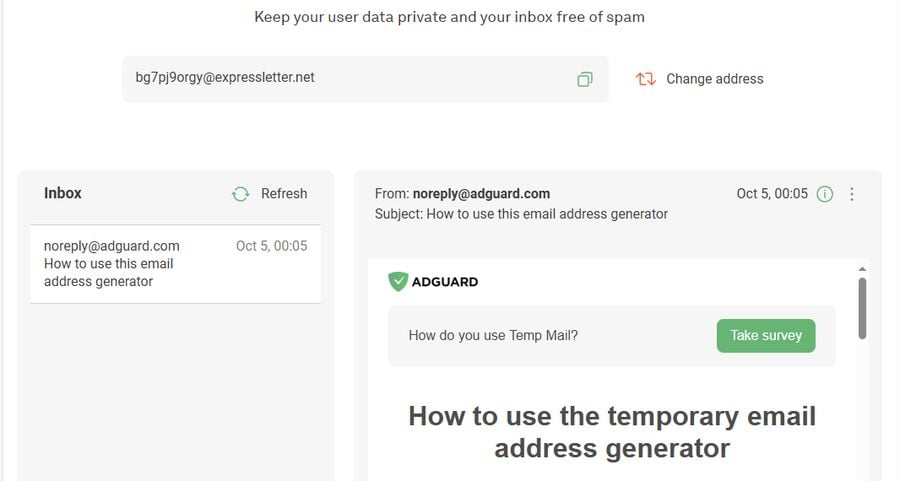
- Open AdGuard Temp Mail: Go to the Temp Mail page on AdGuard's site. The address is generated automatically; there is no captcha and no sign-up step.
- Copy the address: Use the copy button beside it. If you dislike the address, "Change address" gives you another — but AdGuard permanently deletes the previous inbox and its mail the moment it does.
- Use it on the form: Paste it into a registration, download, or verification field. Do not use it for an account you actually care about; AdGuard says exactly the same thing in its own FAQ.
- Read the mail in the same tab: Incoming messages appear in the inbox on the page. Keep the cookie AdGuard sets if you want that address to still be there tomorrow.
Can AdGuard Temp Mail receive attachments or replies?
No, on both counts. AdGuard states that its Temp Mail inbox does not accept attachments, and that a disposable address is only used to receive email. Tmailor behaves the same way: attachments are stripped on arrival, and there is no way to reply. This is not true of every disposable service — some do display attachments — but if the file is the thing you actually need, use a real mailbox. In that case, AdGuard points people to its separate AdGuard Mail app, whose forwarding aliases can pass attachments through to a personal inbox.
Can you reopen the same AdGuard inbox later?
Sometimes — in the same browser, on the same device. AdGuard stores your current address in a cookie so that it is still waiting on your next visit, and its FAQ warns you not to delete AdGuard's cookies if you want the address more than once. What you do not get is a portable key. Clear your cookies, switch to your phone, click "Change address," or leave the inbox untouched for seven days, and the address and its mail are gone: AdGuard is explicit that deleted mailboxes cannot be recovered.
What if a site rejects a disposable email address?
First work out which kind of "no" you are looking at. If the site has that one domain on a blocklist, it is an ordinary delivery problem — AdGuard acknowledges that temp mail domains sometimes get blocked, and asks users to report it when they do. If the service's terms say plainly that disposable addresses are not allowed, that is a rule and not a glitch, and the answer is to sign up with your real address. Cycling through fresh temp domains until one slips past a policy you have already read is not troubleshooting. We cover which services filter, and why, in why websites block temp mail domains.
Instructions for using temp mail addresses provided by tmailor.com
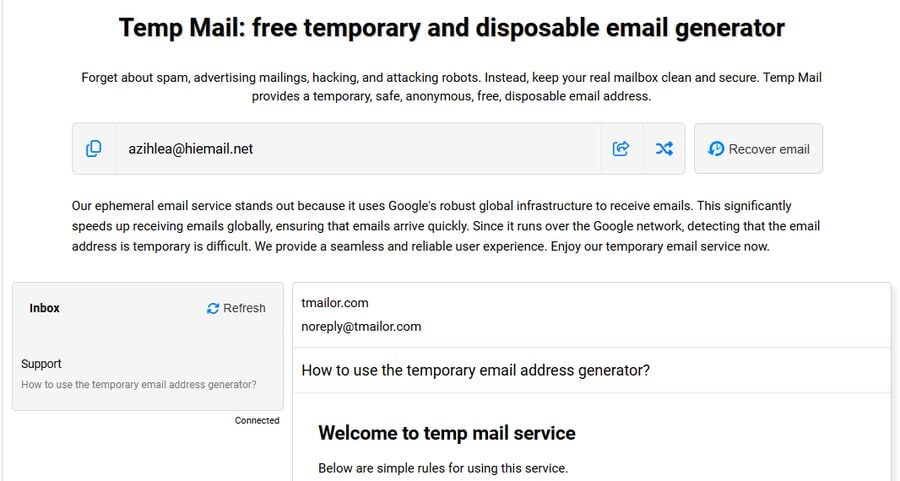
The flow has the same shape as AdGuard's, with one extra step that matters: save the token before you close the tab.
- Open the site: Go to the free temp mail generator. An address is assigned as soon as the page loads.
- Copy the address: Use it on the sign-up, download, or verification form you came here for.
- Watch the inbox on the same page: Mail arrives over Google MX servers and appears in the list. There is no spam folder, so nothing is quietly filed away — what arrives is what you see.
- Save the Access Token: This is the step people skip and later regret. The token is what reopens this exact address tomorrow, or on your phone. Nobody can reissue it if you lose it.
Comparison table between AdGuard and Tmailor
Every AdGuard row below comes from AdGuard's official Temp Mail page and FAQ; every Tmailor row is our own product behavior. Where neither company documents a feature, it is not in the table.
| Feature | AdGuard Temp Mail | Temp Mail (Tmailor) |
|---|---|---|
Price and sign-up | Free, no account | Free, no account |
Send or reply | No – receive-only | No – receive-only |
Attachments | Not accepted | Not accepted – stripped on arrival |
How long mail is kept | Inbox deleted after 7 days without a visit, after 6 months at most, or immediately when you generate a new address | Messages stay visible for about 24 hours from arrival |
Getting the same address back | Only through the cookie, in the same browser; a replaced or expired inbox cannot be recovered | With a saved Access Token, from any device; a lost token cannot be reissued |
Choosing the domain | Not possible; AdGuard updates its domain list but publishes no count | Random addresses draw from an unpublished pool of 500+ domains; the custom-name tab exposes a few |
Where it runs | Web browser (the separate AdGuard Mail app is a different product) | Web, Android, iOS, and a Telegram bot |
Tracking pixels in mail | AdGuard says Temp Mail hides your IP address from senders | Remote images load through a proxy, so pixels do not see your IP |
Key takeaways:
- AdGuard Temp Mail is the better fit for a one-off: you need an address for the next five minutes, you are already on AdGuard's site, and you will never want that inbox again.
- Tmailor.com is the better fit when "never again" turns out to be wrong — when the account you signed up for sends a second code next month and you want the same inbox back, from your phone.
- Neither will get you an attachment, a reply, or a mailbox you can trust with something that matters. Both are free, and both are receive-only.
Domain rotation helps when a site has blocked one specific temp domain, but no service can promise that every form will take a disposable address. Acceptance varies from site to site and can change without warning, so if a service's terms rule out disposable email, use your real one.
Why choose tmailor.com instead of AdGuard Temp Mail?
One thing genuinely separates them, and it is worth being precise about what it is: what happens after you close the tab. AdGuard ties your address to a cookie. Tmailor ties it to an Access Token that you keep. Almost everything else — free, instant, no account, receive-only, no attachments — is the same on both sides.
- You can come back, and from anywhere: Save the Access Token and the same address reopens on any device. AdGuard's cookie only works in the browser that set it, and once an AdGuard inbox is replaced or expires, AdGuard says it cannot be restored.
- It is not only a website: Tmailor runs on the web, on Android and iOS, and as a Telegram bot, so the code you are waiting for can land on the device already in your hand.
- A different approach to domains: Random Tmailor addresses come from a rotating pool of 500+ unpublished domains, and the custom-name tab lets you pick the name before the @ from a small set. That is a convenience difference, not a guarantee — some sites still filter disposable domains, and no provider can honestly claim otherwise.
The reverse is also true, and worth saying on our own blog: if you want one disposable inbox for the next ten minutes and never want to think about it again, AdGuard Temp Mail does that job perfectly well — and it will hold the mail for days, where Tmailor clears it after roughly 24 hours. Pick the service whose failure mode you can live with.
Conclude
AdGuard Temp Mail is a clean, free, no-account inbox from a company with a long privacy record, and for a single throwaway sign-up it is entirely sufficient. Its limits are the ones AdGuard itself publishes: no sending, no attachments, no choice of domain, no recovery once an inbox is replaced or expires, and an explicit warning not to use it for anything important.
Tmailor answers one of those limits — the Access Token brings the same address back on any device — while keeping the same receive-only, no-attachment shape and a shorter, roughly 24-hour window on messages. If that is the trade you want, create a temp mail address and save the token before you close the tab.

Elena Petrova compares temp mail and burner email services head to head. She reviews providers, weighs Tmailor against alternatives like 10 Minute Mail, Guerrilla Mail and Apple Hide My Email, and explains which option fits which use case.