Why Some Websites Block Temp Mail Domains — and What You Can Do
Some sites intentionally reject disposable email. This guide explains how that detection works, why sites do it, and the practical fixes when your temp mail address is blocked. Websites block temp mail to fight spam and fraud — the filter rarely targets privacy-minded users directly.
Quick access
Key Takeaways
Websites block temp mail to fight spam and fraud — not always, and not everywhere.
- Some websites block temp mail domains to reduce spam signups, fake accounts, and unreliable contact data — it is a deliberate filter, not a glitch.
- Detection works through disposable email blocklists, MX record checks, and signup form validators that flag known temp mail domains.
- If the rejection is one shared domain sitting on a blocklist, a different domain may work — a large rotating pool means one listed domain does not tell you that every domain is listed.
- A private custom domain is not on shared disposable-email lists in the first place, because the domain is yours — but it does not override a site's policy against disposable email, and the shared list is not the only check a form can run.
- Some blocks are intentional and should be respected — banks, government portals, and KYC flows reject disposable email by design, so use your real email there.
The Short Answer on Why Sites Block Temp Mail
Sites block disposable email mainly to keep spam, fraud, and junk data out.
Websites block temp mail domains primarily to prevent spam signups, fake accounts, and unreliable contact data. Disposable addresses cannot be reached later, so marketing, fraud-prevention, and support teams treat them as low-value or risky. Sites enforce this by checking incoming addresses against published blocklists of known disposable email domains when you submit a form.
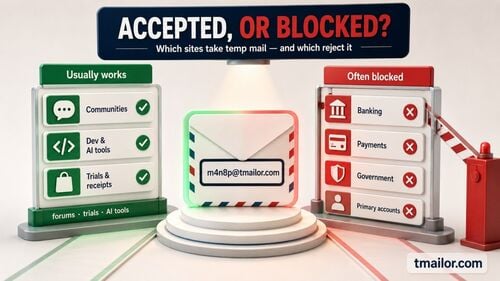
Blocking is selective, not universal. Plenty of services happily accept a disposable address for a newsletter or a low-stakes trial, while a smaller set — usually those most worried about fraud — reject it outright. If the term itself is new to you, this primer on how temporary email works covers the basics before we get into detection and fixes.
How Sites Detect Disposable Email
Three detection methods catch most temp mail addresses at signup.
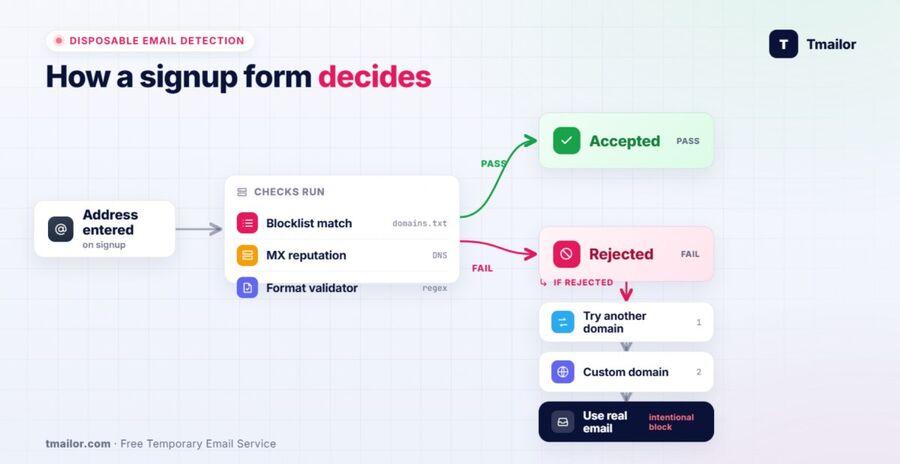
Sites detect disposable email using three methods: matching the domain against maintained blocklists of known temp mail providers, inspecting MX records and mail server reputation, and running signup form validators that flag suspicious patterns. The first method — domain blocklists — accounts for most of the rejections a temp mail user actually encounters.
Domain blocklists
Domain blocklists are the most common detection layer. Open-source projects publish lists naming thousands of disposable email domains, and deliverability vendors expose the same data as a lookup API — Kickbox, for example, runs an open endpoint that answers whether a given domain is disposable. A signup form checks your address's domain against one of those lists and rejects any match, which is why a single shared domain gets filtered quickly across many sites.
MX and mail-server checks
MX and mail-server checks add a second layer. Some validators inspect a domain's MX records or its sending and receiving reputation rather than relying on a static list. Weak, brand-new, or shared infrastructure raises flags. Tmailor routes inbound mail through Google-MX infrastructure, which improves reliability for receiving codes even when a form scrutinizes mail-server quality.
Pattern and behavior validators
Pattern and behavior validators are the third layer. These flag throwaway naming patterns, addresses created seconds before submission, or traffic arriving from a known web interface. They are less common than blocklists but harder to predict, because they react to how an address looks and behaves rather than to a fixed list.
The Real Reasons Behind the Block
Spam control, fraud prevention, and data quality drive nearly every block.
Websites block temp mail for three practical reasons: to cut spam and throwaway signups, to prevent fraud and abuse such as trial farming or fake reviews, and to keep contact data usable for support and marketing. Those three motives are about abuse and data quality rather than about privacy tools as such — but a filter reads the domain, not the reason you chose it, so privacy-conscious users get caught in nets built for bad actors.
Spam reduction is the most common motive. An address that disappears in 24 hours cannot be onboarded, re-engaged, or supported, so sites that depend on email relationships filter it early. Fraud prevention is the second motive: services offering free trials, referral bonuses, or user-generated content have a real incentive to stop one person from spinning up many accounts, and disposable domains are an easy signal to act on. Data quality is the third: a list full of unreachable addresses hurts deliverability metrics and inflates the number of fake users.
Understanding the motive matters because it shapes the right response. A privacy tool getting caught in an anti-abuse net is a different situation from a site that has decided, for legal reasons, never to accept disposable email. For the specific question of whether Tmailor addresses get blocked: a large rotating pool means one listed domain does not tell you that every domain is listed — but no provider clears every filter, and none can change a site's decision to reject disposable email on principle.
What to Do When Your Temp Mail Is Blocked
Switch domains first, use a custom domain for control, and know when to stop.
When a temp mail address is blocked, the first job is to work out which kind of block you hit. If one shared domain is sitting on a blocklist, generating a new address on a different domain is ordinary troubleshooting. A private custom domain removes the shared-list problem entirely, because the domain is yours rather than a publicly listed disposable one. And if the site blocks all disposable email on purpose, the right move is to use your real address rather than work around a deliberate barrier.
- Try a different domain. Random address generation on Tmailor draws from a large, rotating pool of 500+ domains, and only a subset of that pool is issuing addresses at any given moment. The live list is deliberately unpublished — publishing it would simply hand anti-disposable vendors their next blocklist update. One flagged domain therefore does not tell you that every domain is flagged. If the rejection looks tied to a single shared domain on a list, generate a fresh address and retry the signup — rotating temp mail domains is a reasonable troubleshooting step for that case, and only that case.
- Use a private custom domain. For signups you repeat or accounts you want to keep, a private custom domain sidesteps shared blocklists, because the domain is yours rather than a publicly listed disposable one. It is not a guarantee of acceptance: a form can check more than the shared-domain list, and a no-disposable-email policy applies whatever domain you use.
- Check timing, not just the domain. Sometimes the address is not blocked at all — the verification code is merely delayed by greylisting and arrives minutes later. Before assuming a block, rule out a slow code; this guide to fixing OTP delivery failures helps separate a true block from a delay.
- Respect intentional blocks. Banks, government services, healthcare portals, and KYC identity checks reject disposable email by design. When a site blocks temp mail for these reasons, use your real or a permanent private email instead of trying to get around the barrier.
When a Block Can't Be Worked Around
Some rejections are final, and temp mail is the wrong tool for them.
Some blocks cannot and should not be worked around. Regulated services — banks, government portals, healthcare, and KYC identity checks — deliberately reject disposable email, and no domain switch changes that. Temp mail is built for low-stakes, privacy-conscious signups, not for accounts tied to your legal identity, your money, or long-term recovery.
Trying to force a disposable address onto a service that has decided against it usually wastes time and can leave you locked out of recovery later. Recognizing the difference between a casual blocklist filter and a deliberate policy saves effort: the first may justify trying another randomly generated domain, while the second is a signal to use a different email entirely. The full picture of what temp mail can't do safely is worth reading before you rely on a disposable address for anything important.
Frequently Asked Questions
Why is my temp mail address blocked on some sites?
Your temp mail address is blocked because the site checks its domain against a blocklist of known disposable email providers and rejects a match. Sites do this to cut spam, fake accounts, and unreachable contacts. The block is selective — many other sites accept the same address. If the rejection is a single shared domain sitting on a list, another domain may work. If the site refuses disposable email as a matter of policy, as banks and KYC flows do, use your real address rather than hunting for a domain that has not been listed yet.
How do websites know I'm using a temp mail?
Websites identify temp mail through three signals: domain blocklists naming known disposable providers, MX record checks and mail server reputation checks, and signup form validators that flag throwaway patterns. Domain blocklists catch the most addresses, because they only require a fast lookup against a published list of disposable email domains at the moment you submit the form.
Can I get past a temp mail block?
It depends on why you were rejected. If a single shared domain is on a blocklist, generating a new address on a different domain is ordinary troubleshooting — a large rotating pool means one listed domain does not tell you that every domain is listed. A private custom domain removes the shared-list problem, because the domain is yours. If the site blocks disposable email deliberately — as banks and KYC flows do — use your real email instead of working around a block placed there on purpose.
Do all websites block disposable email?
No. Most websites accept disposable email for newsletters, downloads, and low-stakes trials. Blocking is concentrated among services most exposed to fraud or most dependent on long-term contact, such as financial platforms and sites with free trials. Because the practice is selective, an address that one site rejects may still be accepted by another.
Does using more domains help with a blocked temp mail?
Sometimes — it depends on why you were rejected. More domains help only when the problem is a shared-domain blocklist, because one listed domain does not tell you that every domain is listed. Tmailor's random generator draws from a large, rotating pool of 500+ domains, only a subset of which is issuing addresses at any given moment, and the live list is deliberately unpublished so that it cannot simply be copied into a blocklist; the custom-name tab, by contrast, exposes only a few domains. If the site rejects disposable email as a matter of policy, no number of domains changes that, and the right move is your real address.
Why do banks and government sites block temp mail?
Banks and government sites block temp mail because they must tie an account to a verifiable, reachable identity. Disposable addresses cannot support fraud checks, KYC verification, or long-term recovery, so these services reject them as a policy matter. For anything involving your money or legal identity, use your real or a permanent private email rather than a temporary one.
Is it against the rules to use temp mail when a site blocks it?
It depends on the site's terms of service. Many sites prefer reachable contacts and do not outright forbid disposable email, so switching domains is reasonable. Others — especially regulated services — block it deliberately, and using your real email is the appropriate response. Check the platform's terms and respect blocks placed for fraud or identity reasons.
The Bottom Line
Websites block temp mail domains to keep spam, fraud, and dead-end data out — rarely to target privacy-minded users specifically. When an address is rejected, work out first whether one shared domain was listed or the site refuses disposable email outright. Another domain or a private custom domain speaks to the first case; deliberate blocks on banks and KYC flows should be met with your real email. Understanding why the block happened is what tells you which of those two paths to take. For the low-stakes signups it was built for, temp mail remains a strong, private fit.

Marcus Lee writes Tmailor's step-by-step guides — signing up to apps and platforms with temp mail, using the mobile app and Telegram bot, custom domains, reusing addresses, and getting the most out of disposable email day to day.