Temp-Mail.org apžvalga (2025 m.): kaip jis iš tikrųjų lyginamas su "Tmailor" kasdieniam naudojimui
Greita prieiga
TL; DR / Pagrindiniai taksieji
Pagrindiniai faktai ir kontekstas
Ką Temp-Mail.org iš tikrųjų siūlo
Į ką "Tmailor" sutelkia dėmesį (ir kodėl tai svarbu)
Side-by-Side: Temp-Mail.org vs tmailor
Realaus pasaulio scenarijai (ką kada naudoti)
Ekspertų pastabos ir įspėjamosios vėliavėlės
Tendencijos ir ką žiūrėti toliau
DUK
TL; DR / Pagrindiniai taksieji
- "Temp-Mail.org" yra brandi vienkartinių gautųjų platforma su žiniatinkliu, "iOS" / "Android" programomis, naršyklės plėtiniais, viešąja API ir "Premium" pakopa (įskaitant pasirinktinį domeną / BYOD). Jis yra tik priimamas; pranešimai automatiškai ištrinami po tam tikro laikotarpio.
- "Android" programa pažymi, kad gali gauti priedų. Tai naudinga bandomiesiems srautams, tačiau atidarant nežinomus failus yra akivaizdžių saugos įspėjimų.
- "Tmailor" pagal numatytuosius nustatymus teikia pirmenybę greičiui, patikimumui ir saugumui: ~24 valandų saugojimas, tik priėmimas, priedai išjungti, adreso pakartotinis naudojimas naudojant prieigos raktą ir 500+ "Google MX" domenų infrastruktūra, kad būtų pagerintas priėmimas.
- Apatinė eilutė: pasirinkite Temp-Mail.org, jei jums reikia plėtinių + oficiali API + Premium BYOD šiandien; Pasirinkite "Tmailor", jei norite žiniatinklio be skelbimų, greito pristatymo, integruoto adreso pakartotinio naudojimo ir griežtesnės saugos pozicijos (be priedų) kasdieniams OTP ir registracijoms.
Pagrindiniai faktai ir kontekstas
Vienkartinis el. paštas išsprendžia paprastą problemą: jums reikia pašto dėžutės dabar, kad gautumėte kodą ar patvirtinimą, bet nenorite perduoti savo tikrojo adreso (ir dažnai sekančio šlamšto). Temp-Mail.org yra vienas ilgiausiai veikiančių paslaugų teikėjų, siūlantis ekosistemą už svetainės ribų – mobiliąsias programėles, naršyklės plėtinius ir viešąją API kokybės užtikrinimui ir automatizavimui.
"Tmailor" sprendžia tą pačią problemą, tačiau optimizuoja nuoseklumą ir pakartotinį patikrinimą realiame gyvenime. El. laiškai išlieka maždaug 24 valandas (ne savaites), todėl paslauga sutelkiama į trumpalaikes užduotis. Svarbiausia, kad vėliau galite iš naujo atidaryti tą pačią pašto dėžutę naudodami prieigos raktą, kuris svarbus, kai paslauga prašo dar kartą patvirtinti arba iš naujo nustatyti slaptažodį praėjus kelioms savaitėms po registracijos.
Jei esate naujokas šioje koncepcijoje ir norite aiškaus pradmens, pradėkite nuo paslaugos paaiškinimo čia: Laikinas paštas 2025 m. – greita, nemokama ir privati vienkartinė el. pašto paslauga.
Ką Temp-Mail.org iš tikrųjų siūlo
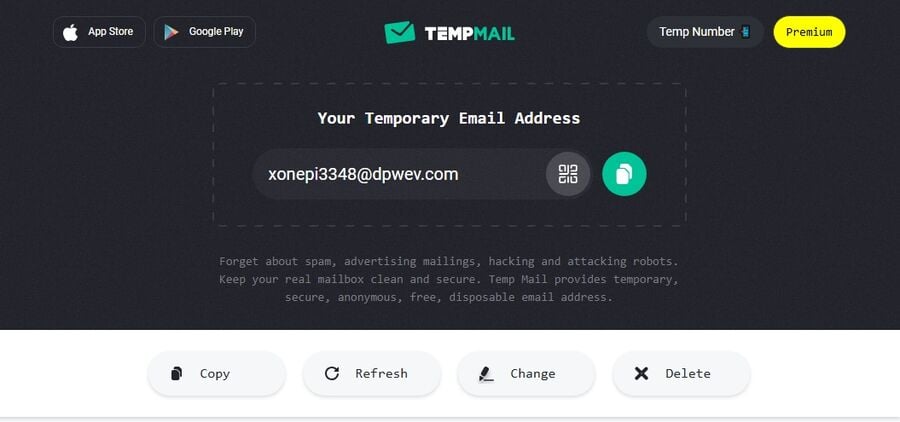
Platformos aprėptis. Temp-Mail.org veikia žiniatinklyje su "Android" / "iOS" programomis ir oficialiais "Chrome" ir "Firefox" plėtiniais. Inžinierių komandoms ir augimo rinkodaros specialistams oficiali API įtraukiama į "Selenium" / "Cypress" / "Playwright" srautus automatizuotam el. pašto testavimui. Tai pilna krūva aplink vienkartinį paštą.
Privatumo pozicija. "Temp-Mail" viešuose pareiškimuose pabrėžiama, kad IP adresai nėra saugomi, o el. paštas / duomenys visam laikui ištrinami pasibaigus galiojimo laikui. Pagrindiniam vartotojų įrankiui tai yra teisinga laikysena ir atitinka laikiną paslaugos pobūdį.
"Premium" ir "BYOD". Jei jums reikia daugiau kontrolės, "Premium" atrakina tokias funkcijas kaip domeno prijungimas (atsineškite savo domeną), kelių adresų paleidimas vienu metu ir kitos "patyrusio vartotojo" privilegijos. Komandos, vykdančios bandomąją aplinką arba prekės ženklui jautrias kampanijas, įvertins galimybę atsisakyti perpildytų viešųjų domenų.
10 minučių variantas. "Temp-Mail" taip pat siunčia 10 minučių pašto dėžutę, skirtą "naudoti ir deginti" situacijoms. Tai patogu, tačiau trumpas saugiklis gali būti atsakingas, jei svetainė riboja pristatymą ir jūsų OTP atvyksta minutę per vėlai.
Priedai. "Android" įraše minima nuotraukų ar kitų priedų gavimas. Tai patogu, jei jūsų darbo eigoms reikia peržiūrėti vaizdus arba PDF kvitus bandomuosiuose gautuosiuose. Vis dėlto nežinomų failų atidarymas yra rizikos vektorius. Dėl šios priežasties daugelis operacijų komandų nori išjungti priedus išmestuose pašto dėžutėse.
Į ką "Tmailor" sutelkia dėmesį (ir kodėl tai svarbu)
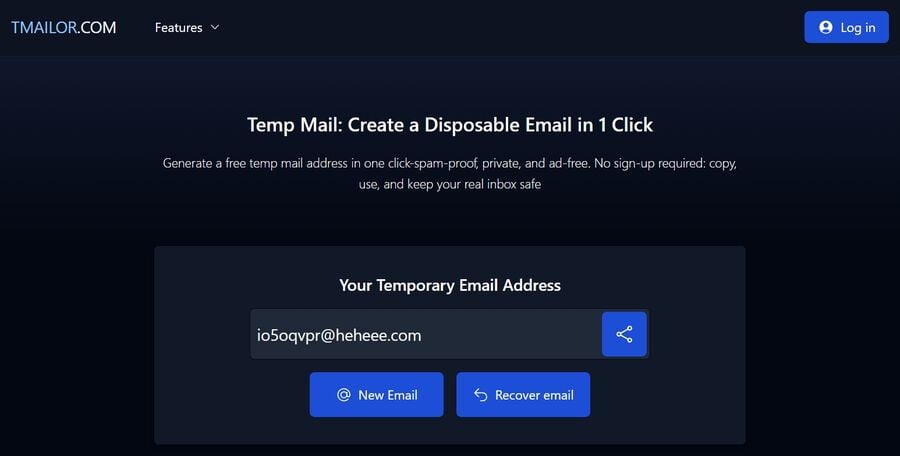
Greitis ir pristatymas. "Tmailor" gaunamas vamzdynas remiasi "Google" pašto infrastruktūra ir 500+ domenų telkiniu. Tai padeda užtikrinti pristatymo greitį ir priėmimą svetainėse, kurios tyliai sumažina akivaizdžių vienkartinių domenų reitingą.
Pakartotinis naudojimas be paskyros. Naudojant tmailor, prieigos raktas veikia kaip saugus raktas į tą pačią pašto dėžutę. Jei tikitės pakartotinio patvirtinimo, išsaugokite atpažinimo ženklą ir grįžkite po savaitės ar mėnesio, kad gautumėte naujų pranešimų tuo adresu. Sužinokite, kaip tai veikia čia: Pakartotinis laikinojo pašto adreso naudojimas.
Aiškus sulaikymas. Kiekvienas pranešimas saugomas ~24 valandas, tada išvalomas. Tai pakankamai ilgas, kad būtų galima išgauti OTP, bet pakankamai trumpas, kad sumažėtų duomenų kaupimasis. Jei jums reikia kažko itin trumpo, "tmailor" taip pat palaiko specialią 10 minučių pašto paslaugą – momentinę vienkartinę el. pašto paslaugą.
Griežtesnė numatytoji apsauga. "Tmailor" gali gauti tik ir nepriima priedų pagal dizainą. Šis kompromisas sumažina kenkėjiškų programų poveikį didelės apimties viešosioms paslaugoms. Jis išlaiko "nukopijuokite kodą, įklijuokite jį, judėkite toliau" ritualas greitai ir nuspėjamas.
Mobilumas ir kanalai. Pageidaujate programų? Žiūrėkite Geriausia laikino pašto programa, skirta "Android" ir "iPhone" – apžvalga ir palyginimas. Reikia domeno valdymo? Žiūrėkite Pristatome "Tmailor" pasirinktinio domeno laikinojo el. pašto funkciją (nemokamai). Dauguma kasdienių klausimų taip pat aptariami dažnai užduodamuose klausimuose apie laikinąjį paštą.
Side-by-Side: Temp-Mail.org vs tmailor
| Galimybės | Temp-Mail.org | Tmailor |
|---|---|---|
| Pagrindinis modelis | Vienkartinės pašto dėžutės; tik priimti; Automatinis ištrynimas pasibaigus galiojimo laikui | Vienkartinės pašto dėžutės; tik priimti; ~24 valandų pranešimų saugojimas |
| Adreso pakartotinis naudojimas | Palaikoma per "Premium" "keitimo/atkūrimo" srautą | Integruota per prieigos raktą (nereikia paskyros) |
| Priedai | Palaikoma "Android" programėlėje (gaunama) | Nepalaikoma (rizikos mažinimas pagal dizainą) |
| API | Oficiali API testuotojams / QA automatizavimui | Nereklamuojama jokia vieša API |
| Naršyklės plėtiniai | "Chrome" + "Firefox" | Oficialių plėtinių sąraše nėra |
| BYOD (pasirinktinis domenas) | "Premium" palaiko savo domeno prijungimą | Palaikoma (naujai paleistas "pasirinktinio domeno laikinasis el. paštas") |
| Domenų telkinys | Viešai neišvardyta | 500+ domenų, priglobtų "Google MX" |
| 10 minučių pašto dėžutė | Taip (specialus puslapis) | Taip (specialus produkto puslapis) |
| Žiniatinklio skelbimai | Skiriasi priklausomai nuo puslapio / pakopos | Žiniatinklio patirtis pabrėžiama kaip be skelbimų |
| Kam tai tinka | Patyrę vartotojai, kuriems šiandien reikia API / plėtinio / BYOD | Vartotojai, norintys greito OTP, pakartotinio patvirtinimo ir mažos rizikos įsipareigojimų neįvykdymo |
Pastaba: "Temp-Mail Premium" kainodaros specifika gali skirtis priklausomai nuo regiono ir laiko; Šioje apžvalgoje daugiausia dėmesio skiriama galimybėms, o ne kainoraščiams.
Realaus pasaulio scenarijai (ką kada naudoti)
1) Vienos savaitės SaaS bandomoji versija su galimu tolesniu patikrinimu
Naudokite tmailor. Sugeneruokite adresą ir išsaugokite atpažinimo ženklą. Jei paslaugų teikėjas vėliau vėl atsiųs el. laišką (apklausa, atnaujinimas, nustatymas iš naujo), gausite jį į tą pačią pašto dėžutę. Kodams išgauti pakanka ~24 valandų lango; Adresas galioja vėlesniems pranešimams, kol išsaugojote atpažinimo ženklą.
2) QA komandai reikia 100 adresų automatizuotiems testams
Naudokite Temp-Mail.org su oficialia API. Sukite adresus kode, išbandykite srautus (registracijas, slaptažodžių nustatymą iš naujo) ir viską nugriaukite. Jei testams reikia analizuoti PDF failus ar vaizdus, priedų palaikymas "Android" kliente gali būti naudingas atliekant rankinius patikrinimus; Turėkite omenyje OPSEC.
3) Rinkodaros pradžia naudojant prekės ženklui jautrius domenus
Jei norite griežčiau kontroliuoti siuntėjo / gavėjo optiką, BYOD gali padėti. "Temp-Mail" "Premium" palaiko domeno prijungimą. "Tmailor" taip pat siūlo nemokamą pasirinktinio domeno funkciją. Palyginkite strategijos pasekmes, TTL ir visus maršruto parinkimo apribojimus prieš perkeldami gamybos srautą.
4) Didelės rizikos naršymas svetainėje, kuria visiškai nepasitikite
Abi paslaugos teikiamos tik priėmimui. Kad būtumėte maksimaliai atsargūs, pirmenybę teikite sąrankai, kuri išjungia priedus, kad sumažintų sukčiavimo / kenkėjiškų programų riziką – "tmailor" pagal numatytuosius nustatymus naudoja šį modelį. Naudokite trumpalaikes užduotis ir niekada nelaikykite vienkartinių pašto dėžučių kaip archyvinės saugyklos.
Ekspertų pastabos ir įspėjamosios vėliavėlės
- Priedai: patogumas ir rizika. Galimybė gauti failus gali atrodyti "pilna", tačiau saugos komandos dažnai atsisako vienkartinių pašto dėžučių. Išjungus priedus, tmailor susiaurina atakos paviršių ir sutelkia UX tik į kodus / nuorodas.
- Priėmimas ir pristatymas. Domeno pasirinkimas yra svarbus. Paslaugų teikėjai, talpinantys patikimą infrastruktūrą (pvz., "Google MX") ir išsidėstę dideliame domenų telkinyje, paprastai mato geresnius OTP pašto dėžutes. "Tmailor" iškviečia 500+ domenų būtent dėl šios priežasties.
- Privatumo pažadai. "Temp-Mail" teigia, kad nesaugo IP adresų ir išvalo duomenis pasibaigus galiojimo laikui. Tai atitinka "išmestų pašto dėžučių" dvasią. Kaip visada, trumpalaikis el. paštas nėra tinkamas įrankis jautrioms ar ilgalaikėms paskyroms.
- 10 minučių kompromisai. 10 minučių laikmatis puikiai tinka greitam atsisiuntimui, tačiau rizikingas, jei pristatymas vėluoja. Naudokite įprastą trumpalaikę pašto dėžutę su pakartotiniu naudojimu, jei manote, kad siuntėjas gali sekti po kelių valandų ar dienų.
Tendencijos ir ką žiūrėti toliau
- Įmonėms pritaikytos funkcijos. Tikėkitės labiau struktūrizuotų API, žiniatinklio kabliukų ir strategijos valdiklių (priedų įjungimo / išjungimo, domeno perjungiklių, leistinų sąrašų), nes vienkartiniai el. laiškai tampa standartiniais kokybės užtikrinimo krūvose.
- Pristatomos ginklavimosi varžybos. Kadangi svetainės intensyvina vienkartinių domenų aptikimą, paslaugos su besisukančiais, patikimais domenais ir išmanesniu maršrutizavimu bus naudingos.
- Numatytieji privatumo nustatymai. Pramonė linkusi į minimalų duomenų saugojimą, skaidrius ištrynimo langus ir pakartotinio naudojimo mechanizmus be paskyros (pvz., žetonus), kurie išsaugo tęstinumą nerenkant asmeninių duomenų.
DUK
Ar Temp-Mail.org gali siųsti el. laiškus?
Ne. Tai tik gaunama vienkartinė el. pašto paslauga.
Ar Temp-Mail.org saugo IP adresus?
Jų viešojoje politikoje teigiama, kad IP adresai nesaugomi, o pasibaigus galiojimo laikui duomenys ištrinami.
Ar Temp-Mail.org gali gauti priedų?
"Android" programa pažymi, kad ji gali gauti nuotraukas / priedus. Būkite atsargūs atidarydami failus iš nežinomų siuntėjų.
Kiek laiko el. laiškai saugomi "tmailor"?
"Tmailor" saugo pranešimus maždaug 24 valandas nuo pristatymo, tada juos automatiškai išvalo.
Ar galiu pakartotinai naudoti tą patį adresą tmailor?
Taip, išsaugokite prieigos raktą, kad vėliau vėl atidarytumėte tą patį aplanką Gauta, net ir visuose įrenginiuose.
Ar tmailor leidžia priedus ar siuntimą?
Ne. Jis skirtas tik priėmimui, o priedai yra išjungti pagal dizainą, kad būtų sumažinta rizika.
Ar abi paslaugos turi 10 minučių parinktį?
Taip, abu atskleidžia 10 minučių pašto skonį, kad būtų galima atlikti greitas, vienkartines užduotis.