Disposable Temporary Email Addresses: Quick Temp Mail Generator Guide (2026)
 Tmailor Team
 Quick access
Introduction
In today’s digital world, email is almost impossible to avoid. Whether you’re signing up for a free trial, downloading a whitepaper, testing a new app, or creating an account on a social platform, a valid email address is usually required. But sharing your personal inbox across multiple platforms increases your exposure to spam, phishing, tracking, and privacy risks.
That’s where disposable temporary email addresses help. They are fast, free, and designed to reduce unwanted exposure online. With a modern temp mail generator like Tmailor.com, you can instantly create a temporary inbox for sign-ups, OTPs, and one-time verifications—without registration or sharing personal details.
This updated 2026 guide explains what temporary email addresses are, how to use them in seconds, when to use them, and why Tmailor.com is a strong choice for privacy-focused users in the U.S. and worldwide.
What Is a Disposable Temporary Email Address?
A disposable, temporary email address is a short-term address you can use for one-time or temporary online activities. Unlike a personal mailbox such as Gmail or Outlook, a temporary email usually does not require registration, a password, or any personal information.
It is commonly used as a burner email, a temp mailbox, for quick sign-ups, coupon access, app testing, and account verification.
Key Characteristics
- Instant generation → Get an email address in seconds.
- Anonymous by design → No name, no profile, no identity linkage.
- Short message retention → Messages are typically available for a limited time (for example, 24 hours).
- Receive-only usage → Most services focus on incoming email only, which helps reduce abuse.
This makes disposable email addresses useful when privacy and speed matter more than long-term inbox management.
Quick Steps: How to Use Temp Mail in Seconds
With Tmailor.com, using a disposable email is fast and straightforward:
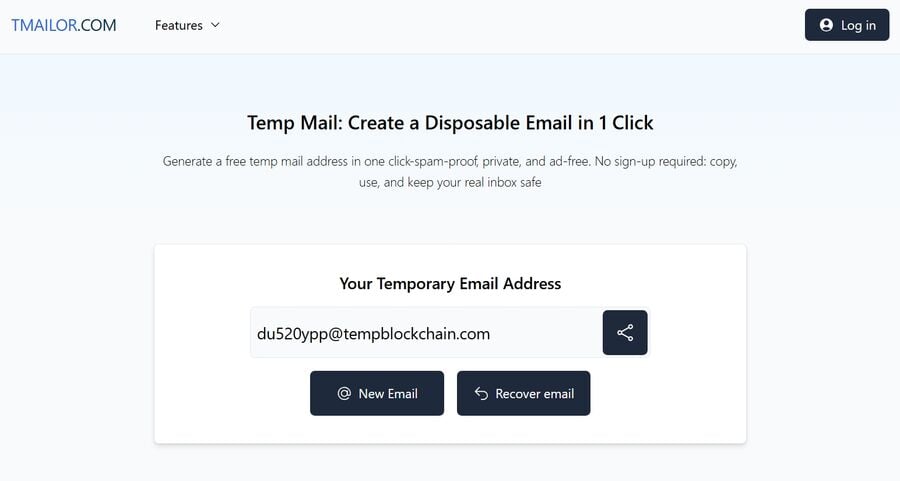
Could you open the temp mail page?
Visit tmailor.com/temp-mail to get a disposable email address instantly.
Could you copy your generated email address?
Copy the automatically generated temporary email address shown on the page.
Could you paste it into the website or app?
Use the addrsign-uperever a signup, registration, or verification email is required.
Could you wait for the incoming email?
Keep the inbox open on Tmailor and wait for the incoming message, which often arrives within seconds.
Use the OTP or verification link.
Open the message, copy the verification code (OTP), or click the activation link. After that, you can leave the inbox behind; sign-ups are no-sign-up, no-password, and no personal email exposure.
Why Disposable Emails Matter in 2026
- Better spam control: Promotional and follow-up emails stay out of your personal inbox.
- Stronger privacy protection: You reduce the risk of identity linkage when signing up for unfamiliar websites.
- Faster workflows: No registration, no inbox setup, and no cleanup later.
- Safer short-term use: Ideal for one-time downloads, coupon claims, beta tests, and temporary registrations.
When to Use a Temporary Email Address
- Free trials and downloads – avoid getting added to long marketing sequences.
- Testing apps, websites, or APIs – useful for QA, staging, and developer workflows.
- Online shopping and promo codes – claim discounts without exposing your primary email.
- Forums and community sign-ups – join a discussion without long-term inbox clutter.
- Receiving OTPs and verification emails – valid for sign-up, standard signup, and verification flows (not recommended for sensitive accounts).
Standard Temp Mail Problems and How to Fix Them
- If no email arrives, could you refresh the inbox and wait a little longer? Some senders delay non-essential emails.
- Domain rejected: Try generating a new address with another domain from the available pool.
- Verification expired: Request a new code and keep the inbox open before retrying.
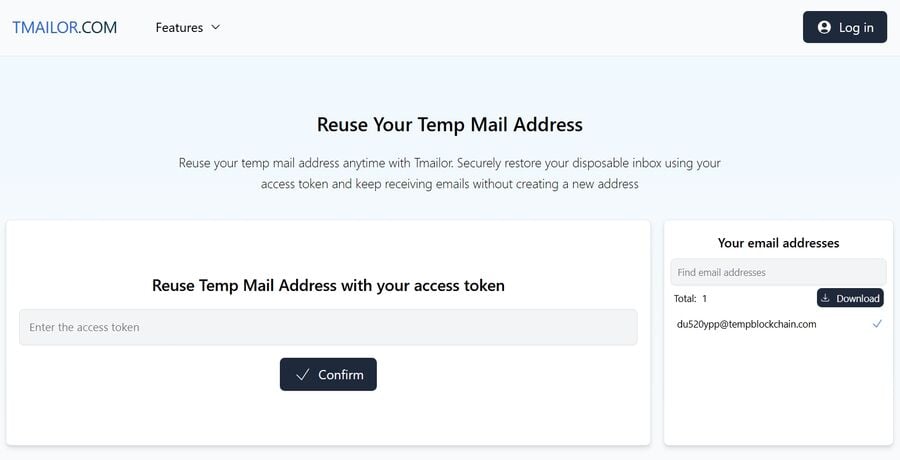
- Need the same inbox again: Save your token so you can restore and reuse the address later.
Why Choose Tmailor.com for Disposable Email
Many temp mail providers offer basic inboxes, but Tmailor.com includes features that improve reliability, convenience, and long-term usability.
Token-Based Reuse
Unlike many disposable email services, Tmailor lets you reuse a temporary address using a token. This is useful when you get a second verification email later or return to the same account sign-in flow.
Large Domain Pool
Tmailor provides access to 500+ domains, helping reduce the risk of rejection on websites that block commonly used temporary email domains.
Fast Delivery Infrastructure
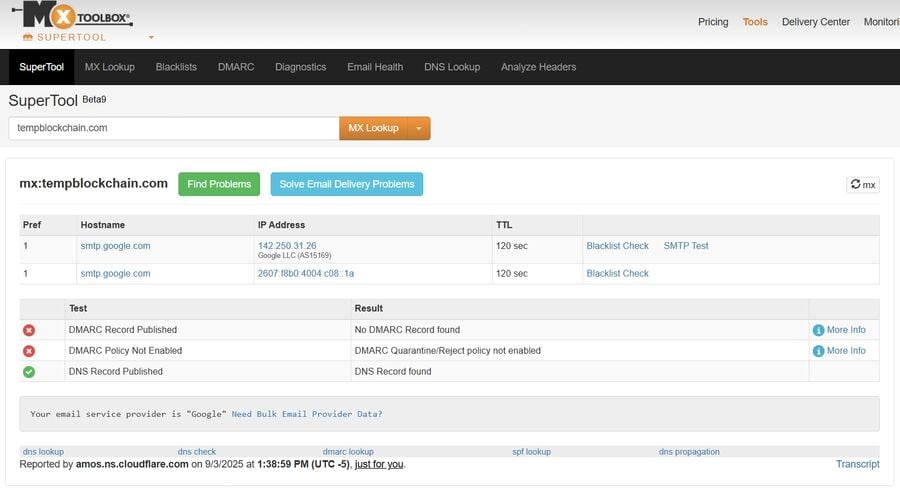
Tmailor uses a robust infrastructure design and Google-hosted domain routing components to improve the speed and reliability of incoming message delivery.
24-Hour Inbox Message Availability
Incoming emails are typically available for 24 hours—long enough for complete sign-ups, OTP verification, and short-term account access. The address can still be reused later with a token.
Free to Use
No subscription is required for standard temp mail usage. Tmailor provides free disposable email access for everyday use cases.
Best Practices for OTP and Verification Emails
- Use temp mail for low-risk accounts: Great for trials, test accounts, and one-time registrations.
- Avoid sensitive services: Do not use a temporary email for banking, taxes, healthcare, or primary account recovery.
- Keep the inbsign-upn during signup: This helps you catch OTPs and links quickly before they expire.
- Store your token safely: It helps if the service sends another verification email later.
Tips to Get the Most from Temp Mail
- Bookmark the inbox page if you may need the message again soon.
- You can save your access token to restore and reuse the same temporary address later.
- Use a VPN if you want an extra layer of privacy while browsing.
- Avoid sensitive accounts such as banking, taxes, or primary recovery email accounts—temp mail is best for disposable use cases.
Disposable Email vs. Permanent Email: Quick Comparison
| Feature | Disposable Temp Mail | Personal Email (Gmail/Outlook) |
|---|---|---|
| Setsign-up | ant, no sign-up | Requires registration |
| Privacy | Anonymous/low identity linkage | Linked to personal details |
| Spam Risk | Isolated from the primary inbox | Higher if reused widely |
| Message Lifespan | Short-term (e.g., 24h) | Long-term/permanent |
| Reuse | Possible with Tmailor token | Always available |
| Best Use Case | Trials, OT sign-ups, loads | Work, personal communication, important accounts |
Conclusion
Disposable temporary email addresses are one of the easiest ways to protect your privacy, reduce spam, and move faster online. They include practice sign-ups, time-sign-up sign-ups, temporary access, app testing, and many verification workflows.
With token-based reuse, 500+ domains, and a fast delivery-focused infrastructure, Tmailor.com remains a strong temp mail generator choice in 2026.
The next time a website asks for your email, and you do not want to share your primary inbox, use a temporary email address instead.
FAQ
How fast can I create a disposable email address?
Usually instantly. On Tmailor, a temporary email address is generated as soon as you open the temp mail page.
Can I use a temporary inbox later?
Yes. Tmailor provides a token-based reuse system that can help you restore and reuse the same temporary email address.
Is temp mail safe for OTPs and verification emails?
It is commonly used for standard OTP and signup verification emails. However, do not use temporary email for banking, financial services, or sensitive accounts.
a sign-up sign-up. What happens after 24 hours?
Incoming emails are typically kept for 24 hours. If you saved your token, you may be able to reuse the address later.
Is Tmailor.com free to use?
Yes. Tmailor offers free disposable temporary email access for common use cases.
Every day, what is the difference between temp mail and a personal email account?
Temp mail is built for short-term privacy and quick sign-ups, while personal email accounts are better for long-term communication and important accounts.
essentialsign-ups Can I receive verification codes with a disposable email address?
Yes, many services send OTPs and verification links to temporary email addresses. Results vary by website, and some platforms may block certain temp mail domains.
Why is my temp mail inbox not receiving messages?
Possible reasons include sender delays, blocked domains, expired verification requests, or website restrictions. Try refreshing the inbox or generating a new address with another domain.
Could you try? Would you like me to register or create a password?
No. Tmailor temp mail usage does not require account registration or a password for standard disposable inbox use.
Is a disposable email address the same as a burner email?
In most cases, yes. People often use the terms disposable email, temp mail, temporary email, and burner email to describe short-term email addresses.