How to Create Multiple Email Addresses From One Gmail Account
Creating multiple email addresses from one Gmail with plus-tag and dot tricks is easy, but they never hide your real inbox. Here is how each alias works, where it falls short, and when a disposable inbox is the better tool.
Quick access
Key Takeaways
You can create multiple email addresses from one Gmail using plus tags and the dot trick, and every variation still lands in your one inbox. That is great for filtering but useless for privacy, because any site can strip the alias back to your real address. For genuine separation and anonymity, a disposable temp mail inbox is the stronger choice.
- Gmail aliases (plus and dot) create address variations that all deliver to your primary inbox — convenient, not private.
- Easily reversed. Sites can remove a plus tag or the dots and reach your real Gmail, and some reject plus tags outright.
- Disposable temp mail gives a separate inbox that is not tied to your personal account, then auto-clears after about 24 hours.
- Reusable when needed. Save an Access Token to reopen the same temp address for a later reset or re-verification.
- Use both. Gmail aliases for trusted mail you want to sort; disposable inboxes for trials, testing, and privacy-sensitive sign-ups.
Two Ways to Make Multiple Email Addresses From One Gmail
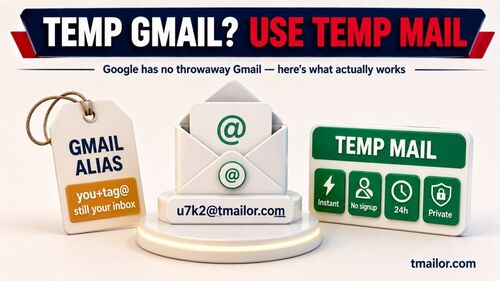
There are two practical ways to avoid creating a brand-new email account for every service: Gmail's built-in alias tricks and a genuinely disposable temp mail service. Both hand you extra addresses, but only one creates real separation from your identity. If you are actually after a throwaway Google account rather than aliases, see the options in our guide to a temp Gmail account.
Gmail aliasing reshapes your existing address so mail still arrives in your one inbox, sorted by a tag. Disposable temp mail instead gives you a fresh inbox with no link to your personal account. The rest of this guide covers how each alias works, where aliases fall short, and when disposable email is the better fit.
How Gmail Plus-Addressing Works
Gmail plus addressing adds a label after your username, and Gmail ignores everything after the plus sign when it delivers the message. If your address is jane@gmail.com, then jane+shopping@gmail.com, jane+netflix@gmail.com, and jane+dev-trial@gmail.com all arrive in the same inbox, with the tag preserved so you can filter on it. The number of tags is effectively unlimited for normal use.
No setup is needed: type your address with a +tag into any sign-up form. To stay organized, create a filter for each tag in Gmail under Settings, then Filters and Blocked Addresses, and assign a label or an auto-archive action to that tagged address. The catch is privacy: any website can strip the +shopping portion and recover your real address, and some sign-up forms reject the plus sign entirely, so the alias is easy to defeat.
How the Gmail Dot Trick Works
Gmail also ignores dots in the username, so janedoe@gmail.com, jane.doe@gmail.com, and j.a.n.e.d.o.e@gmail.com all reach the same inbox. You can insert dots between letters in the username, and, like plus tags, it needs zero setup — just type a dotted version into a form. It is handy for visually distinguishing which service got which spelling.
The limitation is the same as plus tags, only more so: dots are trivial to reverse. Remove them and you have the canonical address, and no service that wants to deduplicate users will be fooled by dot placement. Treat the dot trick as a labeling aid, not a privacy layer.
Where Gmail Aliases Fall Short
Gmail aliasing creates the appearance of many addresses but fails at the three things privacy-conscious users actually need: separation, anonymity, and revocability. No filter or label can fix these structural gaps, because every alias still resolves to one real identity.
- No real separation. Every alias funnels to one inbox, so if that inbox is compromised, all of them are exposed. There is no isolated sandbox, just labels in the same room.
- No anonymity. Your real username is embedded in every alias, so anyone with basic pattern-matching can reverse it to your permanent identity.
- No revocability. You cannot delete an alias; you can only filter or block it while it keeps receiving mail. A disposable inbox, by contrast, is built to be retired.
Where Disposable Temp Mail Fits
Disposable temp mail creates a brand-new address in seconds with no registration, and the inbox is separate from your Gmail. Messages arrive; you grab the code or confirmation link, and the inbox auto-clears after about 24 hours. That gives you something Gmail aliases do not: a separate inbox that is not derived from your real address.
The advantages over aliasing are concrete: better separation because the address is not derived from your real email, spam isolation because follow-up marketing hits the disposable inbox, and clean revocability because you simply let it expire. It supports receiving verification codes through Google MX across 500+ domains, though some strict sites still block disposable domains. New to temp mail? Start with how temp mail works. Under the hood, this is why random aliases feel instant.
Gmail Alias vs Temp Mail: Side by Side
The two methods suit different jobs. Aliases keep mail you trust organized inside your own inbox; disposable inboxes keep mail you do not trust away from your identity. The table compares them so you can match each to the right task.
| Criterion | Gmail Alias (plus / dot) | Disposable Temp Mail |
|---|---|---|
| Setup | Zero — just type the alias | Seconds — open a temp mail page |
| Privacy from the service | Low — real address is derivable | High — no link to your identity |
| Spam isolation | Partial — spam still hits your inbox (filterable) | Full — spam stays in a disposable inbox |
| Detection by websites | Easy — many sites strip plus tags | Varies — some sites block disposable domains |
| Long-term continuity | Permanent — same inbox forever | Optional — reopen with an Access Token |
| Message retention | Permanent (your normal Gmail) | About 24 hours, then auto-deleted |
| Revocability | None — alias cannot be deleted | Full — let the inbox expire |
| Best for | Newsletters, receipts, light sorting | Trials, testing, privacy-first sign-ups |
When to Use Which Method
The right choice depends on how much separation you need and for how long. Use aliases where filtering is enough and you trust the service; use disposable inboxes where privacy and a clean exit matter more than continuity.
- Use Gmail aliases when you want lightweight filtering inside your own inbox and you plan to keep the account: newsletters, order confirmations, loyalty programs, and internal work tools.
- Use disposable temp mail when you do not want a service to know your real email, or you are testing tools in parallel and want each to have its own sandbox: free trials, app testing, and sign-ups you are unsure about. For accounts you might revisit, save the Access Token so you can reuse the same address later. If you juggle several of these sandboxes, a free Tmailor account saves every address you create while signed in, so they all sit in one searchable list.
- Use both together for a layered system: aliases for known, trusted senders, and disposable inboxes for unknown or untrusted ones. For the wider privacy picture, see the complete guide to temporary email.
Frequently Asked Questions
Common questions about making several addresses from one Gmail and when to switch to disposable email.
How many addresses can I create from one Gmail account?
Effectively unlimited with plus tags, since you can invent any label after the plus sign. Dot variations are more limited, because they depend on how many letters your username has, but there are still many. Either way, every variation lands in the same inbox.
Are Gmail aliases private, or can websites detect them?
Not really. Many sites strip the plus tag during registration, collapsing the alias back to your real address, and some reject plus-tagged addresses entirely. That makes Gmail aliases unreliable as a privacy tool, even though they work well for filtering your own mail.
Is the Gmail dot trick more private than plus tags?
No. Dot placement is even easier to reverse, since removing all dots reveals the canonical address. Dots are useful for visual distinction but add no meaningful privacy over plus tags. Neither hides your real Gmail from a determined service.
When should I use temp mail instead of a Gmail alias?
Use temp mail when you do not want a service linked to your real identity: free trials, untrusted sign-ups, app testing, and privacy-sensitive registrations. A Gmail alias is fine for trusted mail you simply want to sort, because it never actually hides your address.
Can I reuse a disposable temp mail address later?
Yes, if you save the Access Token. Enter it to reopen the same inbox on any device for a follow-up verification or password reset. The Access Token is a reuse key, not a password. If it is lost, a guest address cannot be recovered, so store it safely; an address saved to your Tmailor account can still be opened from Created Emails after you sign in.
Can I send email from a disposable temp mail address?
No. Tmailor is receive-only and does not accept attachments. It is designed to receive verification codes and confirmation links, so if you need to send mail or share a file, use your Gmail or another regular mailbox for that step.
The Bottom Line
Making multiple addresses from one Gmail is a useful organizing trick, but it is not a privacy solution: every alias traces back to your real identity, and any service can strip the tag to reveal it. Disposable temp mail fills that gap with a separate inbox, a clean exit, and optional reuse through an Access Token. Use aliases to sort mail you trust, reach for a disposable inbox when privacy matters, and when you need one now, you can create a free temp mail in seconds.

Marcus Lee writes Tmailor's step-by-step guides — signing up to apps and platforms with temp mail, using the mobile app and Telegram bot, custom domains, reusing addresses, and getting the most out of disposable email day to day.