Tmailor
 Tmailor for iOS: A Full Walkthrough of the Free Temp Mail App
A guided tour of every screen in Tmailor's iPhone app — how to create disposable inboxes, reuse them across devices with an Access Token, and read mail before it auto-expires after 24 hours.
Quick access
Tmailor for iOS is a free, receive-only temp mail app for iPhone. It hands you a disposable inbox the moment it opens — no signup — and an Access Token lets you reopen that same inbox on another device or on the web. Messages stay for about 24 hours and then delete themselves. It is built for inbound mail you do not want in your real inbox: verification codes, newsletters, one-time notices.
Key Takeaways
A quick map of the iOS app before the screenshots roll — five facts that will save you a few taps later.
- Tmailor for iOS gives free disposable inboxes with no signup; the home screen shows your current address the moment the app opens.
- Two domain groups ship with the app — Standard (free, server-randomized) and Premium (VIP only).
- Every inbox carries an Access Token plus a Recovery Link, so the same address opens on a second iPhone, iPad, or the web.
- Messages auto-delete 24 hours after delivery, and the exact deletion timestamp is printed on every email.
- Saved addresses live in two lists — cloud-synced ("Your Email Addresses") and device-local ("Email Addresses on This Device").
Why an iOS app instead of just the browser
Tmailor's iOS app delivers the same disposable email service as the website, plus three iPhone-specific advantages — system push notifications for new mail, a saved-addresses list stored on the device, and a one-tap Create Inbox flow. Everything else (the Access Token, the randomized domain pool, the 24-hour expiry) carries over unchanged from the web product.
The app is free to download and free to use — no account, no paywall on the basic inbox, ads on the free tier. Signing in with Apple is optional: it keeps your saved-addresses list synced across devices, and it is not needed to create or read an inbox. In practice, the app feels quicker than mobile Safari for two reasons — Tmailor holds a live connection open while the app is in the foreground, and a system push notification fires when a message lands. For readers who want the same comparison on Android handsets, the cross-platform mobile experience piece covers both builds side by side.
One caveat to set early: Tmailor is receive-only on every platform. The iOS app cannot send, reply to, or forward mail. It is built to receive verification codes, newsletters, and one-time notifications, not to replace your regular inbox.
Get the Tmailor app: both builds, with the install link for each store, are listed on the official iOS and Android app page.
The home screen — your inbox at first launch
Tmailor opens with an address already generated; one tap copies it, one tap creates another.
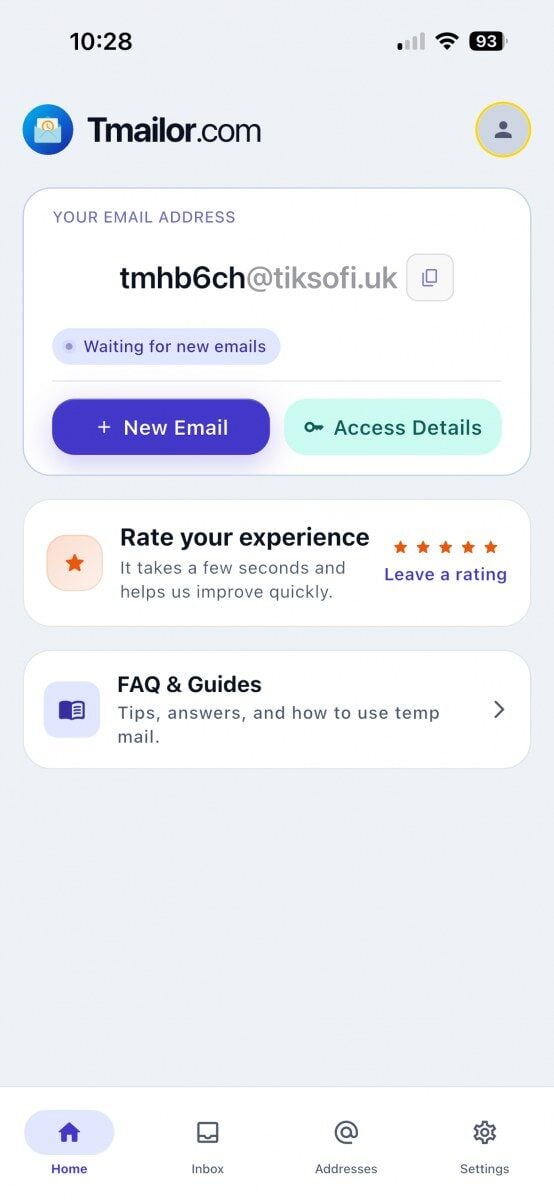
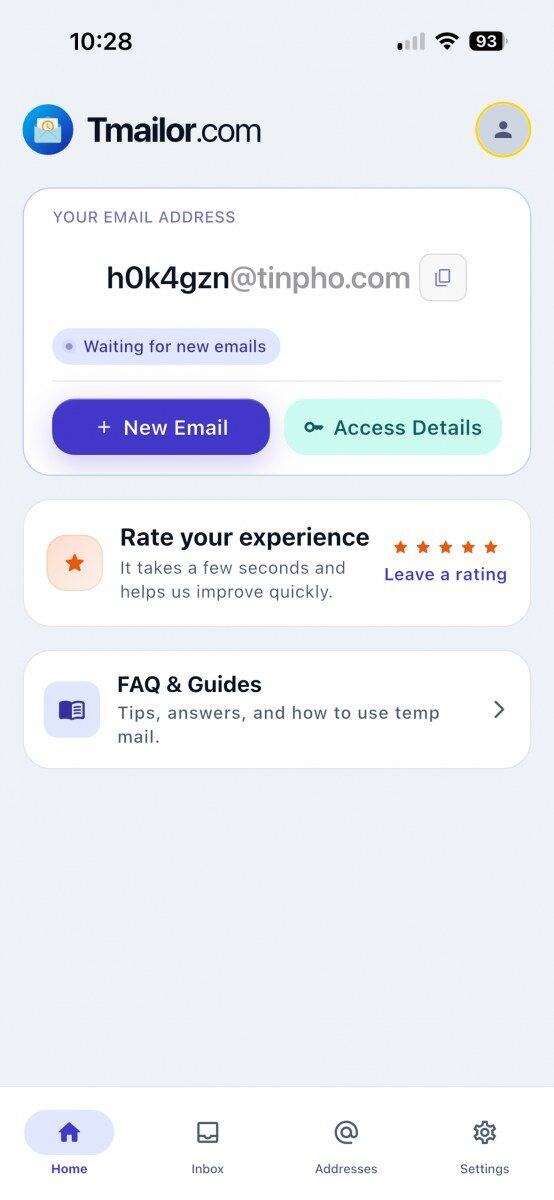
On first launch, Tmailor's iOS app generates a random address and parks you on the Home tab. The address card shows the email, a copy button, a status pill ("Waiting for new emails"), and two primary actions — New Email (create another inbox) and Access Details (export tokens). A bottom tab bar handles navigation across Home, Inbox, Addresses, and Settings.
Below the address card sit two utility cards. The "Rate your experience" card is a genuine App Store rating prompt — tapping it opens iOS's native review sheet, not a fake review collector. The "FAQ & Guides" card opens an in-app help section, useful when you are testing a sign-up flow and do not want to context-switch back to Safari. The status pill toggles between "Waiting for new emails" and "Listening for new emails" depending on which tab you are viewing, which is Tmailor's way of telling you the real-time listener is alive.
If you are new to the brand, this single screen captures the value proposition cleanly — Tmailor is a free temp mail service with an address ready in under a second, no account, no email-verification handshake to start.
Creating a new inbox — Standard vs Premium domains
Tapping New Email opens a Create Email sheet with two domain groups. Standard is the default and is free for everyone, and the sheet states the rule plainly: both the username and the domain are randomized by the server, and you see the finished address only after you tap Create inbox. You get a scrambled username on a domain the app picks for you, with no input either way. Premium Domain Group sits above it behind a VIP badge and a lock, so free accounts can see the option but cannot select it.
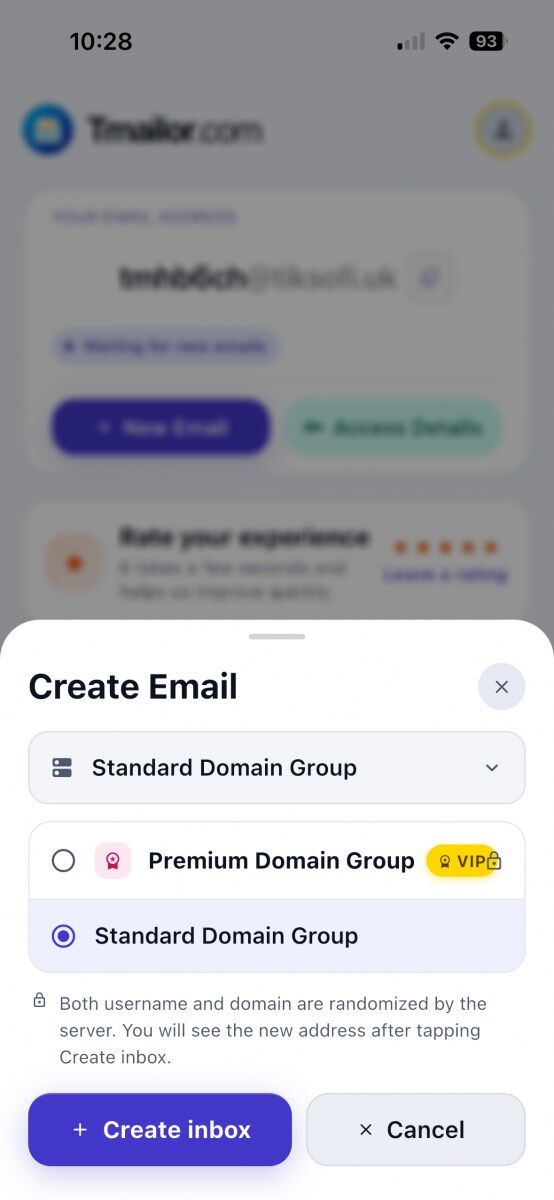
Tmailor does not publish the list of domains it draws from, and that is deliberate — a published list is a ready-made blocklist for the vendors who sell disposable email detection. Random creation pulls from a large rotating pool, while the custom-name flow exposes only a handful of domains. What that means for you is simple: acceptance varies from site to site and can change without warning. If one address is rejected, a different domain may still be accepted, and trying one is ordinary troubleshooting. But if a service tells you it does not accept disposable email, that is a policy, not a puzzle — sign up with your real address instead.
If you want full control over the domain itself, the Standard and Premium groups are not your only options. Manage Domains in Settings lets you point your own private domain at Tmailor by changing a single MX record — and, unlike the Premium group, that feature does not require VIP. We cover it later in this walkthrough.
Reusing the same inbox — Access Token and Recovery Link.
The Access Details sheet shows three things: the email address, a long Access Token, and a Recovery Link that reopens the same inbox in a browser. The app's own yellow banner spells out what they are for — "Use this token or recovery link to access the same inbox on another browser or device. Anyone with them can access this inbox, so keep them safe."
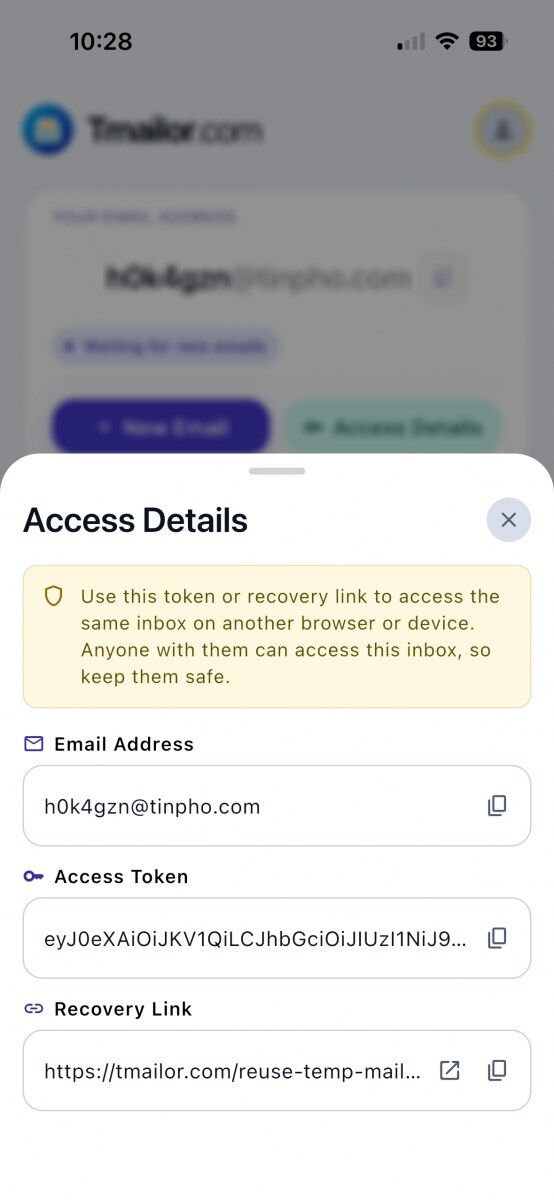
Two everyday workflows make the token useful. First, copy the Recovery Link on the iPhone, then AirDrop or paste it to a Mac, and the same inbox opens in Safari with whatever mail is already there. Second, tap "Use this email address" on a second iPhone with Tmailor installed, and the address attaches to that device without being recreated. The full mechanics of how Tmailor preserves an address so you can reuse the same temp mail later are documented separately.
Be precise about what the Access Token is, because the name misleads people. It is a reuse key, not a password. It lets you back into an address; it does not lock anyone else out of it. And if you lose it, nobody — Tmailor included — can recover it for you, so paste the token somewhere you will still have it tomorrow if the inbox matters. If you think a token has leaked, stop using that address and create a fresh one. Signed-in owners get one extra control: they can rotate an address's Access Token, which immediately cuts off any device still holding the old one.
The inbox — 24-hour auto-delete and real-time delivery
The Inbox tab lists incoming messages newest first, under a yellow banner stating "Emails auto-delete after 24 hours." Open any message and the app prints the exact deletion timestamp — date and time — above the body, so the deadline is never abstract: you can see precisely when the code or link in front of you stops existing.
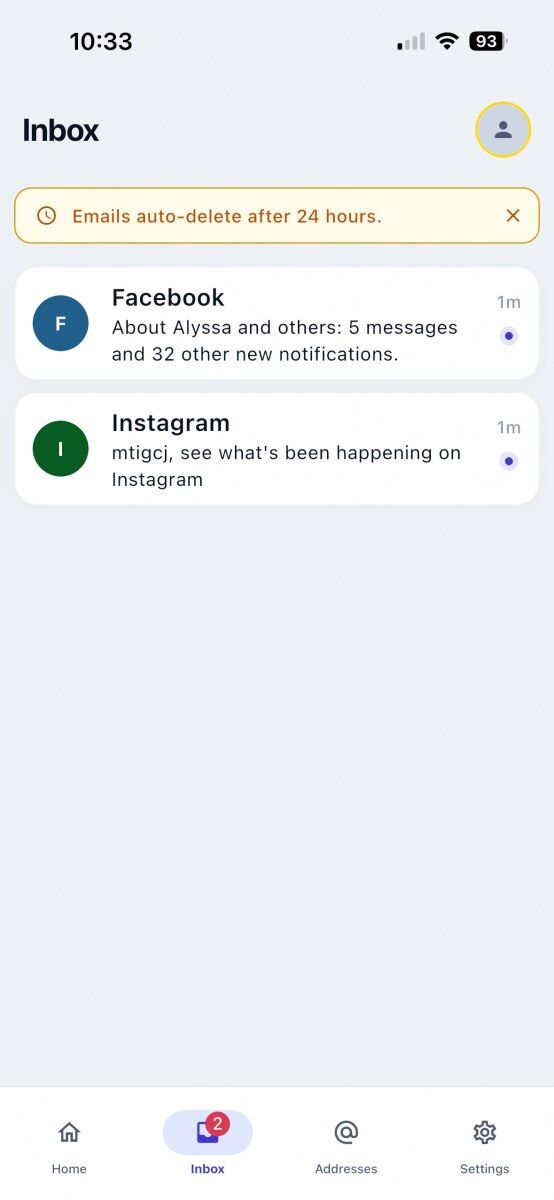
New mail raises a system push notification and increments the red badge on the Inbox tab, so you do not have to sit in the app waiting for a code. Push still works while Tmailor is closed, provided you accepted the notification permission when the app first asked. Inside the Inbox, an animated empty state ("Listening for new emails") tells you the real-time listener is alive; messages land on their own, with no pull-to-refresh.
Not every sender will deliver successfully. Some platforms greylist or outright block disposable email domains. Tmailor cannot force a sender to honor a temp address — if the message does not arrive within a minute or two and the listener is healthy, the sender side is the likely culprit, not the app.
Managing saved addresses — cloud list vs device list
The Addresses tab opens "Your Email Addresses" — a cloud-synced list visible on every signed-in device. A smaller sub-screen, "Email Addresses on This Device", shows only the inboxes saved locally. The app states the trade-off plainly: "If you delete the app, this list will be lost." The cloud list survives a reinstall; the device list does not.
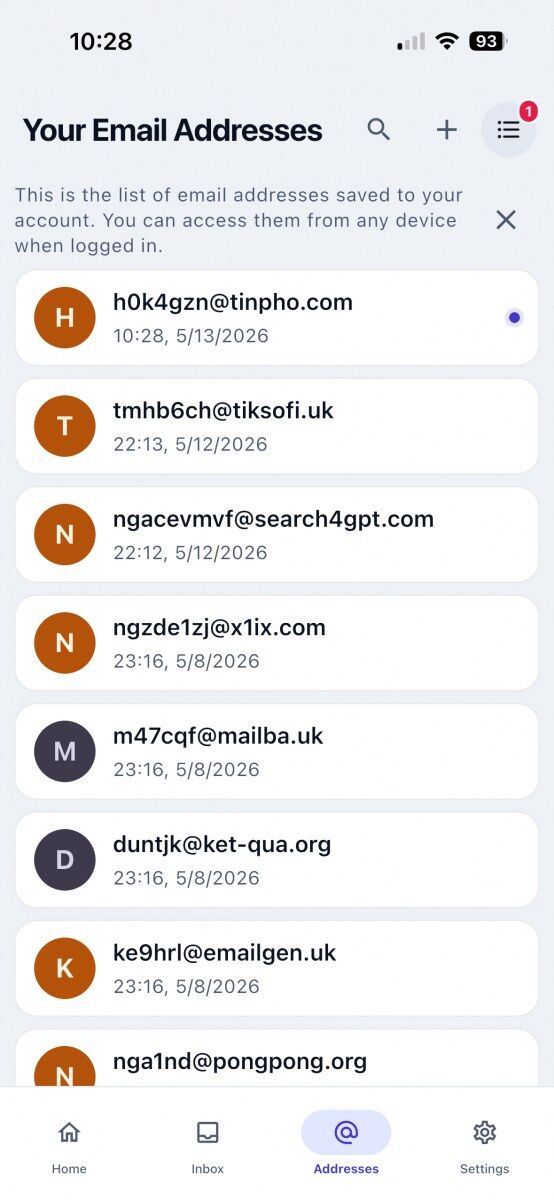
Why two lists? The cloud list ties your inbox roster to a Tmailor account, so it follows you to a new phone. If you signed in with Apple, that account shows up in Settings as an Apple private-relay address rather than your real one. The device list exists for the opposite case — a throwaway you never intend to reopen elsewhere and would rather not sync at all. Both lists support tap-to-switch and a search box, which starts earning its keep once you are past a dozen saved entries.
A small dot on a list entry means that inbox has unread mail even though it is not your current address. Tap the entry to switch the home card to that inbox, and the marker clears.
Settings worth knowing — language, dark mode, custom domain
Settings groups the account header and three navigation rows (Current email address, Email address list, Manage Domains), two appearance controls (Dark mode, Change language), an app-review shortcut, and footer links for Contact us, Privacy policy, and Terms of service. The build number sits at the very bottom — 2.5.1 in these screenshots — and it is the first thing to quote when you report a bug.
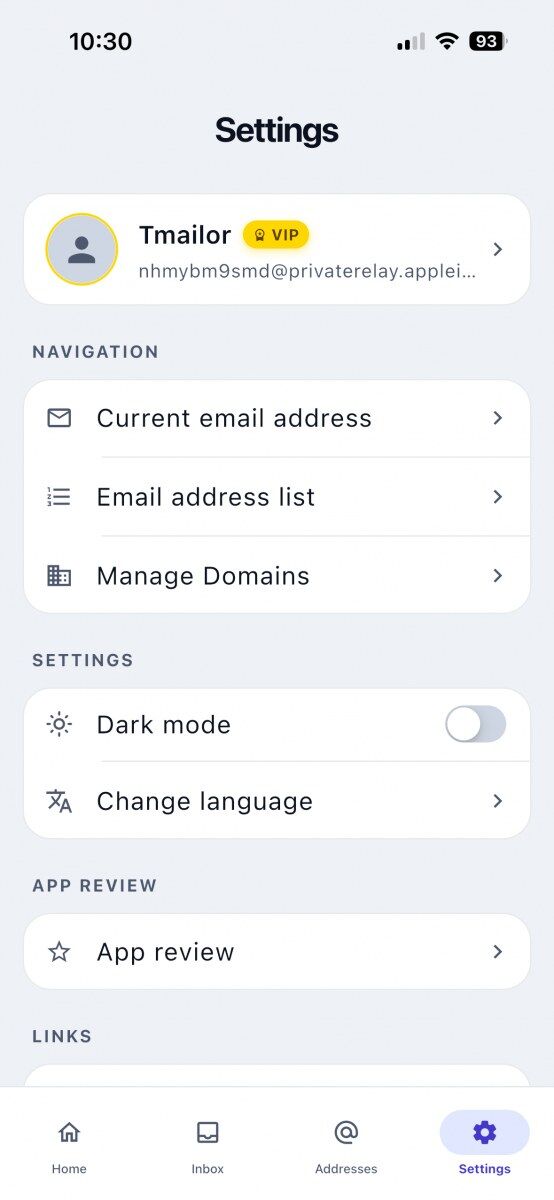 | 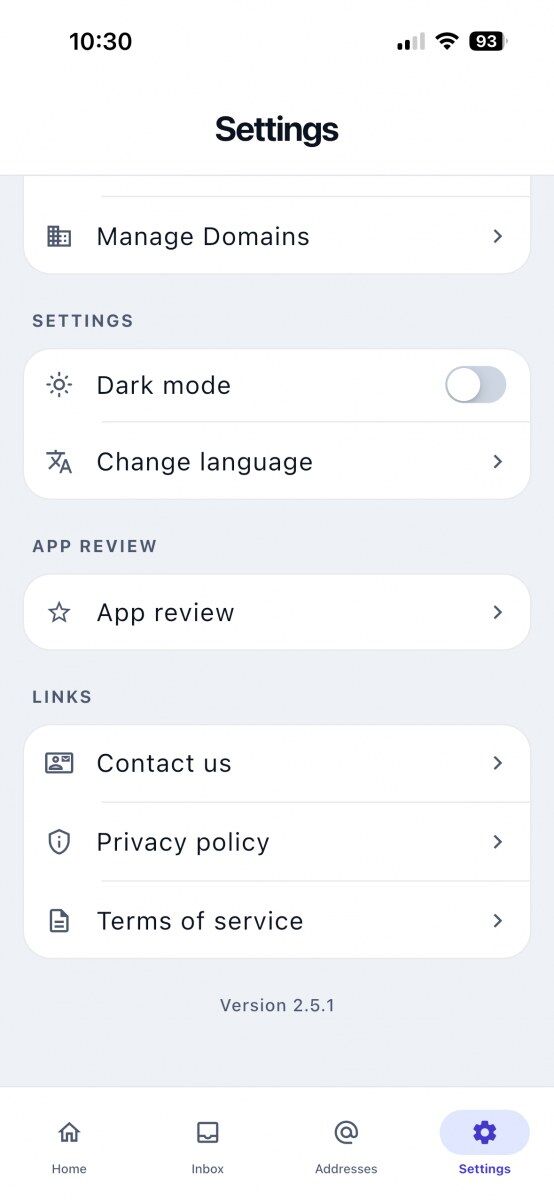 |
Three of these carry more weight than the rest. Change language switches Tmailor's own interface into any of a long list of languages, and the change is scoped to the app — your iOS system language and every other app stay exactly as they were. Dark mode is a manual toggle rather than a "follow system" setting, so an always-dark iPhone still needs one flip here. Manage Domains opens the custom-domain flow — an empty state with an "Add Your Domain" button — for anyone who would rather receive mail on a domain they already own. It costs nothing inside Tmailor, and it does not require VIP.
If iOS is not the only surface you use, the same disposable inbox is reachable from the Telegram bot, which is handy when you would rather not install another app.
Limitations to know before you rely on it
Tmailor's iOS app is privacy-first temp mail, not a full email client — here is what it does not do.
The short version: Tmailor's iOS app can only receive. It cannot send or reply. Attachments sent to the address are stripped before you ever see the message. Mail disappears about 24 hours after it arrives, and some services refuse disposable domains outright. Treat it as a short-lived inbox, never as an account you could not stand to lose.
- Receive-only. The app cannot send replies or compose new mail. This is by design across every Tmailor platform.
- You cannot receive files. Attachments sent to a Tmailor address are stripped, so there is nothing to open or download — you get the message body and headers, and that is all. If a sender has to deliver a file, use a real inbox.
- Some services reject disposable domains. Banks, government portals, and certain SaaS tools turn Tmailor addresses away. Acceptance varies by site and can change without warning. If one domain is blocked, another may still be accepted; but if a service tells you it does not allow disposable email, use your real address instead.
- Device-local list disappears with the app. Uninstalling Tmailor erases the on-device address list. The cloud list survives.
- Premium domains require VIP. Free users see the option but cannot select it. Custom domains, by contrast, are free.
- A lost Access Token is lost for good. Nobody can recover it for you, so save it before you walk away from an inbox you want to come back to.
- Push reliability depends on iOS. Low Power Mode, Focus modes, or aggressive battery settings can delay or suppress notifications.
Frequently Asked Questions
Is the Tmailor iOS app really free?
The Tmailor iOS app is free to download and free to use for Standard temp mail. There is no account requirement for basic inbox creation, and the free tier is ad-supported. A paid VIP tier unlocks the Premium Domain Group in the address picker. Attaching a custom domain of your own is not part of that upgrade — Tmailor does not charge for it, and it does not need a VIP plan.
How do I open the same temp mail on another iPhone or in Safari?
Open the inbox, tap Access Details, and copy either the Access Token or the Recovery Link. Paste the link in Safari on any device, or open Tmailor on a second iPhone and use the token or link there. The same inbox loads with its current messages. The token is a reuse key rather than a password: anyone holding it can read that inbox, and if you lose it, no one can recover it for you — so store it somewhere safe and keep it private.
How long do messages stay in Tmailor's iOS inbox?
Every incoming message lives for 24 hours from the time of delivery and then auto-deletes. The exact deletion timestamp appears at the top of each email detail view, so the deadline is always visible. You cannot extend the expiry, but you can copy a message's contents — verification code, link, body text — into a notes app before the window closes.
Does the app send push notifications when new mail arrives?
Yes. Tmailor's iOS app raises a system push notification when a new message lands in the active inbox, and the Inbox tab shows a red badge with the unread count. You have to allow notifications when the app asks. Push can be turned off later from iOS Settings → Notifications → Tmailor, which does not affect real-time delivery while the app is open.
Can I switch the app language without changing my iPhone's system language?
Yes. Open Settings → Change language and pick from the list — English is the default, and Tmailor ships a long list of others. The setting is scoped to Tmailor only, so your iOS system language and every other app stay on whatever you had before. The change applies immediately, without restarting the app.
What's the difference between "Your Email Addresses" and "Email Addresses on This Device"?
"Your Email Addresses" is a cloud list tied to the signed-in Tmailor account and syncs across every device. "Email Addresses on This Device" is stored locally on the phone only. If you delete and reinstall the app, the device list disappears while the cloud list survives. You can use the device list for one-off inboxes you do not want syncing.
Can I send a reply from the Tmailor iOS app?
No. Tmailor is receive-only on every platform, including iOS. The app cannot compose new mail, reply, or forward. It also cannot receive files: an attachment sent to a Tmailor address is stripped, so you only ever see the message body. Use a regular email account for anything you need to send or any file you need to open, and reserve Tmailor for the inbound side — verification codes, signup confirmations, and other one-time mail you do not want in your primary inbox.
Does Tmailor work with iCloud Hide My Email?
They solve different problems. Apple's Hide My Email creates a relay address that forwards to a real inbox on your Apple Account, so the mail still reaches you and the address sticks around until you turn it off. Tmailor gives you a separate disposable inbox that is not tied to your identity and clears itself about 24 hours after each message arrives. The two do meet in one place: if you sign in to Tmailor with Apple, the relay address appears in Settings as your account name — but that is only for syncing the saved-addresses list, not for receiving your temp mail.
The Bottom Line
The Tmailor iOS app keeps the temp mail core unchanged — free, receive-only, no signup — and layers on iPhone conveniences worth using: native push, a saved-addresses list, and the same Access Token that lets you reopen any inbox on the web. If you sign up privately for newsletters, verify accounts without spam, or test short-lived workflows, the app puts the address one tap away. For sustained reuse across devices, copy the Access Token somewhere safe — that single string is the inbox.

Minh Nguyen is the founder of Tmailor and the developer who publishes the Tmailor temp mail apps on the App Store and Google Play. He has built and operated Tmailor's free, receive-only disposable email service since 2022, focusing on reliable OTP delivery, inbox privacy, and reusable temp mail addresses.