Privacy-First E-Commerce: Safer Online Checkouts with Temp Mail
Every online checkout asks for an email address — and every email address you hand over becomes a permanent entry in a marketing database you'll never control. One purchase can trigger months of retargeting ads, promotional emails, and data-broker entries that follow you across the web. Temporary email breaks that chain. This guide shows how to use disposable and reusable temp addresses for online shopping: which checkout scenarios work safely, why receipts, invoices, and return labels belong in a durable inbox instead, how to handle OTP verification when a domain is rejected, and where the line falls between smart privacy and losing access to warranties and refund trails.
Quick access
E-Commerce Privacy Hub: Shop Safer, Reduce Spam, Keep OTPs Consistent
On Sunday night, Jamie hunted for a pair of marked-down sneakers. The code arrived fast, and the checkout felt smooth—and then the inbox filled with daily promos from three partner stores Jamie had never heard of. A month later, when the shoes scuffed and a return was needed, the receipt was buried somewhere—or worse, tied to the throwaway address used for the discount.
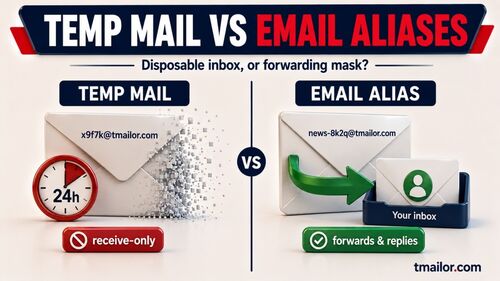
If that sounds familiar, this guide is your fix — and the fix starts with an honest split. A temp inbox is excellent for the promo code and the verification step. It is the wrong place for the receipt. Tmailor shows messages for about 24 hours and strips every inbound attachment, so a PDF invoice or a return label sent to a temp address cannot be opened at all. Deals and codes go to the disposable inbox; anything you may need to prove later goes to a real one.
TL;DR / Key Takeaways
- Start private: use a disposable inbox for coupons and first-time sign-ups.
- For OTPs: wait 60–90 seconds, then resend once or twice. If the code never lands, the store most likely does not accept that address.
- A rejected domain is worth one retry on another domain. A store whose policy refuses disposable email gets your real address — not a fresh temp one.
- Receipts, invoices, and return labels belong in a durable inbox you control. Temp mail cannot receive attachments and does not keep messages past about 24 hours.
- Separate flows: short-life for promos, durable for receipts and high-value orders.
- Troubleshoot in order: verify the address → resend → check whether the store allows disposable email at all → escalate with proof.
Make Checkout Private
You can keep promo noise away from your real inbox while you test new stores with less risk.
When Short-Life Inboxes Shine
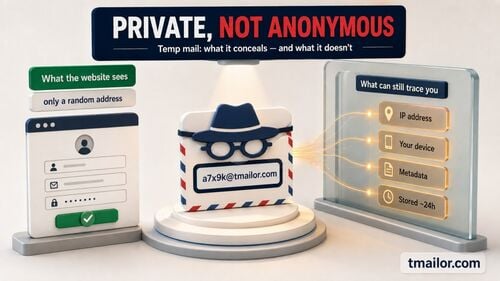
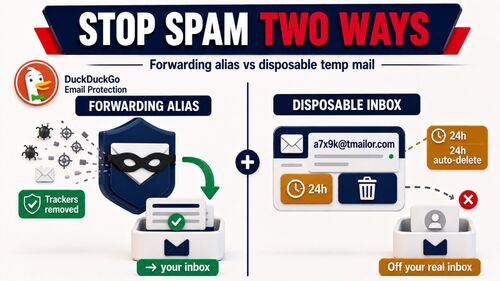
Use a disposable address for welcome codes, trial subscriptions, gift registries, or one-time giveaways. It limits exposure if a merchant’s list is sold or breached. If you’re new to the concept, skim how temp mail works first—where it fits, and where it doesn’t.
When to Skip Temp Mail Entirely
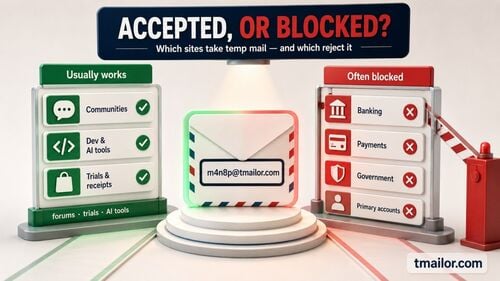
Some checkouts are simply the wrong fit. Skip the temp inbox when the purchase involves financing or identity verification, when the order is high-value enough that you may want a warranty or an insurance claim later, or when the merchant will send documents as attachments — invoices, prescriptions, tax paperwork, return labels. None of those files can be opened from a Tmailor address.
Avoid Lost Confirmations
Type once, paste, then glance at the local-part and domain character by character. Watch for stray spaces or look-alike letters. If the confirmation doesn’t show up immediately, refresh once and hold off on rapid resends—many systems throttle.
Keep Payment Separate
Treat payment confirmations as records, not marketing. Don’t funnel them into the same throwaway address as coupons. That habit saves time when you need to check a chargeback or cross-check an order ID.
Receive OTP Reliably

Small timing habits fix most verification hiccups. The rest are the store’s way of telling you something.
Retry Windows That Work
After requesting a code, wait 60–90 seconds. If it doesn’t land, resend once. If the site allows it, resend a second time. Stop there. Excessive retries are a common cause of temporary blocks, and they rarely produce the code any faster.
When the Code Never Arrives
Remember that a Tmailor inbox has no spam folder and no filters — every message that reaches it is displayed. So if the code is not there, it was never delivered, and that leaves you two possibilities.
The first is ordinary: the specific domain you drew sits on the merchant’s blocklist. Generating a new address on a different domain is fair troubleshooting, and it often just works. Give that one attempt.
The second is not a technical problem at all: plenty of merchants have a standing policy against disposable email, and their checkout will refuse every temp domain you try. If a second address fails the same way — or the site says outright that it doesn’t accept temporary addresses — that is a decision, not a glitch. Use your real address. Cycling through temp domains to work around a merchant’s stated rule is a good way to get an order cancelled or an account frozen, and it is not what the tool is for.
For quick, low-stakes sign-ups, a 10-minute inbox is fine—avoid it for purchases you may need to prove later.
Route Receipts Wisely

Everything you might return, insure, or expense belongs in an inbox that will still be there next month.
The Attachment Problem Nobody Warns You About
This is the single most important paragraph in the guide, so here it is plainly: Tmailor cannot receive files. Every inbound attachment is stripped before the message reaches you. It is not hidden in a folder, not blocked by a setting you can flip — it is simply not there.
That matters enormously for shopping, because so much of e-commerce arrives as a file. A PDF invoice. A prepaid return label you are supposed to print. A warranty certificate. A receipt for an expense report. Send any of those to a temp address and you will never open them. The email body may still show up; the document attached to it will not.
Combine that with the retention window — messages stay visible for about 24 hours from arrival — and the conclusion is unavoidable. A temp inbox is not a filing cabinet. Give the store an address you will still be able to read from in six months, and let the disposable inbox do the job it is actually good at.
Split Promo and Proof
Promos, newsletters, and welcome codes → short-life inbox. Receipts, tracking, serial numbers, invoices, and warranty documents → a durable inbox you control, or the merchant’s own order history page, which is often the better record anyway because it survives your email entirely.
Returns and Warranty Rules
Before you start a return or open a support ticket, put the thread on a durable address. If you want short-term continuity for plain-text messages, you can reuse a temp mail address with an Access Token — but be clear about what that does. The token brings back the address. It does not bring back messages that have aged out, and it does not restore a stripped attachment. It is a recovery key, not an archive, and if you lose it nobody can recover it for you.
Order History Hygiene
Adopt a simple naming pattern: Store – Category – Order # (e.g., “Nordway – Shoes – 13244”). It’s faster to find “Shoes” during a chat with support than to scroll through a month of promos.
Manage Discounts Ethically

Take the deal you were offered, and keep your future receipts out of the mess.
Welcome Codes, Fair Use
A first-order discount is a straightforward trade: the store wants an address on its list, and it pays you a code for it. Using a disposable address for that trade is perfectly reasonable — you get the discount, they get a valid address that reaches you, and your primary inbox stays out of the newsletter.
Where it stops being reasonable is repetition. Generating a stream of fresh addresses to claim the same one-per-customer discount over and over is not privacy; it is just taking something you were not offered, and stores treat it accordingly — cancelled orders, voided codes, and closed accounts. One address per store, once. That is the line, and it is not a hard one to stay on the right side of.
Seasonal Playbooks
During major sale weeks, spin up a dedicated short-life inbox for limited-time blasts, then discard it when the event ends. Keep receipts at your durable address from the start — sale-season orders are exactly the ones you end up returning.
If a Store Pushes Back
If a checkout refuses your address or repeatedly challenges you, take the hint rather than working around it. Some merchants do not accept disposable email, and that is their call to make. Finish the purchase with your real address, or shop elsewhere.
Switch to Reusable Inboxes
Reuse buys you short-term continuity. It does not turn a temp inbox into an archive.
What Reuse Actually Gives You
Saving the Access Token lets you reopen the same temp address later instead of drawing a new one. That is genuinely useful when a store will send a second message — a shipping notice, a code you need again — and you want it to land somewhere you can get back to. What it does not do is extend the roughly 24-hour window during which messages stay visible or restore a stripped attachment. Reuse preserves the address, not the mail.
Before Tracking Updates
Switch just before the store issues a tracking number, so courier notices, delivery windows, and exceptions all land in the same place. If those notices matter to you days later, that place should be a real inbox.
Before Warranty Claims
Move the thread to a durable address before you open a ticket. A single, continuous chain shortens the back-and-forth with customer service — and warranty correspondence tends to arrive as exactly the kind of attached document a temp inbox cannot show you.
After Big Purchases
Large appliances, laptops, furniture—anything you might repair, insure, or resell—belongs on a durable, recoverable address from day one.
Team and Family Playbooks
A one-page rule set beats ad-hoc decisions when you shop for others.
Shared Rules That Scale
Write a one-page rule set everyone can follow: the resend window (60–90 seconds), the cap on resends (two), which purchases always go to the real family or company address, and one rule that matters more than the rest — if a store says it does not take disposable email, we use a real address. Nobody on the team should be improvising that decision at checkout.
Labeling and Archiving
Use the same labels across accounts—Retailer, Category, Order #, Warranty—so threads line up neatly, and archive completed orders once a month. If most checkouts happen on phones, pin a compact, mobile-friendly reference so no one hunts for it.
Handoff Without Friction
When someone else needs to monitor a delivery, you can share the Access Token so they can open the same inbox. Do it deliberately, though: the token is a recovery key, not a password, and it does not lock anyone else out. Anyone holding it can read that inbox. Share it only with someone who genuinely needs access, and only for an inbox that holds nothing sensitive. For on-the-go checks, the temp mail mobile app and the Telegram bot both work well.
Troubleshoot Common Issues
Work the checks in order. It separates a typo from slow delivery and from a store that simply said no.
Verify the Exact Address
Compare each character. Confirm the domain. Remove trailing spaces. Typos and pasted whitespace cause a surprising share of failures.
Resend, Then Reconsider
After one resend — two at the most — stop pressing the button. If the code still hasn’t arrived, one attempt on a different domain will tell you what you need to know. If that fails too, you are not looking at a delivery fault; you are looking at a merchant that does not accept disposable addresses. Finish the purchase with your real one.
Escalate With Evidence
Record the request time, the resend times, and a screenshot of the inbox view. Support agents move much faster with timestamps. The concise FAQ guidance covers more edge cases.
Quick Start
A single page you can save for later.
One-Page Setup
- Use a short-life inbox for promos and first-time codes.
- If an OTP lags, wait 60–90 seconds and resend once or twice. Still nothing? Try one address on a different domain.
- If that fails as well, the store does not take disposable email. Use your real address rather than hunting for a domain that slips through.
- Send receipts, invoices, and return labels to a durable inbox from the start. A temp address cannot receive files, and its messages clear in about 24 hours.
Pitfall Reminders
Don’t mix payment confirmations with promo clutter. Don’t hammer the resend button. Don’t rely on a short-lived inbox for PDF labels, warranty files, high-value purchases, or anything you might insure.
Optional: Micro-tools for Busy Shoppers
Need to check a code while commuting? Both the temp mail mobile app and the Telegram bot give you a tap-friendly view for scanning OTPs and delivery updates.

Marcus Lee writes Tmailor's step-by-step guides — signing up to apps and platforms with temp mail, using the mobile app and Telegram bot, custom domains, reusing addresses, and getting the most out of disposable email day to day.