Burner email vs temp mail: what’s the difference?
Temp mail is instant and receive-only. A burner email is usually a real account you keep longer and can often use for sending too.
Quick access
TL;DR

Suppose you need a quick inbox to grab an OTP and leave. In that case, temp mail is the fast, disposable option: receive-only, short-lived (~24h visibility), safer with no sending and no attachments, and—when supported—token reuse to reopen the exact address later. A burner email behaves more like a forwarding alias to your real inbox; it can live longer, handle ongoing messages, and sometimes supports masked outbound replies. Use temp mail for speedy verification and short trials; use burner aliases for newsletters, receipts, and semi-persistent flows where you still want separation. Watch out for tracking pixels, attachment risks, domain filtering, and account recovery rules on whichever option you choose.
Definitions
What is a Temporary Email?
A temporary email (often “temp mail,” “disposable,” or “throwaway”) gives you an instant address that’s receive-only and designed for short retention—typically about 24 hours of inbox visibility for each message. High-quality providers operate a public pool of domains (often hundreds) to keep delivery fast and widely accepted. For safety and simplicity, the best defaults are no sending and no attachments. Crucially, some services support token-based reuse, which lets you reopen the same address in the future for re-verification or password resets—without creating an account.
In practical terms, temp mail shines when the task is “copy code, click link, move on.” Think: social sign-ups, one-time downloads, coupon verifications, and quick trials.
What is Burner Email?
A burner email is a forwarding alias (or a family of aliases) that relays messages into your real inbox. Because it forwards rather than hosts mail for a day, it can persist longer and be managed (create, pause, disable) per-site. Some burner systems also allow masked sending—you can reply via the alias so recipients never see your address. That makes burners well-suited for ongoing newsletters, order confirmations, and steady conversations where you still want insulation from spam or tracking.
Key Differences at a Glance
- Lifespan & persistence: temp mail is short-lived by design; burner aliases can run for weeks or indefinitely.
- Forwarding vs hosting: burners forward to your real inbox; temp mail hosts and purges quickly.
- Sending/attachments: temp mail’s safest pattern is receive-only with no attachments; some burner systems allow masked replies and file handling.
- Privacy posture: temp mail minimizes exposure by quarantining short-lived content; burners reduce exposure by masking your real address while letting mail flow.
- Recovery options: temp mail depends on token reuse to reopen the exact address later; burners inherently persist as aliases you control.
- Best use cases: temp mail = OTPs, trials, quick sign-ups; burner = newsletters, ongoing receipts, semi-persistent relationships.
Comparison Table: Features × Scenarios

| Capability | Temp Mail | Burner Email |
|---|---|---|
| Lifespan / Retention | Short-lived by design; inbox shows emails ~24 hours then purges. | Can persist as long as you keep the alias active. |
| Address Persistence / Reuse | Token reuse (when offered) reopens the same address later for re-verification/password resets. | Alias stays active until you disable it; easy to reuse across messages from the same sender. |
| Sending & Attachments | Safer default: receive-only, no attachments and no sending to reduce risk. | Many systems allow masked replies and file handling; policy varies by provider. |
| Domain Model | Large public domain pool (e.g., 500+ on reputable infrastructure) improves delivery and acceptance. | Typically lives under the burner provider’s controlled domains or subdomains; fewer domains, but stable. |
| Deliverability & Acceptance | Rotating, reputable domains (e.g., Google-MX hosted) boost OTP speed and inboxing. | Steady reputation over time; predictable forwarding, but some sites may flag aliases. |
| Recovery / Re-verification | Reopen via access token; request fresh OTPs as needed. | Just keep the alias; all future messages keep arriving in your real inbox. |
| Best For | OTPs, quick trials, downloads, sign-ups you won’t need later. | Newsletters, receipts, semi-persistent accounts you expect to keep. |
| Risks | If you lose the token, you may not recover the same inbox; short window can expire before you read. | Forwards into your real inbox (tracking pixels, attachments reach you unless filtered); needs careful alias hygiene. |
| Privacy / Compliance | Minimal retention, GDPR/CCPA-aligned models common; strong data minimization. | Also supports privacy separation, but forwarding means your real mailbox ultimately receives content (sanitize & filter). |
Decision Tree: Which should you use?
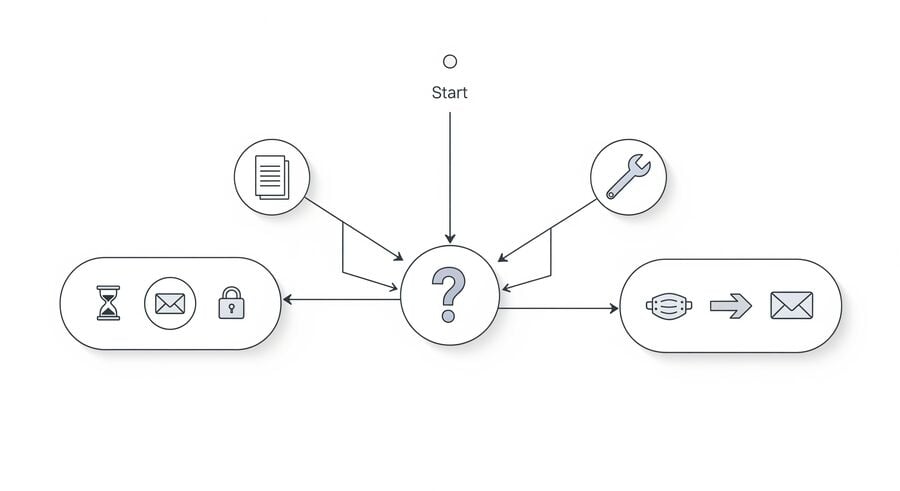
- Need a code in minutes and won’t need this address later → choose Temp Mail.
- Expect ongoing emails from one service (newsletters/receipts) → choose Burner Email.
- Must re-verify later with the same address, but want anonymity → choose Temp Mail with token reuse.
- Want replies under a masked identity → choose Burner alias with outbound support.
- Highest safety (no files, receive-only) → choose Temp Mail with no attachments.
Mini checklist
- Copy OTPs immediately; remember the ~24-hour visibility window.
- Save your token if your temp-mail provider offers reuse.
- Don’t store sensitive data; treat both options as privacy buffers, not archives.
- Respect the platform ToS; never use these tools to evade bans or commit abuse.
Risks, Policies, and Privacy Notes
Receive-only vs masked sending. Temp mail’s receive-only posture is deliberately narrow: it gives you what you need (codes and links) and nothing else. This reduces misuse and shrinks the attack surface. By enabling masked replies, Burner systems expand what’s possible but also what’s exposed—especially if attachments or large threads start flowing.
Tracking and attachments. Disposable inboxes that block attachments and proxy images help avoid malware and tracking beacons. If you rely on burner aliases, configure your real inbox to block remote images by default and quarantine suspicious files.
Domain filtering and rate limits. Some sites treat commonly abused domains strictly. That’s why reputable temp-mail providers maintain large rotating pools—often 500+ domains on Google-MX infrastructure—to maximize acceptance and speed.
Data minimization and compliance. The strongest privacy posture is simple: collect less, keep it briefly, purge predictably, and align with GDPR/CCPA principles. Temp mail embodies this by default (short visibility, automatic deletion). Burner systems need thoughtful alias management and mailbox hygiene.
FAQ
Is burner email the same as temp mail?
No. Temp mail is a short-lived, receive-only inbox; burner email is typically a forwarding alias that can persist and sometimes supports masked replies.
Which is better for OTPs and quick verifications?
Usually temp mail. It’s optimized for speed and minimal friction—generate an address, receive code, and you’re done.
Can I reuse the same temp address later?
Yes—if the provider offers token-based reuse. Save your access token securely to reopen the same inbox for re-verification or password reset.
Are attachments safe in disposable inboxes?
Opening unknown files is risky. A safer default is no attachments—copy codes and links only.
Will websites block disposable/burner addresses?
Some platforms filter certain public domains or known aliasing patterns. If a message doesn’t arrive, switch domains (for temp mail) or use a different alias.
How long do temp emails stay visible?
Typically, about 24 hours before automatic purge. Copy OTPs promptly; request a new code if you miss the window.
Can I send from a burner address?
Some burner systems support masked sending (replying via the alias). Temp mail, by contrast, is receive-only with no sending.
Which option is better for account recovery?
If you need future re-verification, temp mail with token reuse works well—save the token. For ongoing correspondence, a burner alias may be more convenient.

Elena Petrova compares temp mail and burner email services head to head. She reviews providers, weighs Tmailor against alternatives like 10 Minute Mail, Guerrilla Mail and Apple Hide My Email, and explains which option fits which use case.