Exploring tmailor.com: The Future of Temporary Email Services
Most temporary email services do one thing: generate a throwaway address that works for a few minutes and then disappears. tmailor.com was built around a different idea — that disposable email should be reusable, accessible across devices, and reliable enough to handle OTP codes and real verification flows. This article explains what sets tmailor.com apart from conventional temp mail: token-based inbox reuse, a large rotating pool of domains, a dedicated mobile app and Telegram bot, and Google MX-backed inbound delivery — along with an honest look at what a receive-only temp inbox can and cannot do.
Quick access
1. Introduction
Tmailor is a free, no-registration temp mail service built for one job done well: receiving. You open it, an address is waiting, and you can catch a verification code or a confirmation email without handing over your real inbox. What makes it worth a closer look is not that it is disposable — every temp mail service is — but that it treats the address as something you can come back to. This piece walks through how it actually works, and, just as importantly, where its limits are.

2. Understanding Temp Mail: Why Temporary Email Is More Than a Fad
Temporary email services, commonly known as temp mail, let you generate a disposable address for online verifications, registrations, and spam prevention. Unlike a permanent mailbox, a temp address keeps your primary account out of forms you do not fully trust, so the marketing mail and the occasional breach that follow a sign-up never touch the inbox you actually read.
Early on, throwaway addresses were used for a single interaction and then forgotten. The category has since matured into something more practical — a privacy layer people reach for during online shopping, quick sign-ups, and account testing — while staying deliberately short-lived rather than becoming a second inbox.
3. Introducing tmailor.com: Redefining Temporary Email Services
tmailor.com is a free, no-registration temporary inbox that focuses on fast receiving, address reuse, and cross-device access rather than long-term storage. You get a working address the moment the page loads, with no personal details required. It runs on the web, on Android and iOS, and through a Telegram bot, and any address can be reopened later with an Access Token if you saved it.
The trade-off is deliberate and worth stating up front. tmailor.com gives you an immediate temporary email address for low-risk sign-ups, OTP codes, testing, and spam control — but it is receive-only, inbound attachments are stripped, and messages stay visible for about 24 hours rather than becoming a permanent inbox.
4. Key Features and Advantages of tmailor.com
tmailor.com combines instant address creation with short-term reuse, multi-platform access, and a privacy-first inbox — and those advantages all live inside a receive-only, short-lived mailbox, so critical accounts still belong on a permanent email service. Here is what each feature actually does:
4.1 Reusable Addresses via Access Token
tmailor.com does not make the inbox permanent, but it does make the address reusable. When you save the Access Token for an address, you can reopen that same inbox later, in a new session or on another device. The token is a recovery key for that inbox, not a password and not a lock — it is how you get back in, and if you lose it, no one, including support, can recover it for you.
4.2 No Registration, Instant Access
There is no sign-up step. You are handed a fully working temporary address as soon as you land on the site, with no name, phone number, or personal information required. That makes it fast for the one thing most people want: reading a single verification email and moving on.
4.3 Google-Backed Inbound Delivery
For inbound delivery, tmailor.com relies on Google's mail servers (MX) to receive messages quickly and reliably, which is why codes usually appear within seconds. That infrastructure helps with speed and stability. It is not a way to get around a site's policy against disposable email, and it is not sold as one.
4.4 The Site Is Served From a Content Delivery Network
The tmailor.com website and its static assets are served through Cloudflare's edge network — you can see it in any response header from the site. That affects how the page itself reaches your browser. It has nothing to do with your mail: messages are received through Google's mail servers, so a CDN does not make a verification code arrive any faster.
4.5 Enhanced Privacy with Image Proxy and JavaScript Removal
When a message is displayed, tmailor.com rewrites remote images to load through a proxy, so the sender does not see your IP address from a tracking pixel, and it strips scripts and other active content out of the HTML before you ever see it. These are real, server-side measures that reduce the most common ways a sender tries to watch whether and where a message was opened.
4.6 Self-Destructing Emails After About 24 Hours
Every message received on tmailor.com is removed automatically about 24 hours after it arrives, read or not. Short retention is the point: the less time a message sits on a server, the less there is to leak or scrape later. Copy any code or link you need while it is on screen, because there is no archive and no undo.
4.7 Multi-Platform Support: Browser, Android, and iOS
tmailor.com works in any modern browser and in native Android and iOS apps, with a Telegram bot as a fourth option. The experience is the same across all of them: create a receive-only address, watch for incoming mail, and reopen the same inbox later with an Access Token if you need to.
4.8 Real-Time Notifications for Incoming Emails
You do not have to sit and refresh. Incoming mail is pushed into the open inbox as it arrives, and the mobile apps can send a push notification so a code reaches you even when the page is closed. That matters when a verification email lands a minute or two after you expected it.
4.9 Support for Over 99 Languages Worldwide
The interface is translated into more than 99 languages — the language menu on the site lists them all, from Afrikaans and Amharic through Swahili, Tamil, and Vietnamese — so the service is usable well beyond English-speaking audiences. Language should not be the thing that stops someone from grabbing a quick, private inbox.
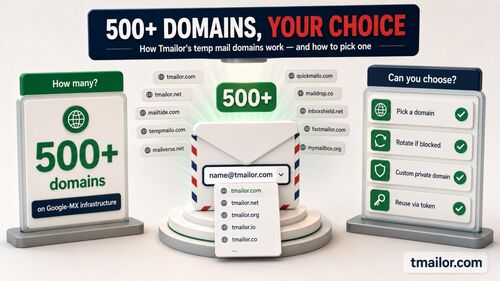
4.10 A Large, Rotating Pool of 500+ Domains
Random addresses are drawn from a large rotating inventory of 500+ domains, and the full live list is intentionally not published — putting it online would simply hand anti-disposable vendors a ready-made blocklist. Only a small set of domains is exposed in the custom-name flow, which also makes those the easiest for outside blocklists to spot. If one shared domain is rejected, another may work; if a service disallows disposable email outright, use a real address.
5. Technical Deep Dive: How tmailor.com Sets Itself Apart
The technical distinction here is not magic deliverability. It is a straightforward combination of address recovery, Google MX-backed inbound delivery, web-and-app access, and anti-tracking message handling that makes the inbox more reusable than a one-tab, 10-minute session while staying intentionally short-lived. The key pieces:
5.1 The Access Token: Reopen the Address, Not a Permanent Archive
The core differentiator is address recovery. When an address starts receiving mail, tmailor.com issues an Access Token that lets you reopen that inbox later from another session or device. That continuity is genuinely useful for re-verification and follow-up codes — but the messages themselves are still short-lived, so treat the token as a way back to the address, not a way to archive its contents.
5.2 Leveraging Google's Infrastructure for Reliable Inbound Delivery
By handling inbound mail through Google's mail server network, tmailor.com gets fast, stable reception without running fragile mail infrastructure of its own. The practical result is that codes tend to arrive quickly and consistently. It is reliability for receiving — not a guarantee that every site will accept a disposable address.
5.3 Front-End Delivery Is Separate From Mail Delivery
The interface is delivered from a CDN edge close to the visitor, while inbound mail runs through Google's mail servers. Keeping those two paths straight matters, because they are often confused: the CDN is why the page loads, and Google MX is why the message lands. Neither one changes whether a given site will accept a disposable address.
5.4 Privacy-Enhancing Technologies
The privacy handling runs at the server level, before a message reaches your screen. tmailor.com proxies remote images so senders cannot use them to log your IP address, and it removes scripts and other active content from the HTML. Every message that is displayed passes through the same processing, so the protection does not depend on you remembering to switch anything on.
5.5 Cross-Platform Compatibility and Real-Time Notification Engine
The web, Android, iOS, and Telegram surfaces are backed by a notification system that pushes new mail to the open inbox and, on mobile, to your device. The aim is simple and narrow: when a message arrives, you find out right away, on whatever surface you happen to be using.
6. Security and Privacy Considerations in Temp Mail Services
tmailor.com improves privacy by keeping throwaway sign-ups away from your real inbox, but it is best understood as a tool for low-risk, short-lived tasks — not a secure vault. It reduces tracking exposure and inbox clutter; it does not replace a permanent account for anything important. Being honest about the limits is part of using it well:
- Receive-only: You can read incoming mail, but you cannot send or reply from a Tmailor inbox.
- Inbound attachments are stripped: A file sent to a Tmailor address cannot be opened or downloaded — you see the message text, not the attachment — so it is the wrong tool when you actually need the file.
- Short message lifetime: Messages are visible for about 24 hours from arrival, so copy codes and links promptly.
- The Access Token is your responsibility: It reopens the same address later, but anyone who has it can reopen that inbox too, and a lost token cannot be recovered by anyone.
- No spam folder and no filters: There is no filtering layer inside the temp inbox; every inbound message is shown as it arrives, which also means nothing you are waiting for is hidden in a spam folder somewhere.
One boundary is worth drawing clearly. If a website accepts disposable email but one shared domain happens to be blocked, switching to another domain is ordinary troubleshooting. If a service's terms plainly disallow disposable email, that is a policy, not a technical obstacle — register with a real address rather than cycling through throwaway ones to get past the rule.
7. Comparing tmailor.com with Other Temp Mail Providers
Disclosure: Tmailor publishes this blog, so the fair way to compare is by how the different disposable-inbox models actually work, not by declaring one the "best." Temp mail services tend to fall into a few shapes, and the right one depends on your task:
- Address continuity: tmailor.com centers on reopening the same address with an Access Token across sessions and devices. A 10-minute-style inbox, by contrast, is built for one sitting and expires on a countdown.
- Sending and replies: tmailor.com is receive-only. Other services differ here, so if two-way email matters, check each one's own rules rather than assuming.
- Attachments: tmailor.com strips inbound files, which is a real limitation to weigh; some other temp mail services do display attachments, so match the tool to whether you need the file.
- Best fit: tmailor.com is strongest when you want a free, no-registration inbox you can reopen across devices for low-risk follow-up over days. If a task needs permanent recovery, attachments, or outbound email, a real mailbox is the better choice.
The point is not that every service is the same. It is that the useful choice depends on whether you need a one-off session, a reusable short-lived inbox, or a standard mailbox you own for the long term.
8. Real-World Use Cases for Temp Email
The best uses for a temp email are low-risk sign-ups, OTP collection, testing, and keeping marketing mail out of your real inbox. The wrong uses matter just as much: if you need outbound email, attachments, permanent recovery, or an identity-verified account, use a regular mailbox instead. With that framing, the common scenarios:
- Online registrations and trials: Sign up for a newsletter, a software trial, or a forum without the long-term inbox clutter that usually follows.
- Privacy-minded shopping: Keep promotions and one-off confirmations away from your main address, so a store's later breach does not expose the inbox you rely on.
- Testing and development: Developers and QA teams check sign-up, verification, and reset flows without burning a real account each time.
- Short-lived follow-up: Access Token reuse helps when a service sends a second code or a re-verification email a day later.
- Spam control: A disposable inbox limits how widely your real email gets copied, resold, or leaked.
8.1 What if a site rejects the address?
If one shared domain is blocked, generating a new address draws a different domain and the sign-up may go through — ordinary troubleshooting. If the site's policy disallows disposable email, that is the real answer: register with a real address instead of trying to work around the rule.
8.2 Random address or custom name?
Random generation draws from the wider rotating pool, while the custom-name option shows only a small public subset of domains. Use the custom-name flow when you want a memorable alias — not on the assumption that it will pass every sign-up, since those visible domains are also the easiest ones for a site to filter.
8.3 Web, app, or Telegram?
Use the web for a quick one-off, the mobile apps when you want push notifications or several inboxes at once, and the Telegram bot when you would rather have codes arrive in a chat you already keep open.
9. The Future of Temporary Email: Trends and Predictions
The near-term future of temp mail looks less like science-fiction AI and more like better reuse, faster mobile delivery, and clearer boundaries between throwaway inboxes and permanent email. The services that will feel most useful are the ones that make short-lived inboxes easier to recover across devices while being honest about what they are not built for. A few directions the category is genuinely moving in:
- Better reuse controls: Simpler inbox recovery and cleaner management of several inboxes across web, mobile, and chat surfaces.
- Clearer domain guidance: More help deciding between a random shared domain, a custom-name address, and your own custom private domain.
- Mobile-first workflows: Faster notifications and simpler OTP collection on phones and in chat apps.
- Stronger privacy defaults: Continued emphasis on anti-tracking image handling and on exposing less of a user's real identity.
For readers, the practical takeaway is steadier than any prediction: temp mail is getting easier to reuse across short-lived tasks, but it still works best paired with a real mailbox for anything long-term or high-stakes.
10. Conclusion
tmailor.com is a clear, practical take on temporary email. It removes the registration step, receives mail quickly through Google's servers, protects the inbox from common tracking, and — unlike a one-off 10-minute session — lets you reopen the same address later with an Access Token. For low-risk sign-ups, OTPs, testing, and spam control, that combination covers most of what people actually need from a disposable inbox.
It is just as important to know where it stops. It cannot send or reply; it strips inbound attachments; its messages last about 24 hours; and a lost Access Token cannot be recovered. Those are not oversights; they are the design. Use tmailor.com for what a receive-only, short-lived inbox does well, and keep a real mailbox for accounts you need to own for the long term.
Call to Action:
If you want a reusable, receive-only inbox for low-risk sign-ups and OTP codes, start with Tmailor temp mail. Use it to keep your primary email free of spam and tracking, and switch to a real mailbox whenever a task needs permanent recovery, file attachments, or two-way email.

Marcus Lee writes Tmailor's step-by-step guides — signing up to apps and platforms with temp mail, using the mobile app and Telegram bot, custom domains, reusing addresses, and getting the most out of disposable email day to day.