دروستکردنی ئەژمێرێکی لینکدئین بە ئیمەیڵی کاتی (بە سەلامەتی )
TL; دکتۆر: بەڵێ، دەتوانیت ئیمەیڵی لینکدئین تەواو بکەیت بە بەکارهێنانی سندووقی هاتووی کاتی، بەڵام ئەنجامەکان بەپێی نیشانەی مەترسی دەگۆڕێت. دەتوانیت چاوەڕێی هەنگاوی پشتڕاستکردنەوەی ئیمەیل بکەیت، و جاروبار پشکنینی تەلەفۆن یان بەرەنگاری سەلماندنی دوو فاکتەر (2FA). بۆ باشترین ئەنجام، ناونیشانێکی دووبارە بەکارهێنان لەگەڵ تۆکنێکی پاشەکەوت بەکاربێنە، دۆمەینەکان یەک جار بسوڕێنەوە ئەگەر گەیاندن وەستا، و دۆمەینێکی تایبەت/سازێنراو بۆ کردارە گرنگەکانی پرۆفایل، وەک نێردراو یان ڕۆڵی سەرکردایەتی.
دەستگەیشتنی خێرا
وەڵامی خێرا، پاشان مەترسی
چۆنیەتی کارکردنی تۆمارکردن و سەلماندن لە لینکدئین
ئایا ئیمەیڵە سووتێنەرەکان بلۆک دەکەن؟
کاتێک ئیمەیڵی کاتی کاردەکات بەرامبەر سەرکەوتوو نابێت
ۆرکفلۆی کارەی پارێزراوی تایبەتمەندی بە بەکارهێنانی TMailor (چۆنیەتی کارکردن)
گەیاندنی OTP / متمانەپێکراو
چوونە ژورەوەی درێژخایەن &چاکبوونەوە
یاساکانی سەلماندنی دامەزرێنەر/جێبەجێکار
چارەسەرکردنی ئاریشەکانی خۆتۆمارکردن
بەکارهێنانی ئەخلاقی و پابەندبوون
پرسیاره باوەکان
ئەمە بۆ تۆ چی دەگەیەنێت
وەڵامی خێرا، پاشان مەترسی
لینکدئین هەمیشە ئیمەیڵێکی پشتڕاستکردنەوە دەنێرێت کاتێک ئەژمێرێک دروست دەکەیت یان ناونیشانێکی نوێ زیاد دەکەیت. هەندێک لە دۆمەینەکانی سوتێنەری گشتی لەوانەیە ڕووبەڕووی بەریەککەوتنی زیاتر ببنەوە (دواخستن، بلۆککردن، یان داواکاری تەلەفۆن). ئەگەر یەکەم هەوڵت سەرکەوتوو نەبوو، دۆمەینێکی TMailor ی جیاواز تاقی بکەوە یان بگۆڕە بۆ ناونیشانێک کە لە درێژخایەندا کۆنتڕۆڵی دەکەیت. بۆ تازە هاتووەکان، بە Temp Mail دەست پێبکە بۆ تێگەیشتن لە چۆنیەتی کارکردنی هاتووەکە پێش گواستنەوە بۆ ئامادەکردنە پێشکەوتووەکان.
چۆنیەتی کارکردنی تۆمارکردن و سەلماندن لە لینکدئین
بەلایەنی کەمەوە، ئەو ئیمەیڵە پشتڕاست دەکەیتەوە کە نووسیوتە. بەگوێرەی سیگناڵەکان (ناوبانگی IP، نەگونجانی ئامێر، خێرایی)، LinkedIn لەوانەیە تەحەدای سەلماندنی تەلەفۆن بکات یان پێشنیاری چالاککردنی سەلماندنی دوو فاکتەر بکات. لینکی پشتڕاستکردنەوەی ئیمەیڵ بە شێوەیەکی ئاسایی یەکەم نیشانە تەواو دەکات. 2FA دواتر بەریەککەوتنی چوونەژوورەوەی داهاتوو کەم دەکاتەوە و سەقامگیری ئەژمێر دەپارێزێت.
چاوەڕێی چی دەکەیت
- پشتڕاستکردنەوەی ئیمەیل: هەنگاوی سەرەتایی، پێویستە دەربچیت.
- تەلەفۆن یان 2FA: بۆ شێوازە مەترسیدارەکان یان پاش ڕووداوی ئاسایش.
- تەواوکردنی پرۆفایل: سەردێڕ، وێنە، ئەزموون — متمانە دروست بکە بۆ دوورکەوتنەوە لە پێداچوونەوەکانی دواتر.
ئایا ئیمەیڵە سووتێنەرەکان بلۆک دەکەن؟
پلاتفۆرمەکان تێکەڵەیەک لە دۆزینەوەی دۆمەین، لیستە گشتییەکان و داتای توانای گەیاندن بەکاردەهێنن بۆ دیاریکردنی سندووقی هاتووی کورتخایەن. ئەمە هەمیشە مانای بەربەستێکی سەخت ناگەیەنێت. هەندێک جار سیستەمەکە پشکنینی زیاتر زیاد دەکات. ئەگەر یەکەم دۆمەینەکەت شکستی هێنا یان OTPs دواکەوت، بیر لە بەکارهێنانی دۆمەینێکی تایبەتی تایبەتی TMailor بکەوە بۆ ئەوەی ئاساییتر دەربکەوێت، یان بژاردەیەکی کورت خایەن هەڵبژێرە وەک پۆستی 10 خولەکی، بەتەواوی بۆ تۆمارکردنی مەترسی کەم.
کاتێک ئیمەیڵی کاتی کاردەکات بەرامبەر سەرکەوتوو نابێت
ئەمە ماتریکسێکی خێرایە بۆ بڕیاردان لەسەر ئەوەی چ ڕێکخستنێک بەکار بهێنرێت.
مێز
ۆرکفلۆی کارەی پارێزراوی تایبەتمەندی بە بەکارهێنانی TMailor (چۆنیەتی کارکردن)
ئەم زنجیرەیە بەکاربێنە ئەگەر ئێستا تایبەتمەندییت دەوێت بەبێ قوربانیدان بە دەستگەیشتنی داهاتوو.
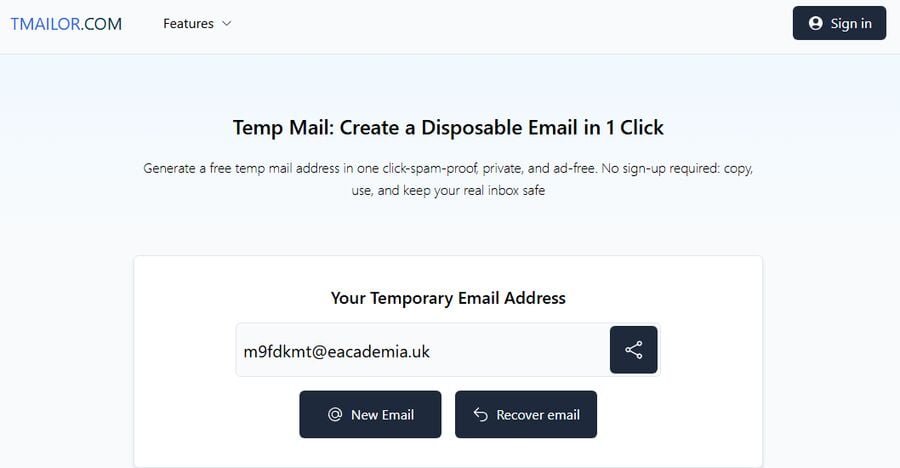
- هەنگاوی 1: سندووقی هاتوو دروست بکە کە دووبارە بەکار بهێنرێت. ناونیشانی ئیمەیڵێکی کاتی دروست بکە و دەستبەجێ نیشانەی گەڕاندنەوەکەی تۆمار بکە (وەک نهێنوشە مامەڵەی لەگەڵدا بکە). سەیری پەڕەی ناونیشانی کاتی دووبارە بەکارهێنانەوە بکە بۆ چۆنیەتی کارکردنی دووبارە بەکارهێنانەوەی لەسەر بنەمای تۆکن.
- هەنگاوی دووەم: پەڕەی خۆتۆمارکردنی لینکدئین بکەوە، پاشان ئیمەیڵەکەت بنێرە. کردنەوەی https://www.linkedin.com/signup/cold-join (پێشنیارکراوی دێسکتۆپ)، پاشان ناونیشانی TMailor خۆت لەسەر فۆرمەکە بنووسە. هێشتنەوەی سنووقی هاتوو بە کراوەیی و نوێکردنەوە بۆ پەیامی پشتڕاستکردنەوە. ئەگەر لە ماوەی 60-120 چرکەدا هیچ شتێک نەگەیشت، فۆرمەکە پۆستی نەخوازراو مەکە — جارێکی تر داوا بکە و بۆ ماوەیەکی کەم چاوەڕێ بکە.

- هەنگاوی 3: دۆمەینەکە یەک جار بسوڕێنەوە (ئەگەر پێویست بوو). ئەگەر گەیاندن هێشتا وەستا، بگۆڕە بۆ دۆمەینێکی تری TMailor و دووبارە بنێرە. بۆ دەستپێکردنی خێراتر، ئەم ڕێنماییەی دەستپێکردنی خێرا پەیڕەو بکە.
- هەنگاوی 4: سەلماندنی دوو هەنگاوی چالاک بکە. دوای ئەوەی ئەژمێرەکە چالاک بوو، 2FA چالاک بکە بۆ کەمکردنەوەی ئاستەنگەکانی داهاتوو و داخستنی پرۆفایلەکە.
- هەنگاوی 5: تۆکنەکەت بە پارێزراوی هەڵبگرە. بەڕێوەبەری نهێنوشە بەکاربێنە. تۆکنەکە دەستگەیشتن دەپارێزێت بۆ دووبارە ڕێکخستنەوەی نهێنوشە و گۆڕانکارییەکانی ئیمەیڵ.
گەیاندنی OTP / متمانەپێکراو
کۆدەکانی لەدەستچوو بە هۆکاری جۆراوجۆر روودەدەن، لەوانە ناوبانگی نێرەر، لیستی خۆڵەمێشی، یان پەنجەرەی کات. دوو تاکتیک زۆر یارمەتیدەرن: (1) یەک جار دۆمەینی وەرگرتن بگۆڕە، و (2) هەوڵەکانی دووبارە هەوڵدانت بڵاو بکەوە. فێربوونی تاکتیکی پێکهاتە بۆ سووڕانەوەی بوارەکان لە OTP و دەستنیشانکردن بۆ چارەسەرکردنی وونبووەکانی OTPs.
چوونە ژورەوەی درێژخایەن &چاکبوونەوە
پرۆفایلەکانی لینکدئین زۆرجار بۆ چەند ساڵێک دەژین، بۆیە پلانی زیاتر لە رۆژی یەکەم دابنێ. دووبارە بەکارهێنانەوە، سندوقی هاتووی پارێزراو بە تۆکن دووبارە بەکارهێنانەوە دەهێڵێتەوە بەبێ ئاشکراکردنی ناونیشانی سەرەکیت. بۆ گۆڕانکارییە هەستیارەکان (وەک ئیمەیڵەکانی ئاسایش یان سەلماندنی خاوەنکار)، هێشتا دەتوانیت دواتر بیگۆڕیت. زانیاری زیاتر سەبارەت بە دووبارە ڕێکخستنەوەی لۆجستیک لە OTP بە ئیمەیڵێکی کاتی بخوێنەوە.
یاساکانی سەلماندنی دامەزرێنەر/جێبەجێکار
لە ساڵی 2025ەوە، لینکدئین سەلماندنی ناونیشانی دامەزراندن و سەرکردایەتی بەرزکردۆتەوە بۆ سنووردارکردنی لاساییکردنەوە. ئەگەر دواتر ئەو ڕۆڵانە زیاد بکەیت، چاوەڕێی پشکنینی شوێنی کار بکە. ئەمە کاتێکی باشە بۆ گۆڕینی ئیمەیڵی سەرەکی ئەژمێرەکە بۆ ناونیشانی کار، لە کاتێکدا سندووقی هاتووی کاتی وەک بەردەنگ یان پاڵپشتی دەهێڵیتەوە.
چارەسەرکردنی ئاریشەکانی خۆتۆمارکردن
- هیچ ئیمەیڵێک وەرنەگیراوە: سەیری پۆستی نەخوازراو بکە، 60-120 چرکە چاوەڕێ بکە، پاشان جارێکی تر داوای بکە. ئەگەر کێشەکە بەردەوام بوو، دۆمەینەکەت بسوڕێنەوە و دووبارە هەوڵ بدە.
- لینکەکە دەکرێتەوە بەڵام تەواو نابێت: وێبگەڕێک یان ئامێرێکی جیاواز تاقی بکەرەوە، پاشان دووبارە بەستەری پشتڕاستکردنەوە لە هەمان هاتووەوە بکەرەوە.
- مۆبایل یان لێشاوی چات پەسەند بکە: ئەو ئیمەیڵە کاتییە بەکاربێنە کە لەلایەن بۆتی Telegram یان ئەپلیکەیشنی ئیمەیڵی کاتی مۆبایل دابینکراوە بۆ پشکنینی خێرای پەیامەکان.
بەکارهێنانی ئەخلاقی و پابەندبوون
لینکدئین تۆڕێکی ناسنامەی ڕاستەقینەیە. بەکارهێنانی ناونیشانی ئیمەیڵی کاتی بۆ تایبەتمەندی لەکاتی خۆ تۆمارکردن باشە. بەکارهێنانیان بۆ خۆناساندنی کۆمپانیایەک یان دامەزرێنەر نییە. پرۆفایلەکەت ڕاستگۆ بهێڵەوە، سەلماندنی دوو فاکتەر (2FA) چالاک بکە، و ئامادە بە بۆ زیادکردنی ئیمەیڵی کار ئەگەر داوای سەرکردایەتی یان بەرپرسیارێتی دامەزراندن دەکەیت.
پرسیاره باوەکان
- ئایا دەتوانم ئەژمێرێکی لینکدئین دروست بکەم تەنها بە بەکارهێنانی ئیمەیڵێکی کاتی؟
- بەڵێ، ئەگەر ئیمەیڵی پشتڕاستکردنەوە گەیشت و هەنگاوەکەت تەواو کرد. هەندێک لێشاوەکان لەوانەیە تەلەفۆن یان 2FA زیاد بکەن.
- ئەی ئەگەر ئیمەیڵی پشتڕاستکردنەوەم هەرگیز دەرنەکەوت؟
- جارێک بسوڕێنەوە بۆ دۆمەینێکی جیاواز، پاشان دووبارە هەوڵ بدەنەوە. سەیری بەشەکانی متمانەپێکراو و چارەسەرکردنی ئاریشەکان بکە.
- ئایا پاوانی تایبەت باشترە؟
- زۆرجار بەڵێ بۆ ئەرکەکانی متمانەی بەرز. پاوانی تایبەت زیاتر ئاسایی دەردەکەوێت و خۆی لە لیستە گشتییەکان بەدوور دەگرێت.
- ئایا دەتوانم پۆستی کاتی بۆ هەمیشە بهێڵمەوە؟
- دەتوانیت ناونیشانەکە بهێڵیتەوە و دووبارە بەکاری بهێنیتەوە لە ڕێگەی تۆکن، بەڵام پلانی ئەوە دابنێ کە ناونیشانێکی ئیمەیڵی درێژخایەن زیاد بکەیت بۆ سەلماندنی شوێنی کار.
- ئایا پێویستم بە ژمارە تەلەفۆنە؟
- نەک بە بەردەوامی، بەڵام لەوانەیە لەسەر بنەمای ئاماژەی مەترسی بەرەنگاری ببیتەوە. هەڵکردنی 2FA جێگیری باشتر دەکات.
- ئایا دواتر ریسێتکردنەوەی نهێنوشە لە دەست دەدەم؟
- نەک ئەگەر تۆکنەکەت پاشەکەوت بکەیت و هێشتا کۆنتڕۆڵی سندووقی هاتوو بکەیت کە دووبارە بەکاردەهێنرێتەوە.
- ئایا پۆستی تەمەن کورت باشە؟
- بەکاری بهێنە تەنها بۆ تۆمارکردنی مەترسی کەم. بۆ لینکدئین، سندووقی هاتوو کە دووبارە بەکار بهێنرێتەوە لەگەڵ تۆکنێک سەلامەتترە.
- ئەی دامەزرێنەرەکان؟
- ڕۆڵی دامەزراندن/سەرکردایەتی زیاتر پێویستی بە پشکنینی شوێنی کار هەیە. ئامادە بە بۆ زیادکردنی ئیمەیڵی کار دواتر.
- ئایا دەتوانم ناونیشانی ئیمەیڵەکەم بگۆڕم پاش خۆ تۆمارکردن؟
- بەڵێ ئیمەیڵێکی نوێ زیاد بکە، دڵنیای بکەوە، پاشان بیکە بە سەرەکی. ئەگەر حەز دەکەیت سندووقی هاتووی کاتی وەک پاڵپشتی بهێڵەوە.
- چۆن دەتوانم پشکنینەکان خێراتر بکەم؟
- لەسەر یەک ئامێر/وێبگەڕێ بمێنەرەوە، سەلماندنی دوو فاکتەر (2FA) چالاک بکە، و وردەکاریەکانی پرۆفایلەکەت بە جێگیری بهێڵەوە.
ئەمە بۆ تۆ چی دەگەیەنێت
بۆ زۆربەی بەشداربووان، ناونیشانی TMailor کە دووبارە بەکاردەهێنرێتەوە بەسە: خێرا بۆ بەکارهێنان، تایبەتی، و دواتر ئاسانە بۆ وەرگرتنەوە. ئەگەر LinkedIn پاشەکشەی کرد، بیر لە گۆڕین بۆ دۆمەینێکی جیاواز بکەوە، سەلماندنی دوو فاکتەر چالاک بکە، و—کاتێک ڕۆڵەکەت بەڕاستی پێویستی پێیەتی (بۆ نمونە، دامەزراندن یان سەرکردایەتی)—پەیوەندی سەرەکیت بگوازەوە بۆ ئیمەیڵێکی کار. مامەڵە لەگەڵ تۆکنەکە وەک نهێنوشە بکە بۆ ئەوەی گەڕاندنەوە هەرگیز لە مەترسیدا نەبێت.